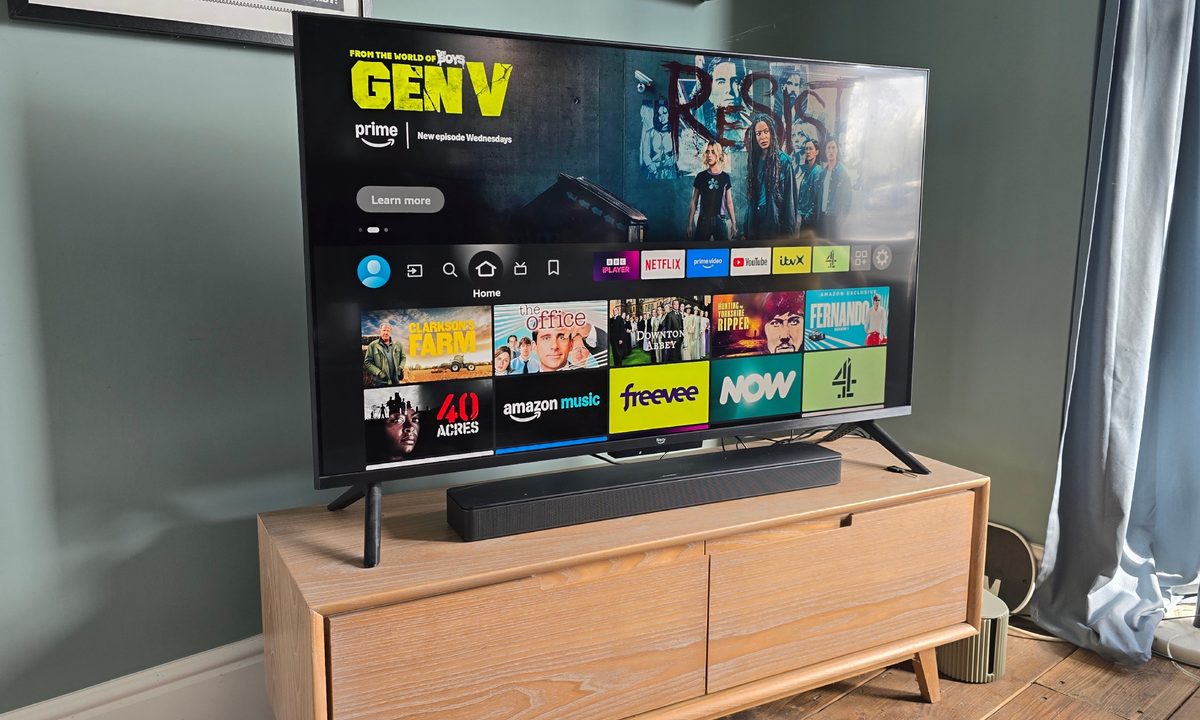
The news that Amazon has scheduled its latest hardware launch event for September 30 has put me in a reflective mood. Just under a year ago, I took a punt on the impressively cheap 50-inch Amazon Fire TV Omni QLED as a stopgap while I deliberated over which of the best OLED TVs to spend my hard-earned cash on.
The Amazon set offers a 4K quantum dot LED display, Dolby Vision IQ and HDR10+ support, three HDMI 2.0 ports and an HDMI eARC 2.1 port — all in a 50-inch package for less than my monthly grocery bill. How could I go wrong?
And by and large, I haven’t. For the money, this TV is still a solid deal – though not without its frustrations. So, dear Amazon, here’s how I think you could make things better next time…

1. The sound
Eh? What’s that? Oh, it’s the very muffled sound that this TV produces. To be fair, most 4K sets in this price bracket aren’t exactly going to knock your socks off sonically (unless you happen to snag a decent Hisense), but the Amazon Omni QLED had me on edge from day one.
One minute I can barely make out what people are saying, then next, I’m screaming at Alexa to lower the volume because a pesky ad jingle has blasted me halfway across the couch.
I tried all the usual free tricks to improve the sound of the TV for free, and eventually found some relief by switching to movie mode, which smoothed things out a bit. But hooking up a soundbar was the only way to make the audio experience truly livable.

2. The menus and settings options
Tweaking the sound meant diving into the settings menus — easier said than done. The remote offered no shortcuts, and Alexa seemed to develop selective hearing when I asked for help. Eventually, I stumbled across the telltale cog on the home screen, unlocking a labyrinth of menus.
Inside the sound settings, I found the usual suspects: Standard, Smart, Music, Film, Clear Voice, and Enhanced Bass. This was helpful enough, but less so was the “Equalizer.”
Instead of helpfully labelling things like bass, mids, or treble, it just threw raw frequencies at me in Hz. Given I don’t moonlight as a sound engineer, it took a bit of reading up to understand what this equated to. For the less techie among us, this could be easily improved.

3. Switching into standby
Another of this TV’s bad habits is its tendency to switch itself off without warning after a few hours. In theory, I’m all for saving energy. In practice, when it powered down right as the lights went out at the start of an F1 race — and again just as my soccer team scored a winner in injury time — I was considerably less enthusiastic. I asked Alexa if she could help – she couldn’t.
For the record, the fix is buried in Settings > Preferences > Auto Turn Off. It only took me two months to find it. The feature is supposed to kick in after four hours, though I’d swear my TV was calling it a night much sooner. And on other occasions? It simply ignores its own rules and shuts down anyway, like a sulky child that doesn’t want to play anymore.
4. The stand
Another of my big bugbears with this TV is its feet. They look nice enough, don’t get me wrong, but their deep stance isn’t hugely practical if you are planning to put the set on a bench, as we have done.
Try to angle the screen toward the sofa and you’ll feel like you’re tempting gravity — one nudge away from a very expensive crash. We’d prefer a central pedestal that would allow us to pivot the screen, or at least feet that are narrower and closer towards the middle of the set.

5. The black levels
My final gripe with the Fire QLED is its cloudy blacks. I’m not expecting OLED-level depth at this price, and it’s hardly a deal breaker, but the haze can be distracting, particularly when watching moody TV dramas and movies.
I’ve managed to improve things by tweaking the contrast and taking care to place lighting and mirrors so they don’t affect the picture. But if Amazon can sharpen things up in future models, I’d be more than happy.
So I’ll look to Amazon’s hardware launch with interest.
Don’t get me wrong, the Fire QLED 4K TV is still a fantastic option for the money. The overall picture quality is great, with lifelike skin tones and stunning colors, particularly when handling HDR and 4K content. By and large Alexa does listen, and I haven’t had too many issues with the Fire TV platform.
Let’s just see if Amazon can iron out the kinks come September 30.