
When it comes to wireless speakers, Sonos consistently lands on best-of lists for performance and reliability, including our own best speakers list.
Sonos has been around for more than two decades. While the company originally cemented its reputation with its Wi-Fi-connected hi-fi speakers, it has also branched out into subwoofers and, yes, soundbars so that you can invest in some sweet, room-filling sound for your TV. When it comes to the company’s soundbars, two of the most popular options are the Sonos Beam (Gen 2) and the company’s most affordable soundbar, the Sonos Ray.
Though they look similar, and they’re both part of the Sonos ecosystem of multiroom speakers, there are some significant differences. If you need help deciding between them, we’ve compared both models, weighing in on key criteria like design, sound quality, and price, to help you determine which of the two Sonos devices is best for you, your needs, and your budget.
Design

The second-gen Buy at Amazon is available in black and white finishes and measures 25.6 inches wide, 2.7 inches tall, and 3.9 inches from front to back, and weighs 6.2 pounds. Swapping the fabric grille of the previous Beam generation for the tougher plastic covering found on the Sonos Arc, the Beam is equipped with four elliptical midwoofers, three passive radiators, and a single center tweeter. These are individually powered by five class-D amps.
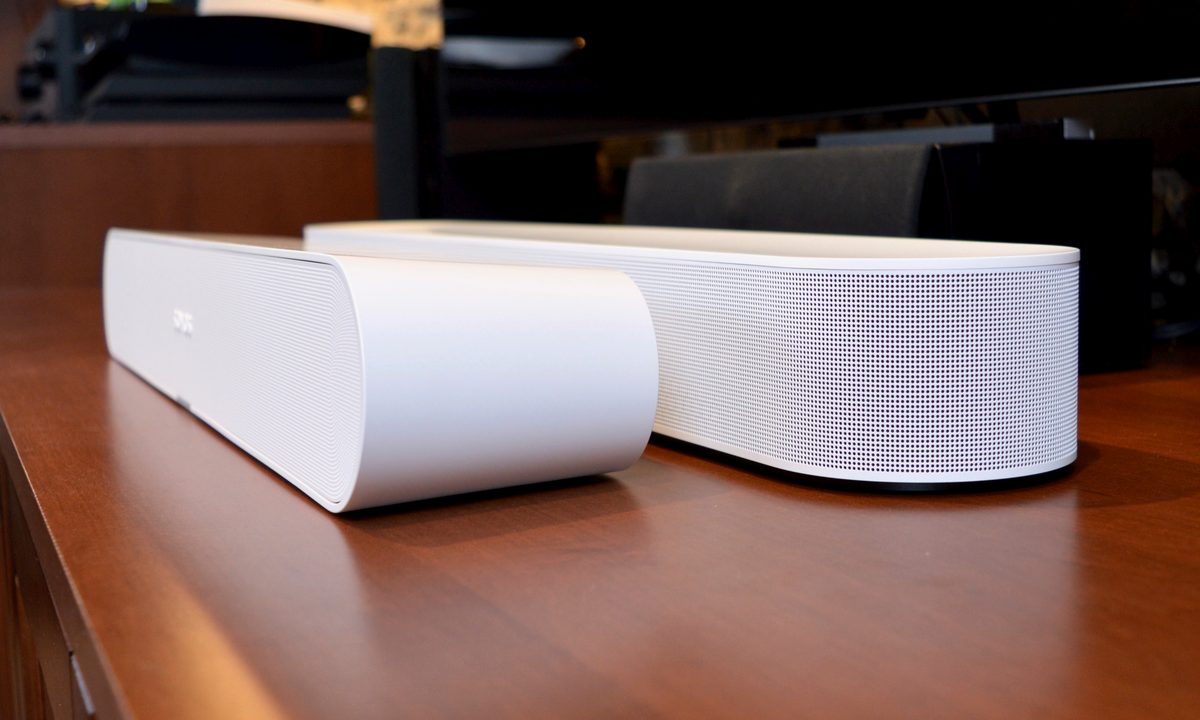
The Buy at Sonos US & Canada also comes in black and white and is clearly the smaller soundbar of the two, measuring 22 inches wide, 2.79 inches tall, and 3.74 inches from front to back, and weighing 4.29 pounds. A plastic grille covers the entire front of the soundbar, with flared edges adding a sharp but stylish look to the chassis. In terms of drivers, the Ray features two high-efficiency midwoofers, two tweeters, and four class-D amps to power everything.
The Beam and the Ray can be controlled with the Sonos app, but each soundbar also features a set of top-mounted touch controls for playback, volume, and track skipping. Both the Beam and Ray are relatively compact and can be placed on a media console or wall-mounted with optional brackets.
The Ray is slightly more versatile in terms of placement: It’s a bit smaller and it can be surrounded on all sides by cabinetry, whereas the Beam needs its sides open to the room for the best sound quality.
We’d argue that the second-gen Beam is the more attractive of the two speakers thanks to its curved, wrap-around grille, but there’s no doubt that the Ray is the more flexible option. You can’t go wrong with either choice, which makes this category a draw.
Winner: Tie
Connections and controls

In terms of actual inputs, the Buy at Sonos US & Canada are similar, except for one major category: the audio connection between the soundbar and your TV.
The Sonos Beam (Gen 2) has an AC power port, an Ethernet port, a Join button, and an HDMI ARC/eARC port. The Ray has the same power and Ethernet connections and a Join button, but instead of HDMI ARC/eARC, the Ray is equipped with a digital optical connection.

HDMI ARC/eARC is the current gold standard for home theater audio, making it the best choice for future-proofing. The Ray’s digital optical connection, by contrast, doesn’t support Dolby Atmos (more on that later), but it’s more than capable of handling up to 5.1 surround sound.
Curiously, the Beam comes with an adapter in case your older TV only supports optical, but the Ray doesn’t come with an HDMI-to-optical adapter for newer TVs that might lack an optical output.
Both speakers support Wi-Fi and Apple AirPlay 2, however the Beam is compatible with both 2.4GHz and 5GHz Wi-Fi bands, whereas the Ray only does 2.4GHz. In practical terms though, this doesn’t make much difference.
Both the Sonos Beam and Ray can be controlled with the Sonos app and your TV remote. And while they are comparable in many ways, one of the standout control differences is that the Ray doesn’t have a built-in mic, which means it doesn’t support the Google Assistant, Alexa, or Sonos Voice controls that the Beam does. That’s not necessarily a huge deal if you add at least one voice-enabled Sonos speaker to your setup, like a pair of Sonos Ones as part of a surround configuration or even an Echo or Google Home device, which will bring voice control to the Ray setup — but it does add cost and some extra complexity.
Given its more universal wired connections and its handy voice control options, we’re giving this one to the Beam.
Winner: Sonos Beam
Setup


Setting up any Sonos component is a relatively straightforward task that only requires the Sonos S2 app (for iOS and Android devices), power, and a Wi-Fi connection. However, if this is the first Sonos speaker you’ve ever purchased, you’ll be tasked with creating a free Sonos account before setting up your soundbar.
Similar to other Sonos hardware, once you’ve downloaded the app, confirmed your credentials, and plugged in either your Beam or Ray, the Sonos app will automatically begin searching for new devices on your home network. Once your soundbar is plugged into your TV, you’ll also be asked to program your TV remote to work with the soundbar (with instructions provided in the app).
Over the years, Sonos has always worked a little more efficiently with iOS devices, and if you’re setting up your Beam or Ray with an iPhone or iPad, you’ll be able to use Sonos Trueplay to calibrate the soundbar based on its listening environment (Trueplay isn’t available for Android devices).
Winner: Tie
Sound quality

From the ground up, the Sonos Beam is engineered to deliver a bigger and more immersive home-theater-style sound. Like the Sonos Arc and Arc Ultra, it’s compatible with Dolby Atmos, the most popular 3D immersive surround sound format.
Keep in mind that, unlike the Arc, which is equipped with top-firing drivers, the Beam’s main driver array focuses more on ear-level surround listening. To achieve Atmos’ signature height effects, it uses channel virtualization — an approach that sometimes yields less impressive results. But if the goal is to own a compact soundbar that can still deliver some of the punch of an Atmos soundtrack or song, the Sonos Beam checks that box.

Beyond the Atmos accolades, though, the Beam sounds incredible — even without a dedicated Buy at Best Buy . The low end is bold but not overbearing, and the mids and highs come through sharp and clear. Ultimately, the total soundstage isn’t as wide as the kind of coverage you’ll get with bigger bars like the Arc Ultra, but for around $500 less, the Beam is certainly a much more cost-friendly alternative to a traditional surround system.
So how exactly does the Buy at Sonos US & Canada stack up against the Beam? Well, as the lack of passive radiators, fewer drivers, and fewer amplifiers may suggest, the Ray is the softer-hitting soundbar of the two. In fact, price-wise, the Ray really belongs more in an entry-level soundbar category rather than the mid-sized tier of the Beam.
Sure, the Ray is smaller, but while it’s only outfitted with a digital optical connection, it’s not a weak soundbar. Like all Sonos speakers, the Ray produces sound that is far larger and more immersive than its size and price suggest. And while bass, mids, and treble are all a bit reduced when compared to the Beam, the Ray’s sound is still rock-solid and on-par with something like Buy at Amazon .
When buying a Sonos product, you’re also investing in a world of expansion options. Whether you want to add additional speakers to a second room or want to group two speakers and a subwoofer with your Beam or Ray to create a full surround system, how you choose to add components is entirely up to you.
If your budget allows it, we’d actually recommend adding the Sonos Sub Mini to your Sonos Ray to up your bass game in your living room.
Winner: Sonos Beam
Price
The Sonos Beam Gen 2 retails for $499 and includes a one-year limited warranty. The Sonos Ray sells for $279 and also comes with a one-year warranty.
Throughout the year, you may find that both soundbars drop in price, and if you’re interested in bundling multiple Sonos items together, the company sells the Beam and Ray as part of several different speaker packages.
Winner: Sonos Ray
The verdict

For only $220 more than the Sonos Ray, the Sonos Beam is the bigger and better Sonos soundbar, hands down, and is built to deliver a more robust home-theater experience for small- to medium-sized rooms. If you can stomach the extra cost, this is your pick.
This isn’t to say that the Sonos Ray is a bad soundbar. In fact, if you’re working with a limited amount of space and simply want to bypass the tinny output of your TV speakers, the Sonos Ray is one of the best entry-level soundbars on the market.
But alas, one soundbar must take home the grand prize.
Winner: Sonos Beam


