
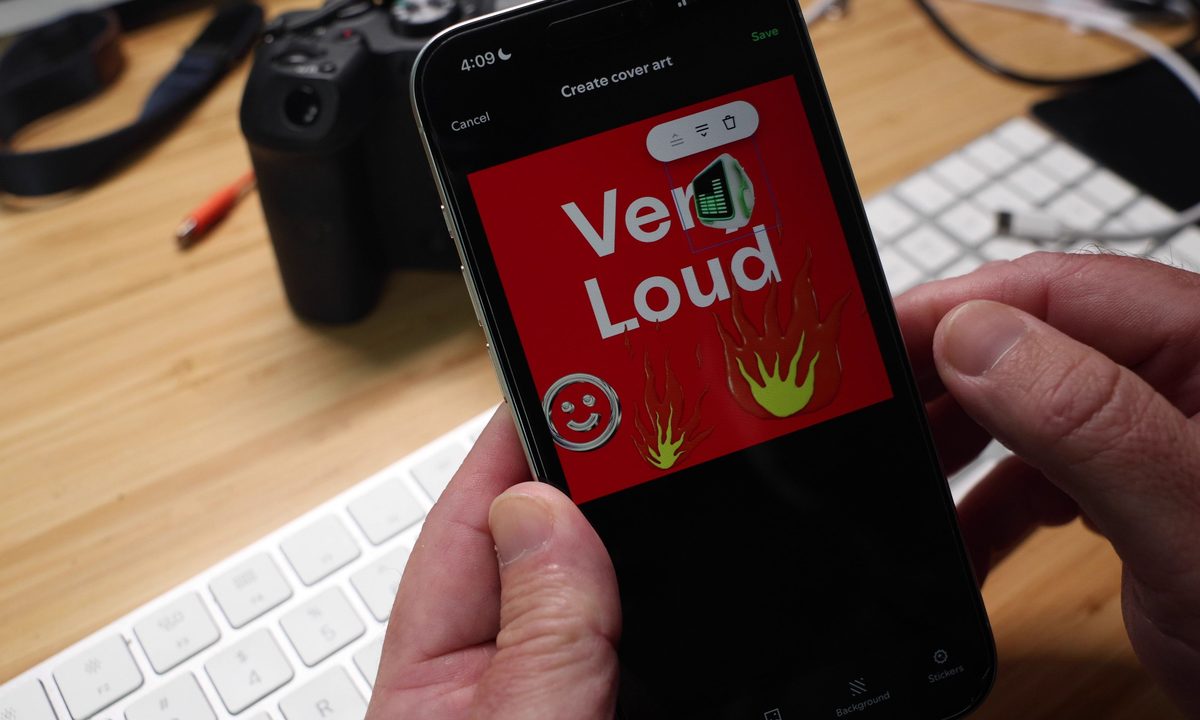
Personalizing your Spotify playlist by uploading your own covert art image is a great way to put a visual stamp on your audio mix, but now, you can design that cover art right in the app. Starting today as a beta feature in English in 65 markets, the “Create Cover Art” feature gives users the ability to pick backgrounds, create text effects, and add stickers to generate an original piece of cover art for their playlists. It’s available to both free and Spotify Premium users.
Accessing the new feature is as simple as opening a playlist you’ve created, selecting the context menu (the three dots … ) and choosing Create Cover Art. You’ll then be given the choice to change the cover image (by uploading) or to create covert art.


Selecting create covert art opens an editor view with your playlist’s name appearing over a default background. This default background is randomly chosen, so sometimes you’ll be given a solid color like blue or green, while other times you may see a gradient or a rainbow.
You don’t need to keep the name of the playlist — you can add or remove text, play with sizes and colors, and pick from several effects. The sticker list isn’t very big, but you can add as many as you like, and they can be resized to create interesting options. Once you’re satisfied with your creation and save it, it will automatically update on your playlist, which can be shared through all of the usual channels.


Your creativity is limited only by your imagination — and by Spotify’s existing Platform Rules. According to the company:
“Spotify is monitoring for violating content in Cover Art, and users can always report playlists for potential violations of Spotify’s Platform Rules. Listeners can still upload their own images to use as part of their custom playlist cover art. For additional design elements, you can use those available within the beta feature including text, color and stickers for further customization. Note, users must own or have the right to post any images uploaded into the feature and follow Spotify’s Platform Rules.”
If Spotify removes your cover art for violating its rules, there’s not much you can do to get it back — unless you live in the EU. Apparently EU residents alone are able to appeal Spotify’s content moderation decisions.
Will folks rush to customize their playlists? It seems like a reasonable assumption given their massive popularity. According to the company, more than 8 billion playlists have been created to date.
Want to create your own playlist, but wish someone would help you curate it? Spotify recently launched an AI playlist creation tool. The company has also partnered with Instagram to give Spotify users one-tap song saves when they discover new tracks on the Meta-owned social network.


