
 Regardless of which ecosystem you pray to each morning, one of the most important features in 2013 is access to your media content on the go. Tens of millions of people in the United States live and die with their smartphone, tablet, or laptop. For better or worse, the portable device has replaced the home stereo and home theater as the platform of choice; primarily because it’s portable, affordable, and compression technology and broadband speeds have made it possible to watch HD content while inhaling a cup of clover coffee in your favorite cafe. The only major limitations are storage space on your device and the ability to access your content via different platforms such as iOS, Windows, or Android. If you have taken a major slug from the flask of Cupertino, you are probably fine with Apple’s iCloud service, but what if not everything you own plays for the same team? What if you use an iPhone and Mrs. Broflovski dances with a Samsung Galaxy S III? Fear not. QVIVO has you covered.
Proponents of MP3 almost had a heart attack over our “It’s Time to Retire the MP3: HDtracks and the High Defintion Audio Revolution” piece last week arguing that the quantity of music they can store on their device outweighs the importance of sound quality and it’s all just a big audiophile conspiracy. On the storage end, they do have a valid point. The ability to access thousands of songs, movies, and television programs on a portable device is the raison d’etre for the thing in the first place. But, wouldn’t you prefer to store all of your content; regardless of format, in the cloud where you could have both accessibility and quality? QVIVO offers the opportunity to stream (with an Internet connection, of course) to your iPad, Nexus 7, Microsoft Surface, Nook HD, Galaxy S III, and pretty much any other PC, Mac, iOS, and Android-based device.
One surprising thing about QVIVO is that it offers unlimited cloud data storage for only $5.00 a month, and that includes you and four other family members. All three plans – Web, Mobile, and Family – offer unlimited storage and web streaming. The Web plan for $2.00 a month does not include mobile streaming or any additional users other than yourself, and is slower when uploading content. The $3.00 Mobile plan makes the most sense if you are single and don’t need the priority upload speed.
QVIVO is currently offering a “Free 14-Day Trial” and it is plenty simple to use after you have signed up – it is also possible to access another account someone else created via Facebook. The QVIVO UI is not overly complicated. Adding content to be uploaded is a either a drag-and-drop affair, or you can manually add content from folders. QVIVO is compatible with iTunes and the service supports playback of AIFF, FLAC, AAC, MP3, WAV, and M4A music files. The only caveat is that music files must have valid meta tags to be uploaded. On the video side, QVIVO supports AVI, FLV, M4V, MKV, MOV, MP4, MPG, RM, and WMV formats.
Any content you add to your account and upload to the cloud will be accessible on any device you decide to use after you download the appropriate app. You can add content to the three sections listed in the Library: “Albums,” “Movies,” and “TV Shows” and it syncs up with the artwork rather nicely. If you want to personalize your backdrop, you can add artwork.
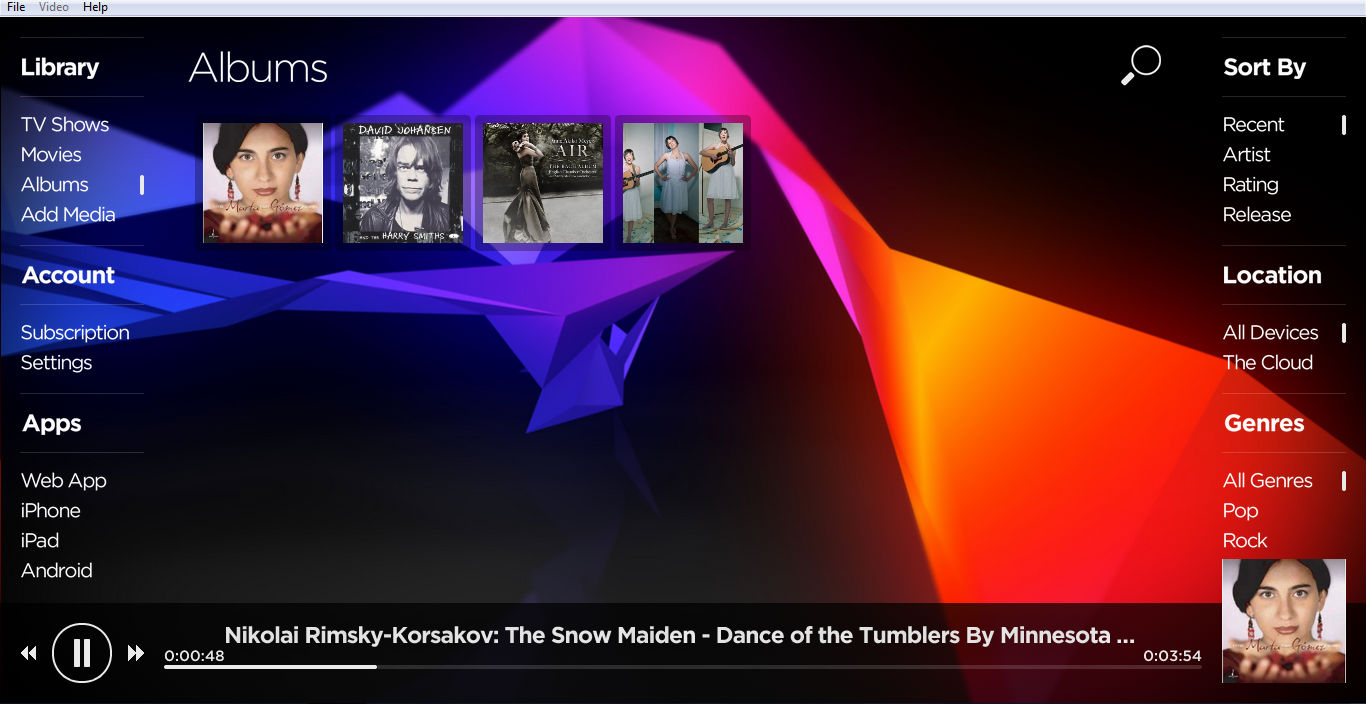
QVIVO also works from your browser, so if you want to us it play back your media on your PC or Mac, you have two ways of going about it: stream from the cloud or from the hard drive where the content is already stored. Accessing your content in offline mode makes sense to save streaming costs, but it also prohibits you from accessing the content on another computer or mobile device. Right now the QVIVO Mobile apps only stream media that’s been uploaded to the QVIVO Cloud. In the future, Qvivo intends to make content on your PC or Mac accessible to mobile devices as well, but there’s no word on when that might happen. The interface, however, handily allows you to determine which content lives offline or in the cloud, and that certainly comes in handy when trying to access content on the road.
We took the opportunity to try QVIVO on an iPhone 4, iPad 2, Google Nexus 7, Samsung laptop running Windows 7, and an iMac running OSX Mountain Lion. Aside from some visual differences in the user interface, all of the various devices played back our content from the cloud without any issues. QVIVO does not support Dolby Digital or DTS multi-channel audio output if you are using your computer as a media center connected to an AV receiver.
From an upload perspective, QVIVO is rather quick with MP3s and AAC files, but an 85 MB FLAC file took more than eight minutes to upload and save to the cloud. Users with huge libraries of high definition music may want to go for coffee and a movie if uploading an entire album.
QVIVO faces some stiff competition from Apple, Google, and Amazon, but we think the first version of the service is miles ahead of the product being offered by Walmart that requires you to bring in the physical copy of the DVD/Blu-ray to prove ownership before it can be uploaded and viewed as an UltraViolet copy of the film on your phone or tablet. Just the idea of having to drive to a Walmart and pay them for this service seems so weird. And besides, don’t we already give Walmart enough of our money for Vudu 1080p movies?
After our experience with QVIVO, we think it is looking like a great option for those who own a lot of content and different devices. With a two-week free trial available, it is certainly worth giving a shot to see if it works for you.


