
Alexa is a wonder of the technological world. She effortlessly maintains your smart home, organizes your schedule, obeys your every voice command, and even allows you to play games. As of early 2019, around 100 million Alexa-enabled devices had been sold. Alexa is everywhere, from thermostats to appliances to headphones to Echo devices. There’s no denying the utility Alexa-enabled devices offer. Smart speakers and displays like the Echo act as our digital planners, entertainment devices, and so much more.
What you may not know, however, is that Alexa listens to and records your conversations to Amazon’s cloud. If this makes you squirm in your seat, we have a solution.
Here is our step-by-step guide to help you stop Amazon from listening in on your Alexa conversations.
How to stop Amazon from listening to your recordings
Step 1: Open the Alexa App.
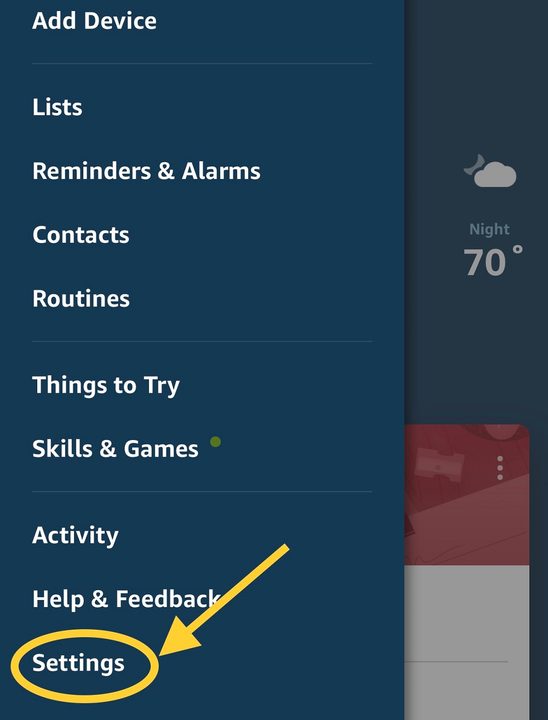
Step 2: Open the menu in the upper-left corner and click on Settings.
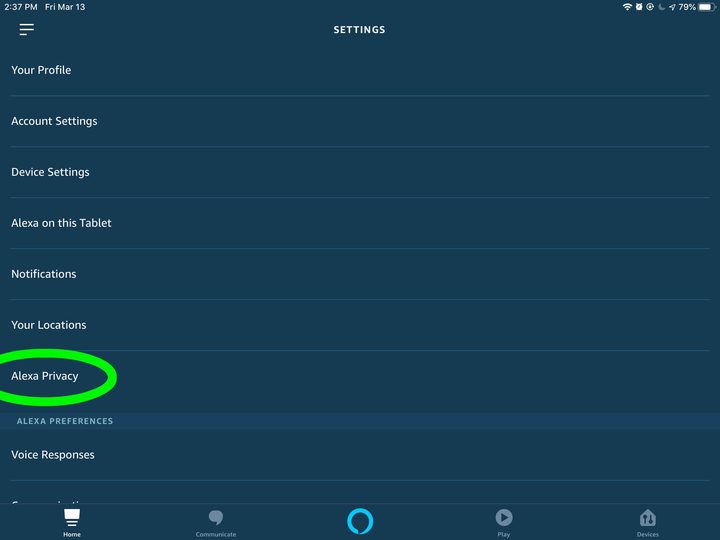
Step 3: Under the Settings menu, select the option that says Alexa Privacy.
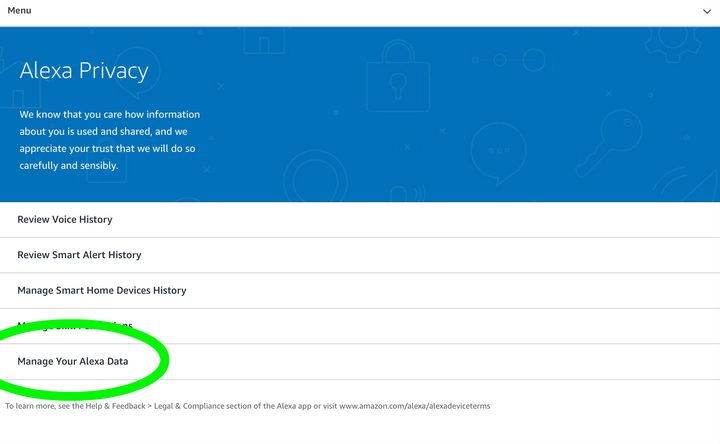
Step 4: The Alexa Privacy menu is where you can tell Amazon that you don’t want them using your voice recordings for research and development purposes. Start by selecting Manage Your Alexa Data.
Step 5: In this menu, you will see two very important sections. First, look at the Voice Recordings section, and select the option that says Choose How Long to Save Recordings.

Here, you will have options to automatically delete all recordings after a certain amount of time. For maximum privacy, you can choose Don’t Save Recordings to immediately remove any registered voice command. Amazon will warn that this may affect voice recognition but still allows you to do it.

This will help keep your data private from attacks and future uses by Amazon. Also, make sure Enable Deletion by Voice is turned on. That way, just to double-check, you can also do this yourself anytime you want by saying, “Alexa, delete everything I said today.”
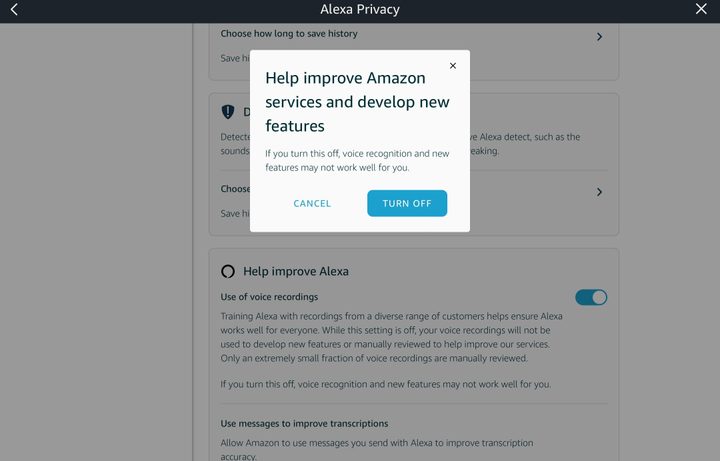
Step 6: The second section is called Help Improve Alexa, and you will have to scroll down a bit to find it. Here, make sure the option that says Use of Voice Recordings is disabled. This will prevent your voice recordings from being directly used by the Alexa team. Now, your voice commands are much more private.
Other Alexa privacy tips
In the Alexa Privacy menu, you can also see all of the archives of everything that was recorded in your communications and delete that history with Alexa. Additionally, you can take a look at your smart alert history, control your smart home device history (which is the data transmitted to Amazon about your smart home gadgets), and maintain your skills permissions (which is similar to controlling app permissions on your mobile device). Beneath Manage Skills Permissions, you can locate which skills have asked for your consent to obtain data like your home address, full name, Amazon pay, mobile phone number, and email address. Another option is to visit the website version of Skill Permissions whenever you want.
By continually monitoring the Alexa Privacy menu, you can observe and change the settings to increase the overall privacy of your Alexa experience.


