
Innovative, easy to install (in most cases), and engineered for your peace of mind, smart locks have quickly become a major staple in the world of residential home security. While some smart lock features, such as on-the-go monitoring and remote locking/unlocking are standard functions that most consumers will expect from their new gear, box-art and brand website specs are merely the surface level. Putting things another way: Smart locks are capable of so much more.
Whether you own a smart lock of your own (or several), are considering purchasing one, or want to learn more about them, we’ve put together this guide to aim the spotlight on some of the lesser-known powers of today’s leading smart locks. The rusted cylinders and deadbolts on our front doors have never looked so pitiful.
Automatic locking/unlocking
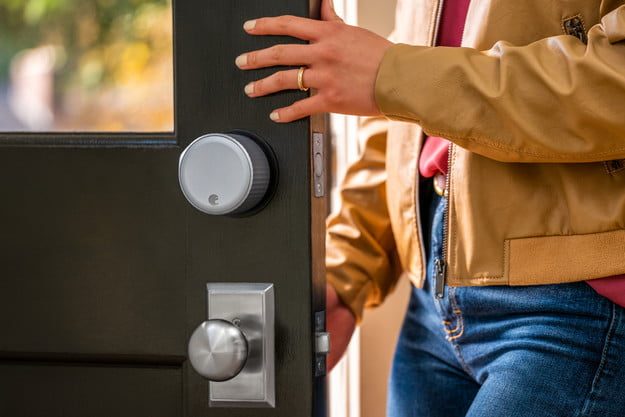
A handful of groceries. Armloads of deliveries on the front porch. A rambunctious, just-walked dog that wants her water bowl. What do all three things have in common? They’re each an obstacle between you and your hands unearthing a set of keys from your coat, purse, or other pocketed wearable to get into your home. That’s where one of the mightiest benefits of smart locking comes into play.
Lock brands like August and Wyze offer an auto-locking/unlocking feature based on your proximity to your smart lock of choice. Let’s look at the August Wi-Fi Smart Lock (fourth-gen) for further illustration. Through the August app, users can set their locks up to recognize mobile devices and Apple watches that are within range of the lock itself. Once a user is detected (via Bluetooth), the lock will act accordingly, automatically unlocking and then relocking once the door is shut. You can even set up the August lock for delayed locking, a convenient add-on if you know other family members are arriving home shortly after you.
Intuitive sensors for doors ajar
It’s happened to the best of us. After a frantic morning, we’re rushing to get out the door, our heads already filled with the worries of the day. Halfway to work, sitting in traffic, it hits us: The front door is unlocked. Strapped for time, with no window to speed back home to lock up the fort, your domicile is in the hands of fate today. Fortunately, there’s a smart lock perk that’ll save the day.
Lock brands like Yale and August are packaged with a stick-on magnetized door sensor, an accessory you’ll be instructed to install onto your door’s framing during setup. In the case of the Yale Assure Lock SL, one of the company’s flagship smart locks, the DoorSensor add-on that monitors whether or not your door is closed. If it’s shut, the deadbolt will extend, properly locking the home up. If for some reason you left the door slightly ajar, the deadbolt won’t engage. Couple that with the Assure’s Auto-Relock feature that automatically locks your door after about 30 seconds (whether you manually locked it or not) and it becomes clear why a smart lock can be a lifesaver for those with minimal moments to spare.
Custom keycodes for family, friends, and travelers

Airbnb hosts may find this feature-set particularly useful for out-of-state rental properties. The same goes for vacationing homeowners that want to grant access to the in-laws while they’re traveling. After all, someone’s got to feed the cat.
The ability to create custom unlock codes for guest users is a big win for smart locks and is a feature available across multiple brands. To unpack this a little more, let’s take a look at Google’s Nest X Yale. Using the Nest app, users are able to generate up to 20 codes that, through custom scheduling, can be assigned to the lock and shared with those visiting your property. After guests checkout or mom-in-law leaves, the code expires, ensuring no reentry, unless you personally regrant permissions. Best of all, the codes are numeric, meaning your guests won’t require the Nest app on their own device to unlock your door.
See who’s at the door (and greet them)
What if we told you that your smart lock-to-be may come equipped with live surveillance that matches the quality of certain video doorbells on the market?
Available with the Lockly Vision, users can pop open the Lockly app, tap the camera toggle, and be connected to real-time video (courtesy of the Vision’s built-in doorbell cam), right on their phone or tablet screen. Better yet, with live video, the Vision lets lock owners record footage, communicate with guests via two-way audio, and remotely operate the lock. While image quality may not be top-notch (as was the case with our Lockly Vision experience), it beats no camera at all, which is more than most lock brands can say.
Unlock your residence for Amazon

Tired of your Amazon packages getting soaked and tattered by Mother Nature? Thankfully, Amazon and the folks at Schlage, Yale, and Kwikset have come up with a solution. Introduced in 2018, Key by Amazon is an interactive mobile service and app available to Amazon Prime members. Combining a compatible smart door lock with a Ring video doorbell or camera product, the Key service allows Amazon delivery drivers to unlock your smart lock, allowing the rep to place your package inside the home.
Skeeved by the prospect of John or Jane from Amazon having access to your house? The Key app links to the smart camera or video doorbell, allowing you to watch your driver in real time, with two-way audio chat if you find it necessary to communicate with the courier.
Due to COVID-19 concerns, Amazon Key’s In-Home Delivery service is currently unavailable. In-Garage Delivery is still available for certain zip codes.
Retrofit your old lock for easy install
Want a smart lock but can’t bear the thought of the install? While most locks only require a short list of steps (most curated through the lock brand’s app) to get the new hardware up and running, there are smart locks that negate most of the installation process altogether.
August, Kwikset, and Sesame all offer smart locks that use your existing deadbolt assembly as part of the install. All you’ll need to do is remove the inner cylinder, clamp the new smart lock module in place, and fasten it in. That’s all there is to it. For those that find it hard to part with a set of keys (it never hurts to carry them), this also ensures that your existing house keys will work with your new smart lock.
If that’s not enough for you, then consider smart locks that retain your door’s existing décor. The Level Lock and Level Touch are two prime examples of smart locks that, well, don’t look like your traditional smart lock. That’s because there are no clunky keypads on the outside and gear to go over your latch. You’d be hard-pressed to realize they’re smart locks in the first place by just looking at them!
Command your smart home

Imagine arriving home, unlocking your smart lock, and your house’s first-floor lights automatically power on. Thanks to third-party compatibility through Wi-Fi and Z-Wave, smart locks are able to interact with a number of our existing smart home devices.
August and Philips Hue are one such smart home duo. By linking your Hue system to your August smart lock app, users can create lighting cues that respond to the lock’s physical locking/unlocking, as well as custom schedules based on time and date. The latter is especially convenient for when you’re away but want passersby to believe your home is still occupied.
Many (if not most) smart locks are also compatible with popular voice assistants like Amazon Alexa, Google Assistant, and Apple HomeKit. Using just voice commands, users can lock, unlock, and check the lock status from the couch, the master bedroom, or two states away. Is your smart lock equipped with video surveillance? If so, you can even view real-time front door footage from your home’s compatible smart display(s).


