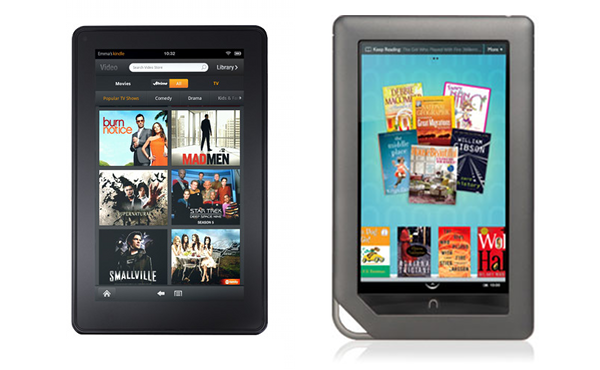
Amazon announced today the Kindle Fire, a 7-inch tablet that runs Android 2.3 Gingerbread. While many expected Amazon’s long-rumored tablet to stand as a major competitor to Apple’s iPad, the device appears to offer greater competition to the Barnes & Noble Nook Color, which is closer in specs and functionality than the far more expensive and feature-rich iPad 2. Here, a quick side-by-side comparison of the two flashiest e-readers now on the market.
| Kindle Fire | Nook Color | |||
| Price | $199 | $249 | ||
| Dimensions | 7.5″ x 4.7″ x 0.45″ | 8.1″ x 5″ x 0.5″ | ||
| Weight | 14.6 ounces | 15.8 ounces | ||
| OS | Android 2.3 Gingerbread (heavily modified) |
Android 2.2 | ||
| Processor | Dual-core TI OMAP 4 | 800MHz Cortex-A8 | ||
| RAM | Unknown | 512 Mb | ||
| Storage | 8 GB | 8 GB | ||
| Camera | No | No | ||
| Max. battery | 8 hours | 8 hours | ||
| Chargers | Micro USB | Micro USB | ||
| 3G | No | No | ||
| Wi-Fi | 802.11 B/G/N/X | 802.11 B/G/N | ||
| Screen size | 7 inches (IPS) | 7 inches | ||
| Resolution | 600 x 1024 | 600 x 1024 | ||
| Pixel density | 169 dpi | 169 dpi | ||
| Browser | Amazon Silk | Android (customized) | ||
| Book store | Amazon | Barnes & Noble | ||
| Book formats | Kindle (AZW), TXT, PDF, unprotected MOBI, PRC natively, DOC, DOCX, Audible | EPUB, PDF, DOC, TXT, DOCM, DOCX | ||
| App store | Amazon, Android apps | Nook Color apps | ||
| Apps available | 16,638 | 729 | ||
| Video formats | MP4, VP8 | MP4 | ||
| Picture formats | JPEG, GIF, BMP, PNG | JPG, GIF, BMP, PNG | ||
| Music formats | AAC (DRM-free), MP3, MIDI, OGG, WAV | MP3, MP4, AAC | ||
| Micro SD card slot | No | Yes | ||
| Adobe Flash support | Yes | Yes | ||
| Additional features | Cloud backup, Whispersync, wireless sync, video rental, 30-day Amazon Prime trial | Newsstand, better children’s book selection, Nook Friends |
As you can see from the spec breakdown, the two devices are very similar. Of course, we haven’t yet had a chance to use the Kindle Fire, so there may be something lost there in its hands-on functionality, when compared to the Nook Color. But seeing as the Nook Color has a tendency to run sluggishly, by our tests at least, we hope Amazon’s newest offering won’t fall behind in the usability category.
Another unknown factor is that B&N may release a new Nook Color sometime in the near future, according to recent rumors, which could shift the balance once again. But if we were to advise someone to purchase one of these two devices today, based on specs alone, the Kindle Fire appears to be the better buy. Our real advice, however, is to wait until the full verdict on the Fire is in before throwing down your credit card.