  1. Home
  2. Mobile
  3. Emerging Tech
  4. Legacy Archives

Amazon adds educational goals for kids on Kindle Fire tablets

Add as a preferred source on Google

Announced by Amazon earlier today, the development team behind the Kindle Fire tablets will be launching new features for Kindle FreeTime that will help parents encourage learning before entertainment. For example, after parents turn on the Learn First feature, all entertainment content within a child’s FreeTime library will be removed until a specific educational goal is met. When using this feature, children would have to earn access to entertainment applications by interacting with educational applications. For instance, parents could set a goal to read for an hour before entertaining videos can be unlocked.
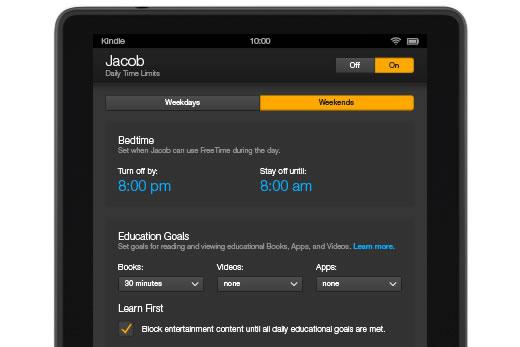
Kindle-FreeTime-Time-LimitsAmazon has also added additional time restriction settings to make sure the child can’t access content in the middle of the night. The new Bedtime mode allows parents to make FreeTime inaccessible between a specific set of hours, 8 p.m. to 8 a.m. for instance.

Recommended Videos

Parents can also set time limits based off different days of the week, ideal when a child has more free time on the weekend compared to a school night. 

While FreeTime is completely free for parents to use, Amazon also offers the Kindle FreeTime Unlimited subscription service that provides access to educational books, videos and apps. The cost of the subscription ranges from $2.99 up to $9.99 a month depending on the number of children using Kindle FreeTime Unlimited as well as membership in Amazon Prime. According to Amazon, hundreds of these educational tools are available now and many more will be added during 2014.

While a much larger collection of educational applications can be found for Apple’s iPad, the sheer amount of customization options for parents on the Kindle Fire tablets significantly trumps Apple’s software at the moment. Amazon plans to roll out these changes to Kindle FreeTime prior to the end of the month, ideal for any parent that receives a Kindle Fire tablet as a holiday gift this year.

Mike Flacy
By day, I'm the content and social media manager for High-Def Digest, Steve's Digicams and The CheckOut on Ben's Bargains…
How to restore deleted or missing contacts on your iPhone
Lost your iPhone contacts? Here's how to get them back in minutes!
iPhone in hand showing restore contacts page

At some point, we all stopped memorizing phone numbers. It happened gradually, and now most of us can barely recall two or three phone numbers off the top of our heads. So when your iPhone contacts vanish, whether after a software update or an accidental delete, it can feel like a minor crisis.

Thankfully, if you act fast, you can easily restore deleted contacts on your iPhone. So, before you start texting people asking for their numbers again, try these methods to get your contacts back. These methods will work on all latest iPhone models.

Read more
The best Google Pixel deals of 2026: big savings on Google’s AI phones
The home screen on the Google Pixel 8 Pro.

Google's Pixel 10 lineup has been out for a bit, and if you've been on the fence about switching to Android's gold standard, current discounts across Amazon make this the best time to buy. We're seeing up to 26% off across the entire Pixel family, including phones and accessories.

Why buy a Pixel right now?
Google has always built the Pixel line around one idea: the smartest possible Android experience. With the Pixel 10 series, that philosophy gets a significant upgrade thanks to deep Gemini AI integration: Google's most capable AI assistant to date. It handles everything from real-time call screening and live translation to on-device photo editing and natural-language search, and it does so more seamlessly than any other Android on the market.
Add in Google's reputation for exceptional cameras, clean software, and the longest OS update commitments of any Android manufacturer, and the Pixel 10 lineup makes a compelling case for itself even at full price. At these discounted prices, it's a genuinely hard argument to beat.
Quick comparison

Read more
The best tutoring apps and websites
Screenshot of student studying

Whether you're thinking of learning a new language, looking for homework help, need a hand with your research paper, or could use a quick review for your upcoming SATs, a skilled tutor can help with all of the above. No longer limited to office hours or library meet-ups, online tutoring services are evolving and improving. In 2025, AI-powered study tools, mobile-first platforms, and expanded access to tutors around the world, students are able to get expert help anytime, anywhere.

Today's learners expect more than just flexibility. They want tutoring that's fast, focused, and delivers results. This shift has led to a new generation of tutoring platforms that combine on-demand help with real-time trackable progress.

Read more