  1. Home
  2. Mobile
  3. Legacy Archives

Android Market now has movie rentals and e-books

Add as a preferred source on Google
android-market-july-2011-update-e-books-movie-rentals
Image used with permission by copyright holder

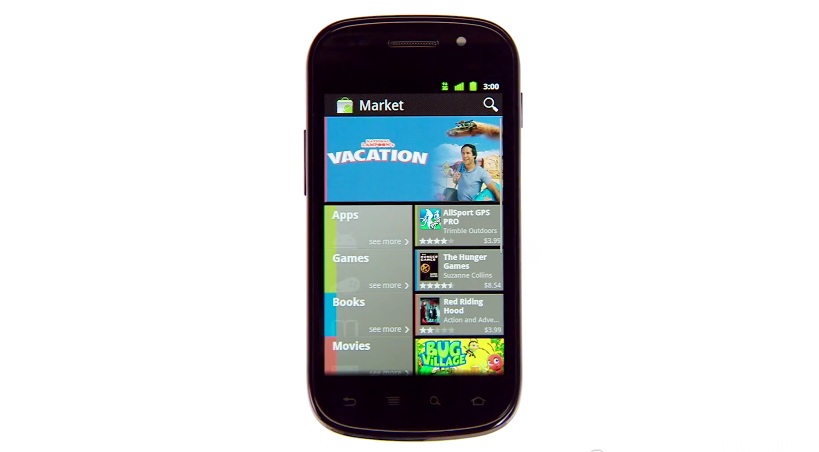
Yesterday, Google announced that a redesigned Android Market with new services will soon be available for all Android 2.2+ phones. Integrating its Google eBooks app and its new YouTube Movies service, the new Market will allow users to buy books and rent movies (U.S. only) directly from its storefront. Both of these services will allow you to pick up where you left off on your PC or any other compatible device. Some of you may already have the new version, which now looks much more similar to Google’s Android Market Website and many of its other post-Google+ designs.

In addition, a new Videos app is now available, which will manage movie rentals, allowing you to download offline copies of your rentals, which range from $1.99 to $3.99 from our initial glance. There are roughly 50 or so movies currently available, though that number is increasing quickly.

Recommended Videos

The new design of the Market includes new categories like Editor’s Choice, which were added to the Web version of the market in May. It also looks and acts a bit similar to the “Metro UI” design of Windows Phone, complete with lots of rectangles and a tabbed swipe. However, before Microsoft loyalists get too upset, it should be noted that Google has toyed with tabbed, swipe-able UI for quite some time, even including it in the News & Weather app for Android.

The new version of the Android Market will roll out to users in the “coming weeks.” It will be an automatic download. Once you get the new Market, you will be able to download the Videos app.


Jeffrey Van Camp
As DT's Deputy Editor, Jeff helps oversee editorial operations at Digital Trends. Previously, he ran the site's…
Snapchat Planets: What’s the order, and what do they mean?
Snapchat Planets turns your best friends list into a solar system, and yes, your orbit says a lot
Snapchat Planets being shown on the Snapchat app on iPhone.

Snapchat is already packed with little symbols that can be weirdly hard to decode. You have streaks, emojis, badges, scores, Best Friends, and if you use Snapchat Plus, a tiny solar system that shows where you sit in someone’s closest-friends list.

The feature is called Friend Solar System, though most people just call it Snapchat Planets. It takes your position in a friend’s Snapchat orbit and turns it into a planet. From Mercury to Neptune, these celestial bodies signify how close a person is to you.

Read more
How to use WhatsApp Web
We'll show you how to use WhatsApp on your desktop or laptop
WhatsApp Web

As one of the most popular messaging services, you’ve already heard of WhatsApp. From its humble beginnings in 2009—two years before Apple introduced iMessage—to its acquisition by Facebook (now Meta) in 2014, WhatsApp has become the dominant messaging platform around the globe.

In recent years, it's grown even more potent with new features like video messages, self-destructing voice messages, the ability to edit sent messages, and more. We even finally got an WhatsApp iPad app in May 2025.

Read more
What is WhatsApp? How to use the app, tips, tricks, and more
From setting it up to mastering hidden features, here is your complete guide to WhatsApp.
WhatsApp app store listing open on iPhone

There's no shortage of messaging apps out there. The past decade has given us more options than we know what to do with, largely because smartphones demanded something better than plain old SMS.

Both the App Store and the Play Store are packed with apps that promise to revolutionize the way we communicate. Most of them didn't make it. The truth is, a messaging app is only as good as the number of people using it, and most apps never cross that threshold.

Read more
