  1. Home
  2. Mobile
  3. Legacy Archives

BlackBerry Q10 – complete with that physical keyboard – comes to AT&T June 21

Add as a preferred source on Google

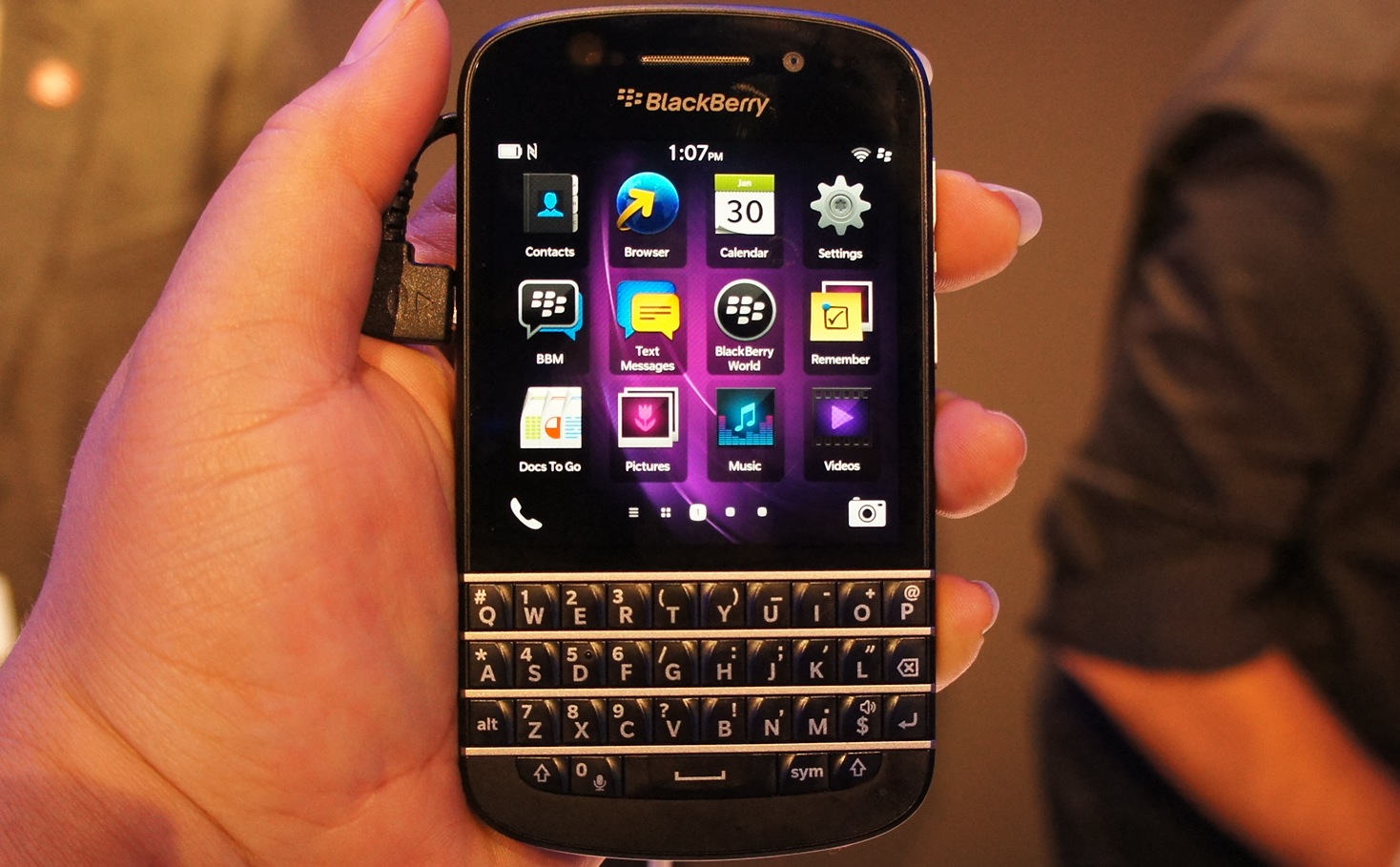
BlackBerry Q10 hands onCheck our full review of the BlackBerry Q10 phone.

AT&T customers who’ve been holding out for the BlackBerry Q10 handset over the Z10 alternative will be pleased to know that, after quite a wait, the device will finally be arriving in stores on Friday.

Recommended Videos

Complete with the physical keyboard so adored by BlackBerry fans, the Q10 will be available for $199.99 with a two-year contract. This matches the price set by Verizon, where the handset has been available for a couple of weeks now.

Alternatively, T-Mobile is offering BlackBerry’s new device for $99, plus 24 monthly payments of $20. Sprint, however, won’t be carrying the phone till “late summer”.

The BB10-powered Q10 follows in the footsteps of the touchscreen Z10, which hit stores in the US in March.

The latest addition to BlackBerry’s line-up incorporates a 1.5GHz dual-core processor, 2GB of RAM, an 8-megapixel camera, and 16GB of storage memory.

Whereas the Z10 comes with a 4.2-inch touchscreen, the Q10’s physical keyboard leaves it with a smaller, 3.1-inch display, also touch sensitive. That may put off a lot of smartphone users who’ve become used to all that lovely screen real estate found on most devices these days, but for diehard BlackBerry users who can’t live without the feel of that physical keyboard, it’ll have to do for now.

Aware of the popularity of such keyboard-equipped devices, the Canadian company said recently it was gearing up for a July launch of the Q5, which, as its name suggests, is a low-cost version of the Q10.

The mobile maker is reportedly also working on a new touchscreen phone, the A10, set to replace the Z10 as the company’s flagship handset. The device should hit stores before the holidays.

The company formerly known as RIM is hoping that its new BB10 devices will help it to claw back some of the market lost in recent years to the likes of Samsung and Apple.


Trevor Mogg
Contributing Editor
Not so many moons ago, Trevor moved from one tea-loving island nation that drives on the left (Britain) to another (Japan)…
Topics
How to use WhatsApp Web
We'll show you how to use WhatsApp on your desktop or laptop
WhatsApp Web

As one of the most popular messaging services, you’ve already heard of WhatsApp. From its humble beginnings in 2009—two years before Apple introduced iMessage—to its acquisition by Facebook (now Meta) in 2014, WhatsApp has become the dominant messaging platform around the globe.

In recent years, it's grown even more potent with new features like video messages, self-destructing voice messages, the ability to edit sent messages, and more. We even finally got an WhatsApp iPad app in May 2025.

Read more
What is WhatsApp? How to use the app, tips, tricks, and more
From setting it up to mastering hidden features, here is your complete guide to WhatsApp.
Electronics, Phone, Mobile Phone

There's no shortage of messaging apps out there. The past decade has given us more options than we know what to do with, largely because smartphones demanded something better than plain old SMS.

Both the App Store and the Play Store are packed with apps that promise to revolutionize the way we communicate. Most of them didn't make it. The truth is, a messaging app is only as good as the number of people using it, and most apps never cross that threshold.

Read more
How to restore deleted or missing contacts on your iPhone
Lost your iPhone contacts? Here's how to get them back in minutes!
iPhone in hand showing restore contacts page

At some point, we all stopped memorizing phone numbers. It happened gradually, and now most of us can barely recall two or three phone numbers off the top of our heads. So when your iPhone contacts vanish, whether after a software update or an accidental delete, it can feel like a minor crisis.

Thankfully, if you act fast, you can easily restore deleted contacts on your iPhone. So, before you start texting people asking for their numbers again, try these methods to get your contacts back. These methods will work on all latest iPhone models.

Read more