

Poor Apple. It seems like no matter what it does, Google goes and one ups it. The iPhone and iPad were huge steps forward for mobile devices, then Google’s Android OS took over a huge chunk of both markets (and continues to advance). Apple ditched Google Maps for its own home-grown option, so Google released Google Maps for iOS and topped Apple’s offering. But at least Apple has the corner on the voice recognition app with it’s well-known, but not always well-functioning, Siri. Or did. Google Now, Google’s take on Siri (and then some) has come to iOS owners via Google’s Search app. Though it’s not integrated with the rest of iOS, it is powered by Google’s well-refined search tools, and there’s plenty of functionality to be had there. It’s just getting to it that might keep Google Now from becoming your go-to for voice search.

Google Now comes bundled in the latest update to Google’s Search app for iOS. Now on version 3.0, Google Search continues to add to its overall experience with it’s Cards feature, which are viewable on the title screen. They offer a wealth of information, though not as much as they do in the Android version of Now. Of course, iOS users may not know that they’re missing out, so they’re likely happy to work with what is here. Among the cards included are local traffic updates, reminders from your calendar, weather in your area, and news stories. These cards are updated regularly and can be dismissed with a swipe when you’re done with them. Cards are customizable to give you the information you want, making it a solid, worthwhile function and a welcome greeting when you open the app.
Google Now is designed to work as a verbally activated Google search. This means it will pull up the information you need from it’s wealth of knowledge and information that it has collected. The difference is, it’s designed to be friendly to standard speech patterns. Instead of trying to say keywords to get the right result, Google Now is designed to hear full sentences, figuring out the context clues to provide the results that you expect. This means you can ask Google Now questions and it will provide direct answers to them.
The results of this functionality are pretty fantastic. Posing the question “What is the weather like in (city name)?” provides a read out of current weather along with expected weather for the rest of the week. Rewording the question provides similar results in almost every scenario, and you can use the term “here” to get information based on your current location. This works similarly for traffic, as Google provides you with a map of major city streets in different colors to indicate traffic flow. These, along with other common questions like “What time is it?” or “What day is it?” are replied to with a friendly voice that does its best to speak the information to you.
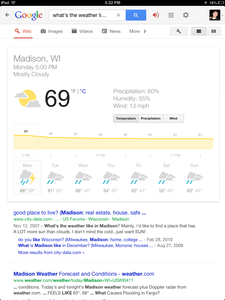
But most of that information is available in the cards that Google Search has. It’s cool that it works, but it can be a little redundant. So what happens when you ask Google Now more specific questions, things that are a little less universal and a bit more specific? Still pretty solid, actually. Ask about a certain type of restaurant and you’ll get a Google Map with listings of the type of food you’re looking for. Ask it to define a word and it reads off the definition and provides you with a pronunciation. Try searching for a certain bit of information about a person or a piece of trivia and it’ll probably figure that out, too. You can even ask it some standard screw-around searches like “What’s your favorite color?” or “Tell me a joke” and it will give you an answer because, of course, Google thought of that before you did.
Google Now’s ability to put together the question you’re asking is fun to watch, as it guesses at words and then confirms its accuracy as your sentence continues. If it gets a word wrong, Google Now is able to recognize and fix it it because of it’s ability to understand speech patterns. That’s not to say that it doesn’t get it wrong sometimes or the search result is always exactly what you want, but it is on point by a considerably larger margin than not.
Google Now, and the Google Search app as a whole, is an excellent tool. It does everything that it promises and does so with impressive accuracy. It’s consistent, improves as you use it, and it has a larger search history and word database to work off of than Siri.
The only problem with it, and the biggest obstacle it will have to overcome, is the fact that Now isn’t working with the rest of iOS the same way Siri does. It’s not a personal assistant app, even though a lot of the information you can get out of the search functionality makes it seem like it could be. More integration with Google apps so you can give voice commands to use other Google products like Calendar would immerse you further into Google’s own infrastructure. But if you started using all of Google’s apps, why would you do it on an iOS device? Maybe that’s Google’s plan, but it will have to talk people into going out of their way to use Now voice search. Unless Apple opens up iOS to allow apps to replace Siri, it’s probably not in the cards.


