  1. Home
  2. Mobile
  3. Legacy Archives

Google Phone Coming in 2010?

Add as a preferred source on Google

The technology industry has been speculating that Internet titan Google was looking at launching its own mobile devices, giving the company’s long-standing interest in all things mobile. The last major swath of rumors turned out to be centered on Android, Google mobile operating system, rather than on any Google-branded mobile device. This weekend, the rumor mill swung back into full force as Google employees began posting notices to social networking services that they were testing a new Android-based device for the company…and it didn’t take long for the first pictures to appear. Google quickly confirmed a new device was out in the field for testing, but revealed little else about the device or the company’s mobile plans.
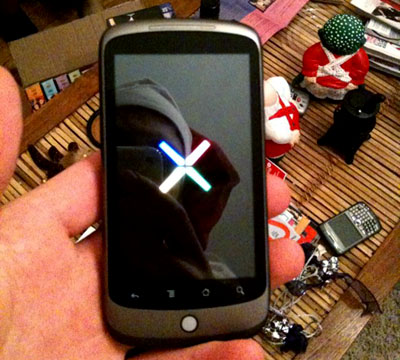
Google Nexus One? Photo by Cory O'Brien
Image used with permission by copyright holder

“We recently came up with the concept of a mobile lab, which is a device that combines innovative hardware from a partner with software that runs on Android to experiment with new mobile features and capabilities, and we shared this device with Google employees across the globe,” wrote Google VP for product management Mario Queiroz in a blog post. Queiroz also referred to employees’ use of the device as “dogfooding,” a process wherein company use their own products (“eating their own dogfood”) to see how they perform in the real world.

Recommended Videos

The Wall Street Journal, meanwhile, cites unnamed “people familiar with the matter” claiming Google plans to launch its own mobile phone directly to consumers without a carrier partner “as soon as next year.” The device would be unlocked and running version 2.1 of Google’s Android mobile operating system.

The device in Google employees’ hands, variously dubbed the “Nexus One,” is apparently manufactured by HTC. The device sports a trackball for navigation, an OLED display, 802.11b/g Wi-Fi networking, Bluetooth 2.1, and a microSD slot for removable storage. Notably missing compared to the much-hyped Droid: a QWERTY keypad.

Industry watchers are mixed on the idea of Google launching its own device. On one hand, doing so gives the company an Apple-like opportunity to manage both the hardware and software side of a mobile platform. On the other hand, going into direct competition with it’s own Android partners may sap momentum from the Android platform…just as it’s starting to take off.

[Photo credit: Cory O’Brien via Twitter.]

Geoff Duncan
Former Contributor
Geoff Duncan writes, programs, edits, plays music, and delights in making software misbehave. He's probably the only member…
Snapchat Planets: What’s the order, and what do they mean?
Snapchat Planets turns your best friends list into a solar system, and yes, your orbit says a lot
Snapchat Planets being shown on the Snapchat app on iPhone.

Snapchat is already packed with little symbols that can be weirdly hard to decode. You have streaks, emojis, badges, scores, Best Friends, and if you use Snapchat Plus, a tiny solar system that shows where you sit in someone’s closest-friends list.

The feature is called Friend Solar System, though most people just call it Snapchat Planets. It takes your position in a friend’s Snapchat orbit and turns it into a planet. From Mercury to Neptune, these celestial bodies signify how close a person is to you.

Read more
How to use WhatsApp Web
We'll show you how to use WhatsApp on your desktop or laptop
WhatsApp Web

As one of the most popular messaging services, you’ve already heard of WhatsApp. From its humble beginnings in 2009—two years before Apple introduced iMessage—to its acquisition by Facebook (now Meta) in 2014, WhatsApp has become the dominant messaging platform around the globe.

In recent years, it's grown even more potent with new features like video messages, self-destructing voice messages, the ability to edit sent messages, and more. We even finally got an WhatsApp iPad app in May 2025.

Read more
What is WhatsApp? How to use the app, tips, tricks, and more
From setting it up to mastering hidden features, here is your complete guide to WhatsApp.
Electronics, Phone, Mobile Phone

There's no shortage of messaging apps out there. The past decade has given us more options than we know what to do with, largely because smartphones demanded something better than plain old SMS.

Both the App Store and the Play Store are packed with apps that promise to revolutionize the way we communicate. Most of them didn't make it. The truth is, a messaging app is only as good as the number of people using it, and most apps never cross that threshold.

Read more

