
 Yesterday Google officially announced the Nexus One smart phone, an Android 2.1 handset with hardware from HTC and a personal software touch from Google. The new handset brings a super-fast 1 GHz Snapdragon mobile processor and offers new Android 2.1 features like voice-to-text entry in all text fields. The handset had been rumored to be incoming since last month, when Google handed it out to employees as a Christmas bonus.
Adobe has released a video detailing its own work with Google on the N1 phone project. The video details Adobe’s efforts to pack Flash 10.1 — hardware-accelerated rich internet media — into the powerful smart phone.
Staff at Adobe state that Flash 10.1, currently in its second beta, is progressing nicely on the smart phone. They showed it being used to play online games and browse rich-media sites like NationalGeographic.com. One prospect that will excite many is the possibility of using the Nexus One to watch video on-the-go via Flash-based services like the popular TV website Hulu.
Of course, with the good comes the bad — cell phone-ready Flash offers Nexus One creator Google an excellent new way to deliver graphical ads to users. In fact, the demo by Adobe showed an animated ad for dog food, the kind that some PC users (those who don’t used ad-blocking software) have become accustomed to. That’s good news for Google, but a minor headache for consumers who’d rather not have their scant smart phone screen space taken up by colorful ads. It’s also a bit of an inconvenience to telecoms, as Flash ads equate to more data traffic.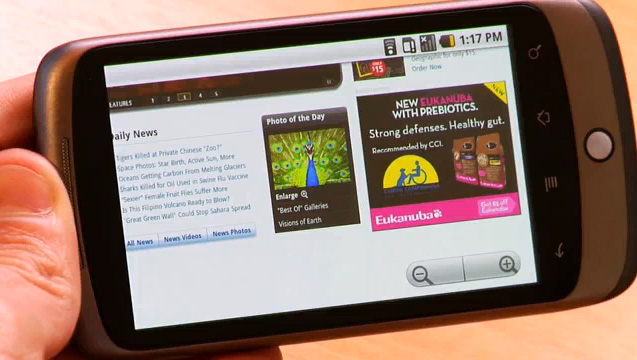
For better or worse, though, Adobe Flash is coming to the Nexus One phone. If you want to try it for yourself, Adobe says the latest beta is working on the handset. You can visit the Adobe Labs page, home to Flash 10.1, here.



