  1. Home
  2. Mobile
  3. Legacy Archives

Google Play Books update adds ability to upload your e-book collection

Add as a preferred source on Google
Google Play Books - Upload Desktop
Image used with permission by copyright holder

During the Google I/O keynote several of the presenters mentioned that there wasn’t enough time to go through every detail of every update, though devs would get full explanations in the various sessions throughout the conference. One of the updates that went unmentioned and thus got a quiet little launch is an update to Google Play Books. The Android app received a makeover to bring it into line with the new Play Store and Music apps and a section under My Library called Uploads that wasn’t there before. Google is now letting customers upload up to 1,000 EPUB and PDF files to Play Books which will be accessible via the Web and mobile apps.

The concept is similar to the way Google Music worked at launch. Play Books acts as a cloud locker for e-books and PDF documents, allows downloading to smartphones and tablets, but doesn’t give users a way to re-download to the desktop. Files uploaded to Play Books act just like native e-books. You can add bookmarks, highlights, and note; the apps will save and sync it all (including progress) across devices. 

Google Play Books - Note Sync
Image used with permission by copyright holder

Other than the 1,000 file cap there are other restrictions. The biggest is that e-books with DRM won’t work. If you upload one, it will stay stuck at the processing stage forever and won’t sync. We couldn’t even delete the book from the interface. What’s the point, then? EPUB files from major bookstores – Barnes & Noble, Sony, Kobo – all have DRM. This feature is likely for that segment of the population that buys non-DRM books from the few e-bookstores that sell them or directly from publishers like Baen or Tor that don’t put DRM on their books. Oh, and people who break the DRM. But we don’t know anyone who would do that.

Recommended Videos

This isn’t a totally new concept. Barnes & Noble long ago added a My Files section to the Nook tablets and the Nook app for outside EPUB files without DRM. The idea being to give customers a chance to put all of their e-books in one app or interface and cut down on having to hop around. Files added to the Nook this way don’t sync to the cloud, that’s a more Amazon Kindle idea. We like that Google lets you sync the book and the data associated with it across devices. 

Google Play Books Android App
Image used with permission by copyright holder

To add EPUB and PDF to Play Books you can upload from a computer or add files stored in Google Drive. Then hop over to your phone or tablet and refresh to see the new content. The DRM-free EPUB file we uploaded synced without issue and looks like a Google Play book. The PDF file we tried synced as well, but there are no advanced PDF tools at hand, so the text won’ reflow. If the font is small, you have to zoom in and then move the page back and forth yourself to read. We’ll stick to EZPDFReader.
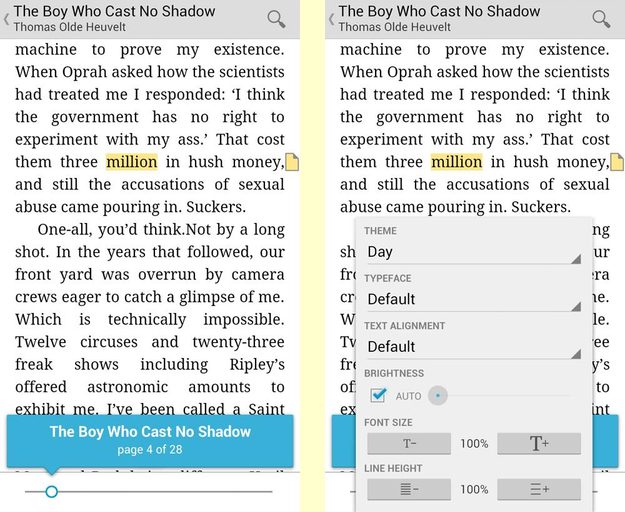
Google Play Books Android App Inside Book
Image used with permission by copyright holder

This update hasn’t caught up to all Google accounts yet (we saw the Upload option on one of our accounts but not all three) and all the Help documentation isn’t even in the system yet. Hopefully it will roll out to everyone soon. Right now this feature doesn’t seem like much. It’s nice to have, of course, but may only be useful to a niche group of e-book lovers. Maybe the quiet rollout means Google is keeping quiet about the service until they’re ready to reveal some cool extra feature. After all, Google Music was just a pre-cursor to All Access.

K. T. Bradford
Former Contributor
K. T Bradford is a lover of gadgets and all things geek. Prior to writing for Digital Trends she cut her teeth on tech…
Topics
How to restore deleted or missing contacts on your iPhone
Lost your iPhone contacts? Here's how to get them back in minutes!
iPhone in hand showing restore contacts page

At some point, we all stopped memorizing phone numbers. It happened gradually, and now most of us can barely recall two or three phone numbers off the top of our heads. So when your iPhone contacts vanish, whether after a software update or an accidental delete, it can feel like a minor crisis.

Thankfully, if you act fast, you can easily restore deleted contacts on your iPhone. So, before you start texting people asking for their numbers again, try these methods to get your contacts back. These methods will work on all latest iPhone models.

Read more
The best Google Pixel deals of 2026: big savings on Google’s AI phones
The home screen on the Google Pixel 8 Pro.

Google's Pixel 10 lineup has been out for a bit, and if you've been on the fence about switching to Android's gold standard, current discounts across Amazon make this the best time to buy. We're seeing up to 26% off across the entire Pixel family, including phones and accessories.

Why buy a Pixel right now?
Google has always built the Pixel line around one idea: the smartest possible Android experience. With the Pixel 10 series, that philosophy gets a significant upgrade thanks to deep Gemini AI integration: Google's most capable AI assistant to date. It handles everything from real-time call screening and live translation to on-device photo editing and natural-language search, and it does so more seamlessly than any other Android on the market.
Add in Google's reputation for exceptional cameras, clean software, and the longest OS update commitments of any Android manufacturer, and the Pixel 10 lineup makes a compelling case for itself even at full price. At these discounted prices, it's a genuinely hard argument to beat.
Quick comparison

Read more
The best tutoring apps and websites
Screenshot of student studying

Whether you're thinking of learning a new language, looking for homework help, need a hand with your research paper, or could use a quick review for your upcoming SATs, a skilled tutor can help with all of the above. No longer limited to office hours or library meet-ups, online tutoring services are evolving and improving. In 2025, AI-powered study tools, mobile-first platforms, and expanded access to tutors around the world, students are able to get expert help anytime, anywhere.

Today's learners expect more than just flexibility. They want tutoring that's fast, focused, and delivers results. This shift has led to a new generation of tutoring platforms that combine on-demand help with real-time trackable progress.

Read more