
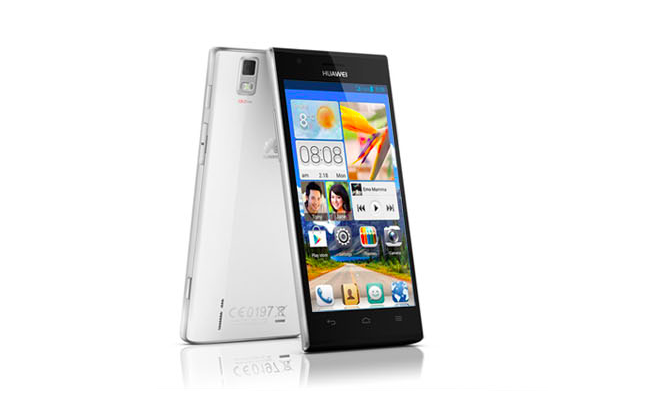

The Huawei Ascend P2 has many of the features and specs we expect to see on an Android phone in 2013, but the company revealed in their Mobile World Congress press conference that it has sights set beyond the droidy competition. Huawei wants to take on Apple, which means trouncing the iPhone 5. Can the Ascend P2 accomplish this lofty goal? Specs aren’t everything, and it remains to be seen how the phone performs in the real world. Still, we can make some preliminary observations based on what we know about the phone from today’s announcements. Here’s a spec breakdown:
iPhone 5 |
Huawei Ascend P2
|
|
| Size | 123.8 x 58.6 x 7.6 (mm) | 8.4 thick (mm) |
| Weight | 112g | TK |
| Screen | 4-inch LCD | 4.7-inch LCD |
| Resolution | 1136 × 640 pixels | 1280 x 720 pixels |
| OS | iOS 6.0.1 | Android 4.1 with Emotion UI |
| Storage | 16/32/64GB | 16GB |
| SD Card Slot | No | TK |
| Processor | Dual-core A6X | 1.5GHz quad-core |
| RAM | 1GB | 1GB |
| Connectivity | Wi-Fi, 4G LTE, HSPA+ | Wi-Fi, 4G LTE |
| Camera | Front 1.2MP, Rear 8MP | Front 1.3MP, Rear 13MP |
| Bluetooth | Yes, version 4.0 | Yes |
| Battery | 1440mAh | 2420mAh |
| Charger | Lightning connector | Micro USB |
| Marketplace | Apple App Store | Google Play Store |
| Price | $200+ | €399 |
| Availability | AT&T, Sprint, Verizon | Orange (EU), unlocked (US) |
The biggest difference is the display size: 4.7 inches to 4.0. Both phones have a similar pixel density with the iPhone 5’s 326 ppi only slightly ahead of the P2’s 315 ppi. When compared side-by-side, most probably won’t be able to tell the difference. Plus, the P2’s display has some neat tricks, such as working with gloved fingers.
On paper, it looks as though the P2 will be the speedier phone thanks to the quad-core processor. However, we’ve seen how phones with heavy interface skins like the Emotion UI can get bogged down if the hardware and software aren’t fine tuned enough.
Shutterbugs will be happy to see other companies taking the rear camera as seriously as Apple does. The higher megapixels on the Ascend P2 don’t necessarily mean better quality than the iPhone 5, though the promise of HDR video could put Huawei’s phone ahead among photo buffs.
As of right now, Huawei isn’t planning to sell the Ascend P2 through a carrier in the US, so the price tag will be higher than that of the iPhone on contract. Off-contract, if the price for US customers is the same for European ones, the P2 is actually less: $525 vs $650.



