
Netflix continually loses movies and TV shows when licenses expire or deals fall through. The streaming service sometimes makes up for this by adding a bunch of new content. It’s still a bummer when stuff on your list goes away with no warning and before you have a chance to watch it. Wouldn’t it be nice if you could save Netflix videos to your computer or smartphone to enjoy at your leisure?
But that’s illegal, you might say. Apparently it isn’t.
According to the folks behind PlayLater, the “world’s first DVR for online video,” it’s perfectly legal to save copies of videos from Netflix, Hulu, Aereo, Amazon Instant Video, and a couple dozen other online sources. As long as you have legal access to the service, you can save a copy to watch on any device you want without restriction and without an Internet connection. The powers that be might take issue with this idea, but until they win a court battle, you can take advantage.

When we heard about PlayLater we thought it might be too good to be true, so we decided to try it for ourselves. Turns out the service works as advertised and is pretty useful. However, you’re not going to get archive-quality videos in the end.
How to set up PlayLater
Even though PlayLater is all about online video, it requires a desktop app to work. It also requires Windows – sorry Mac and Linux users. Once installed, you have to sign up with the PlayLater service before you can get started. It costs $30/year with an option for a $80 lifetime membership (there’s a sale on now that drops the price to $20 and $40, respectively). If you’re not happy, you can always cancel at the end of the month or get your money back within 30 days.
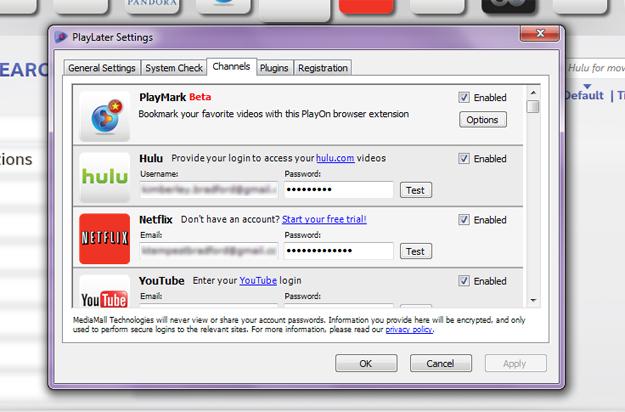
The next part of setup is to get all of your channels working. That means signing in to all of your premium services (Netflix, Hulu Plus, Amazon) and potentially your local cable or satellite provider to get access to channels like HBO GO, TBS, Lifetime, etc. Once everything is authorized, you can browse available videos and start the recording process. This is all straightforward, but it takes a while to do – especially if you have a lot of logins to authorize. Good news is: you only have to do it once.
In addition to the channels listed in the PlayLater app there are a few hundred third-party add-ons that give you access to more. These range from local network affiliates to popular cable networks.
Recording and video quality

The PlayLater app doesn’t have the most sleek and attractive interface we’ve ever seen. And browsing videos can be a bit of a pain since it doesn’t show them to you the way you’d see them on the service’s Web page, but in a grid that looks like a Blockbuster Video kiosk. Grabbing that info also takes far too long, leaving you sitting on a loading screen for a while. Services with favorite lists or queues are easier to deal with since you can search for and sort the videos you want in the real interface, then switch to PlayLater to find them again.
Once you get all that sorted, it’s time to record some video. We tested PlayLater with Netflix, YouTube, and Aereo.
The most important thing to know is that PlayLater works by recording videos in real time. If you want a copy of a movie, the process will take about 90 minutes or however long that movie is. The video plays in the background and you can’t hear or see it, so it’s possible to go on using the computer while recording. Just know that this might affect the recording. PlayLater is still using resources and your connection to stream. So doing things that tax the graphics card or slow down the connection may result in a lower quality video. We ended up queuing several recordings and let PlayLater run overnight.
With non-HD video, the program is supposed to record at the highest quality available to it and with whatever your normal settings are. HD recording isn’t available right now, though it may be in the future. We found that PlayLater recordings weren’t as crisp as the originals, even when they weren’t HD. This is noticeable on large and high definition displays and TVs, but not as much on smartphone and tablets. The quality isn’t archival, it’s just good enough for the stated purpose.
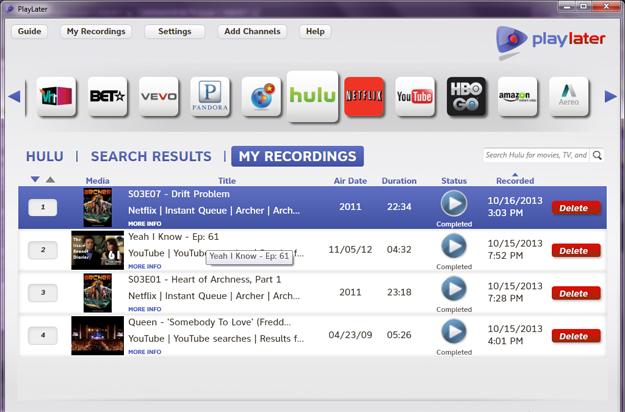
PlayLater records almost exactly what you see when watching online video, so you might get a bit of the Netflix loading bar and some commercials. Once the video is done recording, it’s not locked or DRMed in any way, so you can edit all that out or just skip past it.
The resulting files are MP4 and will play on any computer plus Android, iOS, Windows Phone, and BlackBerry devices. Like any video file you can drag and drop them over USB or sync with iTunes.
Is PlayLater worth It?
Though the videos PlayLater creates aren’t perfect or the highest quality, they are good enough to merit the $30/year subscription fee. This service is perfect for people who want to watch video on a subway ride, on airplanes, and any other place where it’s not possible or practical to stream. Plus, it provides a bit of insurance against movies or shows going away before you get a chance to watch them. As long as the videos are for your own personal use, you’re still within the bounds of the law. At least, for now.


