  1. Home
  2. Mobile
  3. Music
  4. Legacy Archives

Jawbone increases portability with the Mini Jambox

Add as a preferred source on Google

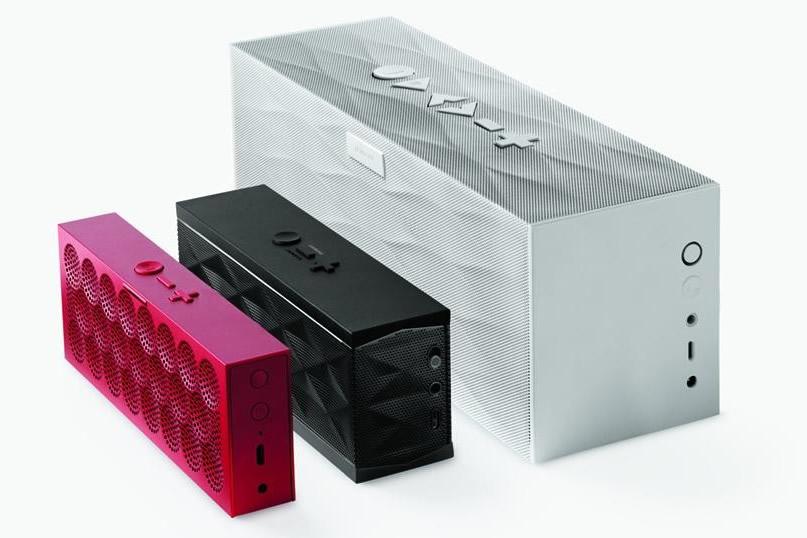
Announced yesterday by Jawbone, the company is expanding their lineup of portable speakers with a thinner version of the standard Jambox. Called the Mini Jambox, the speaker is slightly wider than the original Jambox, but more than a half inch slimmer as well. Built inside a one-piece aluminum chassis, the Mini Jambox can slip into a laptop bag or pants pocket fairly easily. Similar to the original Jambox, the Mini Jambox contains two neodymium drivers, but only one passive bass radiator rather than the dual bass radiators found in the original Jambox.

Identical to the other models in the Jambox lineup, the Mini Jambox connects to smartphones, tablets or laptops over Bluetooth in order to play music. According to Jawbone, the lithium-ion battery inside the Mini Jambox can play music up to 10 hours before requiring a recharge. In addition, the battery offers 75 hours of standby time on a single charge. If listening sporadically, it’s likely that a Mini Jambox owner would only have to charge the battery every couple days. Alternatively, the original Jambox offers 15 hours of music playback. 
jambox-line
Image used with permission by copyright holder

According to Jawbone, the Mini Jambox will be available to consumers in late September in colors such as aqua, blue, graphite, green, orange, purple, red, silver and yellow. However, the price is identical to the original Jambox starting at $179.99. 

Recommended Videos

In addition to the new Mini Jambox, Jawbone has also launched a new mobile app for iOS and Android devices that allows users to name their Jambox and provides instructions on how to use the Jambox for people that don’t quite get Bluetooth. At the moment, the iOS version of the application also allows users to import music playlists from apps like iTunes, Spotify and Rdio. According to the development team at Jawbone, that functionality is also headed to the Android version of the application in the coming weeks. 

Mike Flacy
By day, I'm the content and social media manager for High-Def Digest, Steve's Digicams and The CheckOut on Ben's Bargains…
Topics
How to use WhatsApp Web
We'll show you how to use WhatsApp on your desktop or laptop
WhatsApp Web

As one of the most popular messaging services, you’ve already heard of WhatsApp. From its humble beginnings in 2009—two years before Apple introduced iMessage—to its acquisition by Facebook (now Meta) in 2014, WhatsApp has become the dominant messaging platform around the globe.

In recent years, it's grown even more potent with new features like video messages, self-destructing voice messages, the ability to edit sent messages, and more. We even finally got an WhatsApp iPad app in May 2025.

Read more
What is WhatsApp? How to use the app, tips, tricks, and more
From setting it up to mastering hidden features, here is your complete guide to WhatsApp.
Electronics, Phone, Mobile Phone

There's no shortage of messaging apps out there. The past decade has given us more options than we know what to do with, largely because smartphones demanded something better than plain old SMS.

Both the App Store and the Play Store are packed with apps that promise to revolutionize the way we communicate. Most of them didn't make it. The truth is, a messaging app is only as good as the number of people using it, and most apps never cross that threshold.

Read more
How to restore deleted or missing contacts on your iPhone
Lost your iPhone contacts? Here's how to get them back in minutes!
iPhone in hand showing restore contacts page

At some point, we all stopped memorizing phone numbers. It happened gradually, and now most of us can barely recall two or three phone numbers off the top of our heads. So when your iPhone contacts vanish, whether after a software update or an accidental delete, it can feel like a minor crisis.

Thankfully, if you act fast, you can easily restore deleted contacts on your iPhone. So, before you start texting people asking for their numbers again, try these methods to get your contacts back. These methods will work on all latest iPhone models.

Read more
