  1. Home
  2. Mobile
  3. Legacy Archives

New touch keyboard promises to simplify and revolutionize typing

Add as a preferred source on Google
minuum
Image used with permission by copyright holder

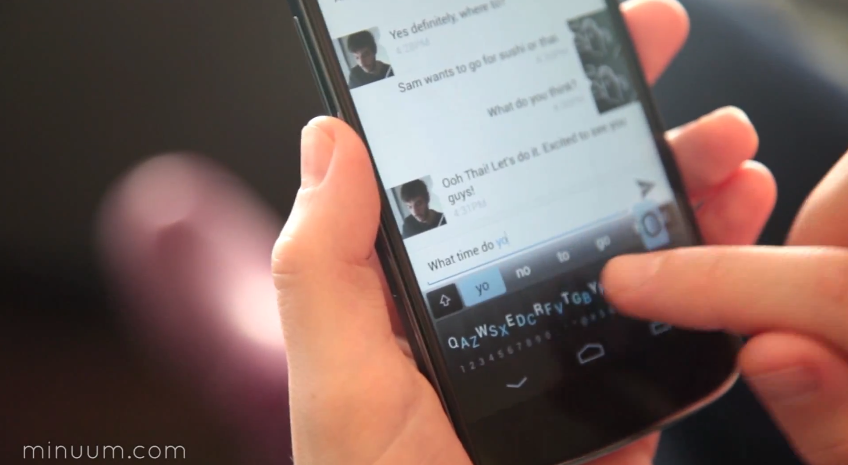
A new keyboard has surfaced on YouTube that, contrary to what you may think, wants you to mess up your typing. The keyboard app, Minuum, is a sleek and slim way to type quickly and sloppily. You’ll make a lot of mistakes, but that’s what autocorrect is for, right?

While most keyboards take up as much as half the screen when you’re writing a text message or entering a search inquiry, Minuum is (per its namesake) a discrete and minimally-sized keyboard that sits on the bottom of your screen. While most keyboard brag about accuracy, Minuum instead takes your jumbled text and predicts your words based on a pattern. The “fast and  sloppy typing” Minuum offers is what they claim to be just as fast and accurate as any other keyboard, but offering so much more real estate on your phone to work with.

Recommended Videos

Minuum’s predictive writing relies on a special algorithm that guesses your words based on the combination you type. Minuum isn’t really meant for those who prefer to hunt and peck for letters. While typing, the keyboard will open up a magnified mode that lets you more easily select individual letters. The keyboard technology can also be integrated with a variety of sensors to allow typing on a variety ways aside from the screen. In the video below, several new ways to enter text are shown.

Minuum is currently running a Indiegogo fundraiser and expects  to have a beta out to backers by June. You can back  it yourself with a $5 or greater donation. However, there’s no way to know just how effective the keyboard will be until its beta reaches its backers. Then again, if you’re already sick of Swype or Swiftkey, it might be worth a try.


Joshua Sherman
Joshua Sherman is a contributor for Digital Trends who writes about all things mobile from Apple to Zynga. Josh pulls his…
Snapchat Planets: What’s the order, and what do they mean?
Snapchat Planets turns your best friends list into a solar system, and yes, your orbit says a lot
Snapchat Planets being shown on the Snapchat app on iPhone.

Snapchat is already packed with little symbols that can be weirdly hard to decode. You have streaks, emojis, badges, scores, Best Friends, and if you use Snapchat Plus, a tiny solar system that shows where you sit in someone’s closest-friends list.

The feature is called Friend Solar System, though most people just call it Snapchat Planets. It takes your position in a friend’s Snapchat orbit and turns it into a planet. From Mercury to Neptune, these celestial bodies signify how close a person is to you.

Read more
How to use WhatsApp Web
We'll show you how to use WhatsApp on your desktop or laptop
WhatsApp Web

As one of the most popular messaging services, you’ve already heard of WhatsApp. From its humble beginnings in 2009—two years before Apple introduced iMessage—to its acquisition by Facebook (now Meta) in 2014, WhatsApp has become the dominant messaging platform around the globe.

In recent years, it's grown even more potent with new features like video messages, self-destructing voice messages, the ability to edit sent messages, and more. We even finally got an WhatsApp iPad app in May 2025.

Read more
What is WhatsApp? How to use the app, tips, tricks, and more
From setting it up to mastering hidden features, here is your complete guide to WhatsApp.
Electronics, Phone, Mobile Phone

There's no shortage of messaging apps out there. The past decade has given us more options than we know what to do with, largely because smartphones demanded something better than plain old SMS.

Both the App Store and the Play Store are packed with apps that promise to revolutionize the way we communicate. Most of them didn't make it. The truth is, a messaging app is only as good as the number of people using it, and most apps never cross that threshold.

Read more
