  1. Home
  2. Mobile
  3. Legacy Archives

Nvidia introduces smart, pressure sensitive stylus for Tegra 4

Add as a preferred source on Google
pQoP1lrAm2
Image used with permission by copyright holder

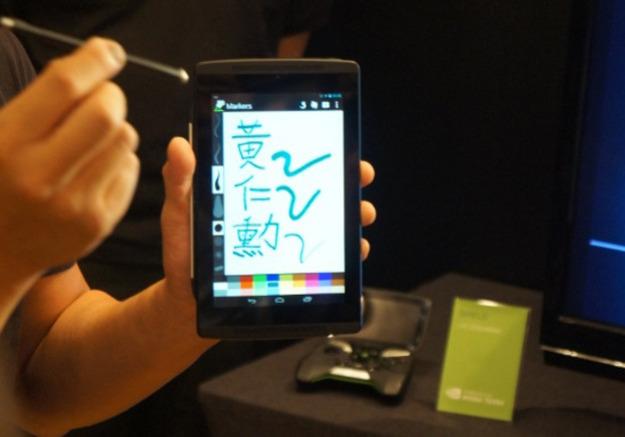
The stylus has been around for a very long time, but it’s remained relatively unchanged since the days of PDA. (Remember when those ridiculous things were regarded as a sign of importance?) And really, when you think about it, just how much innovation can you even do to something that effectively does exactly what it is meant to do? Nvidia announced today a way discovered to do just that. The company unveiled new stylus technology, DirectStylus, that will work on Tegra 4-based tablets, which will make writing and drawing a whole lot easier.

The company says that its new technology will help users utilize a stylus much the same way they would use an everyday pencil. Rather than having to jump back and forth between settings to adjust the thickness of the lines that are drawn, or to switch between drawing and erasing, they’ll be able to use a new, more passive approach. Want a thin line? Press the tip of the stylus lightly against the screen. The thicker you want the line, the harder you should press. (Within reason, of course.) Make a mistake and need to undo it? Flip the stylus over, just as you would with a pencil, and the unique touch of that end will be registered with the tablet, telling it you are looking to erase. The same pressure feature applies for this side as well.

Recommended Videos

Nvidia is quick to acknowledge that yes, others have created passive styluses in the past, but they tend to have 5mm thick tips, and still utilize the aforementioned method of switching line thickness. To boot, the tablet technology will also be able to differentiate between the stylus, and a person’s finger or palm, avoiding unintended writing.

Are you a fan of the stylus? What do you think about this new technology? Would it be something you seek out? Let us know in the comments.


Joshua Pramis
Spending a childhood engrossed in such technologically inspiring television shows like Voltron, Small Wonder, and Power…
Topics
Snapchat Planets Meaning: Order, Rankings, and How Friend Solar System Works
Snapchat Planets turns your best friends list into a solar system, and yes, your orbit says a lot
Snapchat Planets being shown on the Snapchat app on iPhone.

Snapchat+ includes several exclusive features, but few have generated as much curiosity as Snapchat Planets. Part of the app's Friend Solar System, it transforms your Best Friends list into a planetary ranking, assigning each of your top eight friends a planet based on how often you interact.

From Mercury, which represents your closest friend, to Neptune, which represents your eighth closest, the system offers a quick visual snapshot of your interactions. But what do the different planets actually mean, and how does Snapchat decide who gets which one?

Read more
How to use WhatsApp Web
We'll show you how to use WhatsApp on your desktop or laptop
WhatsApp Web

As one of the most popular messaging services, you’ve already heard of WhatsApp. From its humble beginnings in 2009—two years before Apple introduced iMessage—to its acquisition by Facebook (now Meta) in 2014, WhatsApp has become the dominant messaging platform around the globe.

In recent years, it's grown even more potent with new features like video messages, self-destructing voice messages, the ability to edit sent messages, and more. We even finally got an WhatsApp iPad app in May 2025.

Read more
What is WhatsApp? How to use the app, tips, tricks, and more
From setting it up to mastering hidden features, here is your complete guide to WhatsApp.
WhatsApp app store listing open on iPhone

There's no shortage of messaging apps out there. The past decade has given us more options than we know what to do with, largely because smartphones demanded something better than plain old SMS.

Both the App Store and the Play Store are packed with apps that promise to revolutionize the way we communicate. Most of them didn't make it. The truth is, a messaging app is only as good as the number of people using it, and most apps never cross that threshold.

Read more
