  1. Home
  2. Mobile
  3. Legacy Archives

VLC for iOS gets big redesign with new interface, multi-touch gestures and more

Add as a preferred source on Google

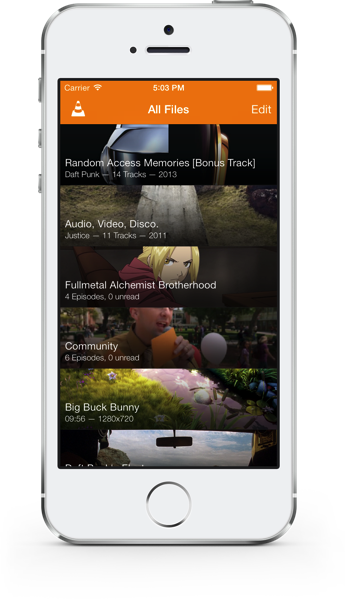
Popular media player VLC received a major makeover for iOS 7 Monday, bringing with it a bunch of new features as well as a new look.

The restyled look matches it up with the design of Apple’s latest mobile operating system, though more important are the slew of new features launching with the update.vlc on iphone 5S
Recommended Videos

These include Google Drive integration, Dropbox streaming support, an improved library layout for TV shows and audio files, and new multi-touch gestures. Among these are a horizontal swipe for playback position, a two-finger tap to play and pause, a vertical swipe in the right half of the video to alter the volume, and a vertical swipe in the left half to alter the screen brightness.

Famous for having just about every video and audio format known to man covered, version 2.2 of VLC for iOS brings with it support for new streaming formats and protocols, meaning you’ll be more hard pressed than ever to find a media file it can’t handle.

The update, designed for all iPhones, iPads, and iPod Touches running iOS 6.1 or later, also brings improved privacy when using an iDevice’s Passcode Lock feature.

Other tweaks and enhancements include improved TV show handling for shows with more than 100 episodes, the ability to rename any item in the library view, and improved sorting of TV shows and music tracks.

For users new to the free app, a startup tutorial has been introduced with step-by-step instructions helping you to get it up and running on your device.

To view the entire list of changes – and there are quite a few – click here.

[VLC on iTunes]

Trevor Mogg
Contributing Editor
Not so many moons ago, Trevor moved from one tea-loving island nation that drives on the left (Britain) to another (Japan)…
Snapchat Planets Meaning: Order, Rankings, and How Friend Solar System Works
Snapchat Planets turns your best friends list into a solar system, and yes, your orbit says a lot
Snapchat Planets being shown on the Snapchat app on iPhone.

Snapchat+ includes several exclusive features, but few have generated as much curiosity as Snapchat Planets. Part of the app's Friend Solar System, it transforms your Best Friends list into a planetary ranking, assigning each of your top eight friends a planet based on how often you interact.

From Mercury, which represents your closest friend, to Neptune, which represents your eighth closest, the system offers a quick visual snapshot of your interactions. But what do the different planets actually mean, and how does Snapchat decide who gets which one?

Read more
How to use WhatsApp Web
We'll show you how to use WhatsApp on your desktop or laptop
WhatsApp Web

As one of the most popular messaging services, you’ve already heard of WhatsApp. From its humble beginnings in 2009—two years before Apple introduced iMessage—to its acquisition by Facebook (now Meta) in 2014, WhatsApp has become the dominant messaging platform around the globe.

In recent years, it's grown even more potent with new features like video messages, self-destructing voice messages, the ability to edit sent messages, and more. We even finally got an WhatsApp iPad app in May 2025.

Read more
What is WhatsApp? How to use the app, tips, tricks, and more
From setting it up to mastering hidden features, here is your complete guide to WhatsApp.
WhatsApp app store listing open on iPhone

There's no shortage of messaging apps out there. The past decade has given us more options than we know what to do with, largely because smartphones demanded something better than plain old SMS.

Both the App Store and the Play Store are packed with apps that promise to revolutionize the way we communicate. Most of them didn't make it. The truth is, a messaging app is only as good as the number of people using it, and most apps never cross that threshold.

Read more

