When it comes to streaming music, podcasts, and other audio content, Spotify provides an enormous variety of customized selections for your listening pleasure. Sadly, when it comes to changing your username, there are no official options to do so that are supported by Spotify, so it would appear that you should choose with care. However, with a bit of ingenuity, you can circumvent this obstacle by either setting up a display name for your account or linking your Spotify and Facebook accounts on your mobile or desktop app. Our handy guide will show you how to change your Spotify username as quickly and conveniently as possible.
To clarify, each account on Spotify is assigned a unique identifier that becomes intrinsically linked to the username that you use to create your account, whether free or premium. This makes your username unalterable, at least employing anything the Spotify mobile or PC apps are capable of doing on their own. That being said, the two methods below will either create a display name that the public can see or merge your Facebook username into your Spotify account and replace your original username.
Please note that if you decide to change your display name after you have linked your Facebook and Spotify accounts, the merged username will be replaced by the display name. These methods do not actually change your account username but rather change what name is publicly displayed and available to other users.
How to set up a display name on Spotify mobile apps
This method works by creating a display name that will publicly replace your username to friends, family, and other users. While you might not change the initial name you chose, this option is effectively the same.
Step 1: Open the app, tap the Home button resembling a house, and tap the Settings gear icon.
Step 2: Tap View Profile > Edit Profile and select your display name to edit it, then tap Save.

How to merge your Spotify and Facebook accounts on your PC
By merging your Spotify and Facebook accounts, your Facebook username with merge with and replace your Spotify username. Again, this method doesn’t actually change your Spotify username, but it gets the job done.
Step 1: Open the app, tap the Home button resembling a house, click the drop-down menu next to your username, and select Settings.

Step 2: Locate the Social section near the bottom of the Settings menu and click Connect to Facebook. From the pop-up that appears, enter your Facebook account information and click Log In to connect your accounts.
How to merge your Spotify and Facebook accounts on the Spotify app
Step 1: Open the app, tap the Home button resembling a house, and tap the Settings gear icon.
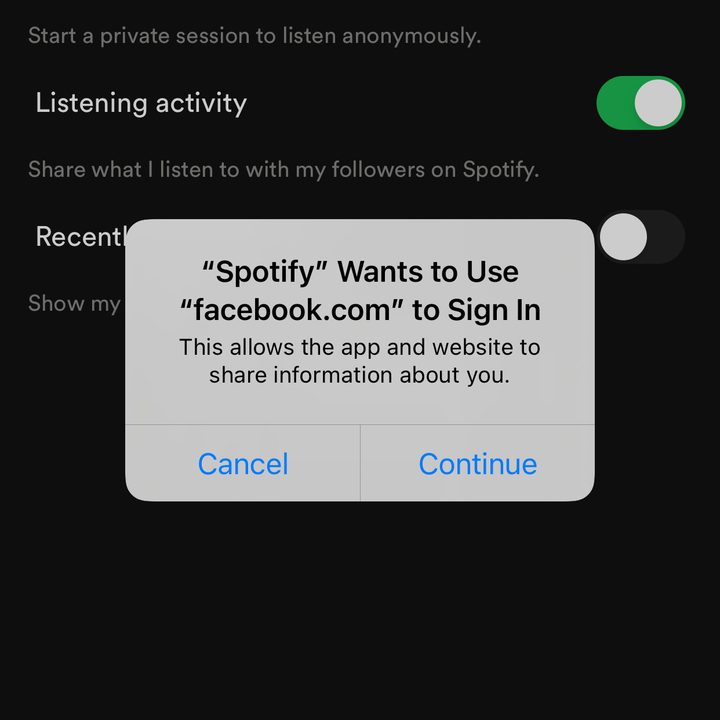
Step 2: Locate and tap the Social tab and tap the Connect to Facebook button at the bottom of the menu, which will open a pop-up to connect Spotify and Facebook. Select Continue to open the Facebook app or your device’s internet browser, and enter your account information to link your accounts.