

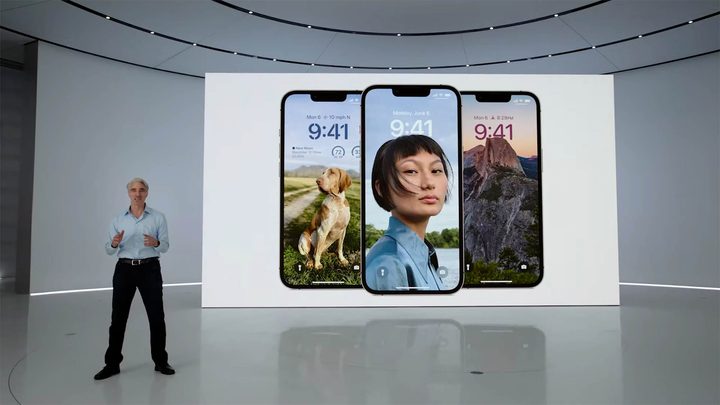
Apple has just revealed the new iOS 16 at WWDC 2022, and it has completely re-imagined the way the iOS lock screen works. Once iOS 16 launches, you’ll be able to customize your lock screen to include filters, change fonts, add widgets, and even track live events.
Your lock screen, exactly as you want it
The lock screen is one of the elements of your iPhone that you’ll see the most, so why shouldn’t you be able to change it? Previous versions of iOS allowed you to change your wallpaper, and that was about it. Now, iOS 16 will launch a massive suite of customization options.
At the basic level, you’ll still be able to change the image you want as your wallpaper — but you’ll also be able to throw a range of filters onto your chosen image, right from your lock screen. A number of preset filter options will be available, including color pop, black and white, and many others. These presets will come with a different style of clock font, and will even put foreground elements of your wallpaper in front of the clock, making the image really pop. You can even set your wallpaper to shuffle between different photos, giving you a fresh look every time you open your iPhone.
But preset options only go so far. What if you love the black-and-white filter but hate the clock font Apple chose? Thankfully, you can change that, and other elements of those filters, including the color shades used in the filters themselves. Apple has promised the wallpaper gallery will include millions of potential combinations, giving even the fussiest of us the tools we need to really personalize our iPhones.
Widgets are ready for the lock screen
Apple has only really just started using widgets on iOS, but it’s clear the company has really fallen for them, as you’ll also be able to add widgets to your lock screen in iOS 16. Put your Health stats on your lock screen so you can quickly see how much activity you need to close that final ring, or just keep your calendar always visible, so you always know what’s coming up.
Apple has also upgraded WidgetKit to work with the lock screen, so app developers will be able to add their own lock screen widgets as well, giving you even more options to change your lock screen as you see fit.
No more stacking of notifications with Live Activities
Apple’s long-awaited notification update has also hit the lock screen. Notifications will now roll in from the bottom of the lock screen as they’re received, and will be able to be easily hidden if not needed.

But the biggest new addition is the “Live Activities” API. Ever had notifications turned on during a particularly energetic football game and been deluged with notifications? Live Activities fixes that. Now, instead of shooting multiple notifications at you, Live Activities will let developers create a notification widget that updates live. It’s safe to say the scope for this particular feature is huge. Keep an eye on that live baseball game, or watch your Uber driver getting closer to you in real time. As more developers pick this up, expect to see this become the feature you never knew you needed.
Keep Focused, even on your lock screen
Finally, Apple is also extending Focus mode to the lock screen, so wallpapers and widgets will change depending on which Focus mode you’re in. While this is clearly meant to keep you from getting those oh-so-tempting Clash of Clans notifications while you’re at work, there’s certainly more to this than initially meets the eye. Are you a serious office warrior by day, and a high-energy fragger by night? Turn on Work Focus to morph your lock screen to a business-like exterior while in the office. Once you leave, toggle it off and let your iPhone switch back to your favorite video game wallpaper.
Like all of these sorts of modes, you’re free to go as deep or as shallow as you like. Keep an eye on our how to use Focus mode guide as we start playing with iOS 16 to see how you can use it to its fullest.


