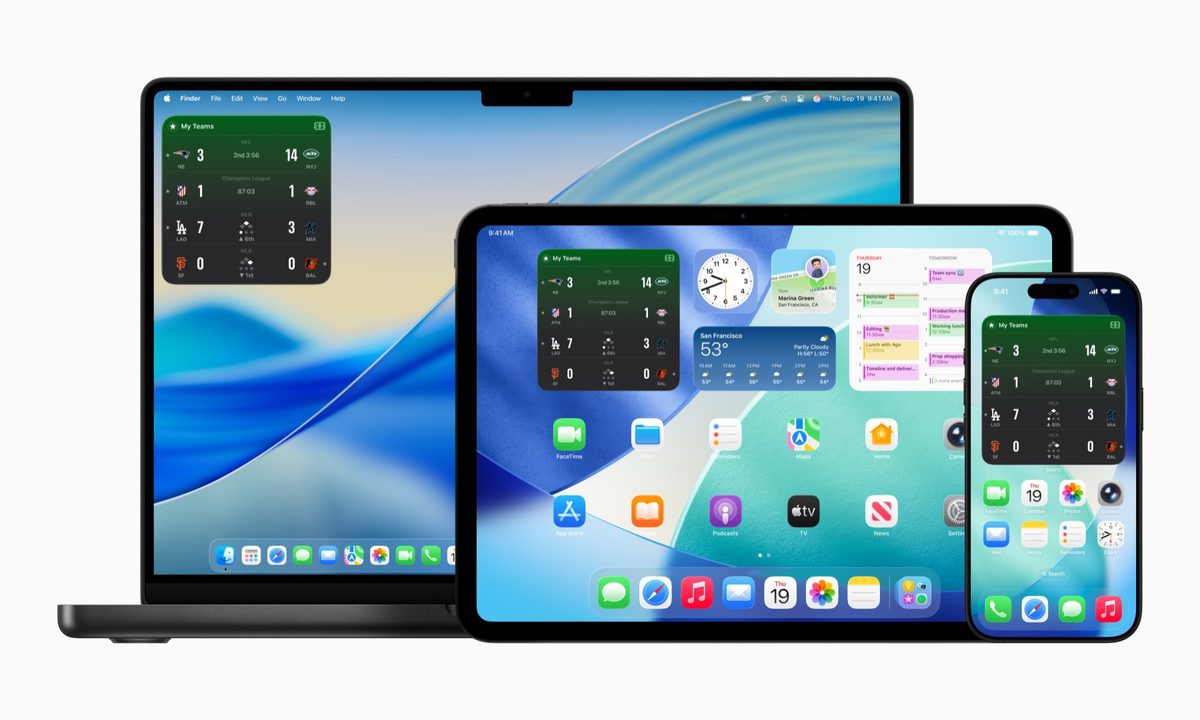
What’s happened? Apple Sports is getting more new features, including one which brings important fixtures and scores onto the home screen on your iPhone, iPad or Mac. Yes, Apple now offers widgets for its Sports app.
- Craig Mahonchak, head of product for sports at Apple, told me “widgets have been one of the most requested items”.
- Widgets are available in two sizes, medium and large, showing live scores, results, and upcoming fixtures.
- The medium widget can show up to six fixtures at once, while the large widget can handle 16.
- As well as sizes, there are two types of widgets to pick from – My Teams and League
- My Teams widget: show scores for your favorite teams, across all sports.
- League widget: shows scores for all teams from a selected league.
- There’s no limit to the number of Sports widgets you can add, and you can choose to show different widgets across your various Apple devices.
- Tap on a fixture in the widget and you’ll be taken directly to the game card in the app, where you’ll notice another new addition: network details on where you can watch the match (with a link to the Apple TV app if it’s available to watch on the service).
- You can now also schedule live activities for an upcoming fixture in the next six days, even if it doesn’t include any of your favorite teams – perfect for keeping an eye on a game with major play-off implications, or a fierce derby match.
New countries, more leagues: Apple is also expanding the availability of its Sports app, and it’s now available in eight new European countries. And to coincide with this expansion, new European soccer competitions have also been added.
- Now available in: Austria, France, Germany, Iceland, Ireland, Italy, Portugal, and Spain
- New soccer leagues include: 2. Bundesliga, Ligue 2, Segunda División, Serie B, and Primeira Liga.
How can I get Apple Sports widgets? To access the new Apple Sports widgets, you’ll first need to download the update from the App Store.
- The update is compatible with iOS 17.2 and later, which means it works with iOS 18 and iPadOS 18 if you’ve not updated to iOS 26, iPadOS 26 and macOS 26 Tahoe.
- To get a widget on your iPhone or iPad home screen, long press on the screen and tap Edit and then Add Widget. From there, you’ll be able to search for the Apple Sports options.
Why this matters: Apple wants to offer the best free sports app for users, providing a fast, clean and fan-first experience which gets you the most important information right away. This update is just the latest from Apple as it continues to improve the Sports app.
- Apple Sports launched in February 2024.
- In the recent June 2025 update, the homepage was refined, baseball cards got more details, and tennis was added as a sport.
- And there’s more to come…
Okay, so what’s next? Mahonchak confirmed to me that development continues for the app, as “from the start, we’ve been building Apple Sports to evolve. We’re finding new ways to make the app even more personal and useful for fans.”
- And more new features appear to be on the cards, with Mahonchak noting his team are “exploring ways to build it deeper around teams, players and the storylines.”
- He also points out Apple’s core focus is that fast, clean experience, which guides decisions on new features. “When you open the app, we want fans to see exactly what they care about, instantly.”