After the surprising success of the KeyOne in 2017, TCL wants to keep a good thing going with the upcoming Blackberry Uni. Expected to launch in early to mid-2018, the Uni may have a few surprises in store for BlackBerry enthusiasts.
While details on the upcoming BlackBerry flagship are a little hazy, we’re learning more about it each day. Here’s what we know so far:
Design

Will TCL surprise us with an entirely new form factor for the BlackBerry Uni? Well, if renders from a recent patent, first spotted by Let’s Go Digital, are correct it actually looks like the next BlackBerry flagship may look a lot like its 2015 predecessor, the BlackBerry Priv.
Like the Priv, it looks as though the BlackBerry Uni will feature a curved touchscreen display. While details are certainly sketchy, it does appear that the BlackBerry Uni will have a similar form factor to the Priv, so we could expect the screen to be around 5.4-inches.
A physical keyboard will sit below the display. While you can use the on-screen keyboard for quick replies, you can easily slide the physical keyboard down from the display when needed.
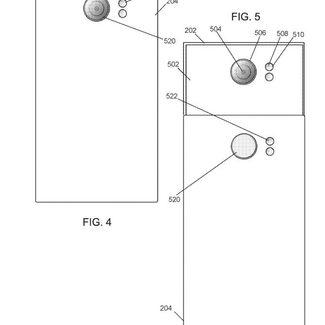
At first glance, the back of the BlackBerry Uni looks almost identical to the Priv. Renders show the Uni with a center flush camera, but the camera appears to be getting a major upgrade.
The camera on the Blackberry Uni may actually sit below the keyboard slider. This change would give the phone two lenses — the primary lens that is available when the keyboard is exposed, as well as an auxiliary lens that can be used when the keyboard it tucked away. Since the patent for the upcoming BlackBerry Uni lists several different auxiliary lens possibilities, it’s possible we will see accessory lenses that can be switched out.
Software
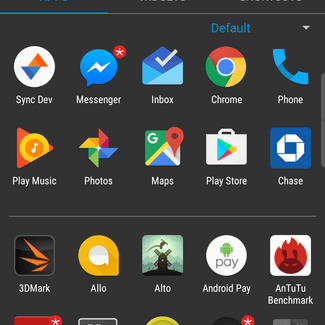
While we would like to see the BlackBerry Uni ship with Android 8.1 Oreo, it looks like it’s shipping with 8.0. Since BlackBerry prides itself on quick updates, however, we’d expect to see an 8.1 update for the Uni shortly after it is released.
We’re almost certain that BlackBerry’s suite of productivity apps will make an appearance on the upcoming Uni as well. While lots of manufacturers add bloatware to their phones, BlackBerry’s productivity apps actually make the phone stand out.
Specifications
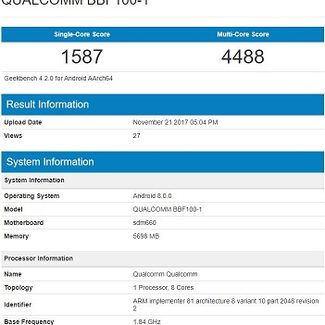
Most of the specification info we have on the BlackBerry Uni comes courtesy of a Geekbench report from last year. While we believe the Uni is the BBF100-1 listed in the report, there’s certainly room for doubt, so be skeptical of these rumors until more information comes about.
The Uni will likely feature a Snapdragon 660 chip. While not as powerful as this year’s Snapdragon 845, it’s a good midrange smartphone processor.
In addition to the Snapdragon 660 processor, the BlackBerry will also feature a hefty 6GB of RAM. While there’s no word on storage, we would anticipate a 32GB and 64GB, similar to last year’s KeyOne.
Release and availability
When should we expect to see the BlackBerry Uni? Right now, it appears we may get a glimpse of the upcoming flagship at this year’s Mobile World Congress in March. If not, we would likely expect to see the device sometime in the spring. Since the phone will be at least one of the 2018 flagships for the company, we would expect to see a global release for the BlackBerry Uni.