
This wasn’t supposed to be a difficult story to write. In theory, all I had to do was play Diablo Immortal on the Samsung Galaxy S22 Ultra and on the Steam Deck and compare the experience on the devices. However, because of the many frustrating aspects of Blizzard’s launcher — and the conflicts I experienced with it and the Steam Deck’s hardware and software — I ended up sinking a huge amount of time into troubleshooting rather than playing. In fact, I could probably have beaten the main Diablo Immortal story on the S22 Ultra in the time it took to troubleshoot the game launcher on the Steam Deck.
Setup process: Simple on S22 UItra; nearly impossible on Steam Deck
Getting started with Diablo Immortal on the Galaxy S22 is a piece of cake. I opened the Google Play Store, downloaded the game, and that’s all there was to it. On the Steam Deck, it was a completely different story.
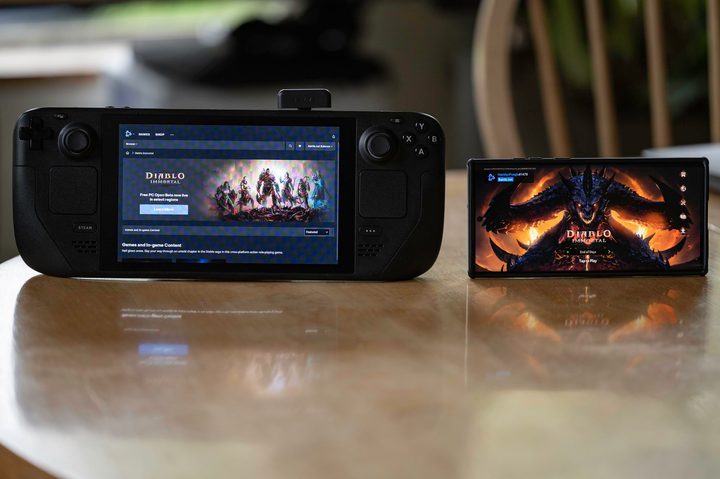
The problem is that the PC version of Diablo Immortal isn’t on Steam, and is designed to be played with a keyboard and mouse. In order to install it, you’ve got to go through desktop mode on the Steam Deck and install the Battle.net launcher using Proton compatibility software — and only then can you download the game through the Battle.net launcher. However, once I installed the launcher, I encountered a bug with Battle.net that prevented me from downloading Diablo Immortal.
I found a potential fix for this that involves changing the DNS server in the network settings, but it had no effect. There’s apparently a piece of software called Lutris that allows you to install the game, but I read that the issue I ran into with the Battle.net launcher also exists when using Lutris. Since the DNS fix had already failed for me, I had no choice but to abandon any plans of installing Diablo Immortal directly on the Steam Deck.
Next, I figured that if I couldn’t actually install Diablo Immortal on the Steam Deck, I would at least be able to install it on my desktop PC and stream it over Wi-Fi via Steam Remote Play to the Steam Deck. Little did I realize that my troubles were just beginning. The download for Diablo Immortal on my PC took an absurdly long amount of time, running well below my maximum download speed. To make matters worse, Battle.net kept running into errors that caused it to frequently pause the download. I had to coax it along right up to the end, when it finally managed to install.
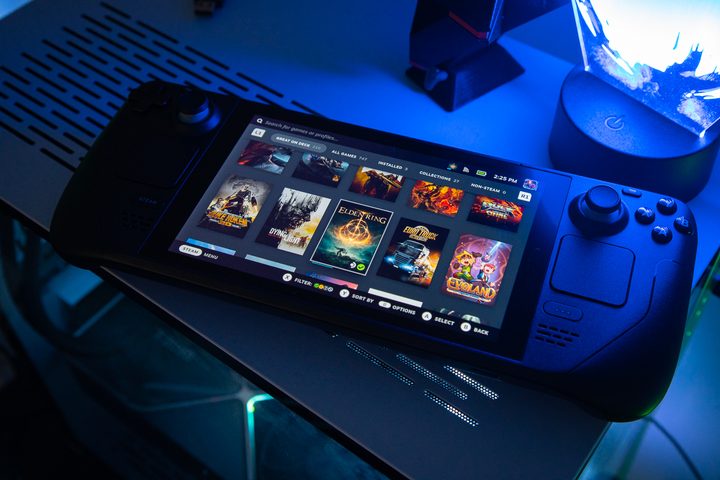
With Diablo Immortal installed and ready to go, I went ahead and added the game to my Steam library, grabbed my Steam Deck, and launched it. A little spinning wheel appeared in the corner of the screen, then with a flicker, it crashed back into my Steam library. This turned out to be because the primary EXE file in the Diablo Immortal directory only launches Battle.net — not Diablo Immortal. And for some reason, Remote Play simply refused to stream the launcher. After hunting through file directories, I finally found the game’s actual EXE file, and it made me unreasonably happy to watch the game actually, finally launch on my Steam Deck.
Moments later, my hopes and dreams were crushed yet again. I got an error message telling me the game couldn’t log into Battle.net, and to try again later. Apparently, Diablo Immortal refuses to launch without first going through the Battle.net launcher (presumably so that Activision Blizzard can try and sell you stuff on your way to the game). It was then that I realized I had sunk over a dozen hours into this project, and that it simply wasn’t worth it to play a mobile game that’s already fully functional on my smartphone.

Your mileage may vary with getting Diablo Immortal to run on Steam Deck. Some people have apparently managed to do it without too much trouble. If you do attempt it, I recommend getting a mouse and keyboard that will connect to the Steam Deck, because trying to use desktop mode on the Steam Deck and navigate file directories is a nightmare if you’re just using the gamepad and touchscreen interface. You might also have better luck installing the Android version of the game using an Android emulator such as Bluestacks, though I can’t find any evidence of anyone having actually attempted this at the time of publication.
Storage space might be a problem
Regardless of which platform you play Diablo Immortal on, it’s going to take up a big chunk of your storage space. On a mobile device like the Galaxy S22 Ultra, it takes up around 10GB, while the PC version on Steam Deck it will eat up roughly 27GB (assuming you can install it). If you’ve purchased a base model of either device with the minimum amount of storage, that might be a bit awkward to fit without having to delete other apps. On Steam Deck, at least, you can install the game to a microSD card.
Ample performance on both devices
The S22 Ultra and Steam Deck are equipped with hardware capable of easily handling Diablo Immortal at maximum settings. The one caveat with the S22 Ultra is that it does get quite hot in your hands while playing the game. If you’re able to get it running on the Steam Deck, you can expect a much more comfortable experience. The Steam Deck is capable of running the latest triple-A games, such as Elden Ring, so even though I was personally unable to test the game on the Steam Deck, there’s no question as to whether or not it can handle this ported PC version of a mobile game.
Samsung’s display shines bright
When you put the Galaxy S22 Ultra and the Steam Deck side by side, you realize that the difference in screen size isn’t actually that significant. The S22 Ultra has a 6.8-inch screen, while the Steam Deck has a 7-inch display. That’s just 0.2 inches of extra screen real estate, but it’s important to realize that with the S22 Ultra, your thumbs obscure a large portion of the screen while playing. With the Steam Deck, you use physical controls and have an unobstructed view of the display.

Resolution is also an important factor, and there’s a pretty significant disparity between these two devices. The S22 Ultra has a 3088 x 1440 resolution display, while the slightly larger Steam Deck screen only boasts 1280 x 720 resolution. In practice, I don’t find the relatively low resolution of the Steam Deck to be noticeable in any of the games I enjoy on it. However, the S22 Ultra has a far superior display not just because of its resolution, but also due to its better color rendition and contrast.
Clunky controls
In theory, the Steam Deck’s physical controls would be a far better way to experience Diablo Immortal. While I wasn’t able to test it personally, other people have reported that you’ve got to configure the controller layout manually. So even if you do get it running, making the game playable on Steam Deck is something of a hassle. On the S22 Ultra, the on-screen controls are responsive and well designed, though as previously mentioned, they take up a good portion of your screen.
Consider your connectivity
Diablo Immortal requires a constant online connection to play, and this gives the Galaxy S22 Ultra a big advantage thanks to its 5G cellular capability. The Steam Deck, by comparison, is limited to Wi-Fi. If you’re playing on the Steam Deck, you can only play where you have access to a Wi-Fi network. On the S22 Ultra, you can play just about anywhere via your cellular connection. A workaround to play Diablo Immortal anywhere on Steam Deck would be to use your phone’s mobile hot spot feature, but that’s hardly an optimal solution.
‘Do you guys not have phones?’
If you have an itch to play Diablo Immortal despite its intrusive microtransactions, my advice is to do so on a phone such as the Galaxy S22 Ultra — or even on a PC. It’s really not worth the trouble to play it on Steam Deck. I tested the game extensively on my S22 Ultra, and put together a guide to help you get the best experience with that device.

If you’re itching for a free-to-play online Diablo-like experience on your Steam Deck, I recommend checking out Path of Exile, which is a fundamentally better game than Diablo Immortal, and its monetization strategy is purely cosmetic. Unlike in Diablo Immortal, you’re not being pressured into pay-to-win microtransactions to succeed at the game.
But when it comes to mobile gaming, Diablo Immortal is easier to digest. Despite all of my problems with the game, it is an enjoyable experience — and something I’ll continue to play on my S22 Ultra. There are other games on the Steam Deck more deserving of your time, but if all you have is your smartphone, Diablo Immortal is worth keeping in the conversation.


