  1. Home
  2. Phones
  3. Mobile
  4. News

Google finally fixes Gmail bugbear which has been around for years

Add as a preferred source on Google
Gmail signature on mobile.
Bryan M. Wolfe / Digital Trends

Consider this: Gmail has existed for 21 years. Over the years, there has been a notable difference between the mobile and web versions of the email service. However, that disparity may no longer be an issue.

Signatures have long been a feature available on Gmail’s web version. Unfortunately, these signatures, which allow users to include important personal information with each email, did not transfer to the Gmail app for Android. Instead, separate signatures were necessary on that platform.

Recommended Videos

As Android Police co-founder Artem Russakovskii has discovered, web signatures now carry over. As such, you
can control Gmail’s signature settings from Settings > See all settings > General > Signature on the web.
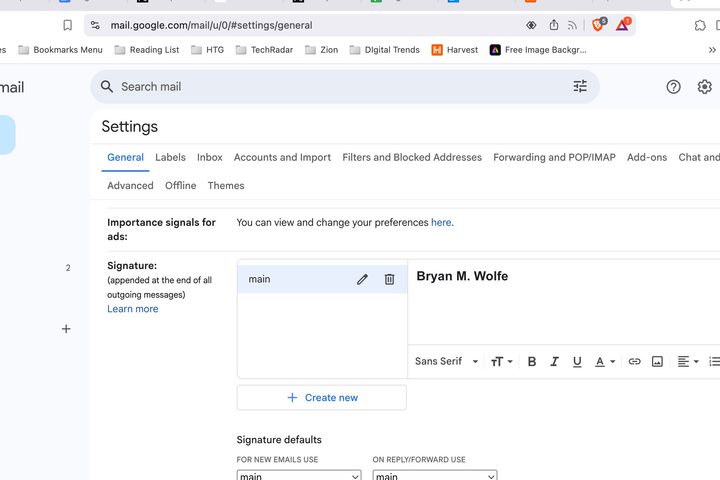
Gmail signature setting on web.
Gmail signature setting on web. Bryan M. Wolfe / Digital Trends

If you have configured your signature to appear in new emails and replies, Gmail will automatically include it on both the web and mobile versions.

There are a few limitations, however. First, while Gmail allows you to store multiple email signatures, you cannot switch between them in the mobile app.

If you set a different signature using the Gmail app on Android, that signature will be used instead of the one you set on the web. Currently, there is no option to stop Gmail from adding a signature to emails sent from mobile devices. The only way to avoid this is to remove your web signature.

Additionally, when you draft an email in the Gmail app on Android, the signature will automatically appear at the bottom of the message. If you prefer, you can manually delete it before sending the email.

Currently, this signature change appears to only work on Gmail for Android devices, such as the Samsung Galaxy S25. It does not impact the Gmail version for iOS.

Bryan M. Wolfe
Former Mobile and A/V Freelancer
Bryan M. Wolfe has over a decade of experience as a technology writer. He writes about mobile.
Samsung’s upcoming Galaxy Z Flip 8 foldable might disappoint with its battery situation
The foldable could bring small changes elsewhere, but battery convenience may remain a weak spot
Samsung Galaxy Z Flip 4.

Samsung's next flip-style foldable is shaping up as a careful update, which isn't great news for anyone hoping the company would finally tackle one of the line's most obvious weak spots. The latest leak points to the Galaxy Z Flip 8 sticking with 25W wired charging, a familiar limit that risks making the phone feel too safe in daily use.

That tradeoff has followed the Flip series for years. Samsung has sold the appeal of a compact foldable design well, but buyers have often had to accept a few practical compromises in return, and battery convenience has stayed near the top of that list.

Read more
Amazon Kindle Scribe Colorsoft review: The luxury ride to digital note-taking
It wants to be your indispensable digital diary, but it will test your Kindle loyalty, too.
Amazon Kindle Scribe

Quick Take

The Kindle Scribe Colorsoft is a new breed of e-readers from Amazon. Aside from being your reading companion, it also wants to double as your trusty note-taking device. And it does a terrific job at serving as a digital diary. The color display does a fine job of replicating the sensation of writing on paper, without any of the input lag woes you would notice on an ordinary tablet. 

Read more
Apple’s foldable is keeping Camera Control, but one-handed photography on a big foldable sounds tricky
Apple went through some serious engineering gymnastics to make it happen, but is it worth it?
Electronics, Mobile Phone, Phone

Apple's first foldable iPhone has been the subject of countless leaks, and the latest one comes from Weibo leaker Instant Digital. As reported by Notebookcheck, the leak suggests that the iPhone Fold will include the Camera Control button, despite being thinner than the iPhone Air when unfolded.

That's no small feat. Fitting the Camera Control button into a device that slim must have required some serious engineering work on Apple's part. But apparently, Apple felt it was worth it.

Read more