1. Home
  2. Phones
  3. Mobile
  4. Photography
  5. Features

Digital Trends may earn a commission when you buy through links on our site. Why trust us?

Here’s what Google Lens’ Style Match, Smart Text Selection features look like

Add as a preferred source on Google
 

Like a pair of sneakers someone’s wearing? Or maybe a dress? There are quite a few apps and services — like Amazon’s Firefly or Samsung’s Bixby Vision — that let you simply point your smartphone camera at the object and search for it, or similar styles. Google is following suit with a similar feature in Google Lens, but it has the potential to reach far more people.

Recommended Videos

Google Lens is currently built into the Google Assistant on Android phones, as well as Google Photos. It lets you point the smartphone camera at objects to identify them, teach you more about landmarks, recognize QR codes, pull contact information from business cards, and more. At its annual Google I/O developer conference, the search giant announced four new improvements to Lens, and we got to try it out.

Built into camera apps

Dan Baker/Digital Trends

Google Lens is now built into the camera app on phones from 10 manufacturers: LG, Motorola, Xiaomi, Sony, Nokia, Transsion, TCL, OnePlus, BQ, Asus. That is not including Google’s very own Google Pixel 2. You are still able to access it through Google Assistant on all Android phones.

We got a chance to try it out on the recently announced LG G7 ThinQ, and the new option sits right next to the phone’s Portrait Mode.

Style Match

Dan Baker/Digital Trends

The biggest addition to Lens in this I/O announcement is Style Match. Like Bixby Vision or Amazon Firefly, you can point the smartphone camera at certain objects to find similar items. We pointed it at a few dresses and shoes, and were able to find similar-looking items, if not the exact same item. Once you find what you’re looking for, you can purchase it if available directly through Google Shopping.

It’s relatively quick, and an easy way to find things you can’t quite write into the Google Search bar.

Smart text selection

Perhaps even more useful is Smart Text Selection. Point Google Lens at text, say like from a book or a menu, and it can single out the text from everything else. You can then tap on the text and copy it or translate it. When we tried it, Lens managed to grab an entire three paragraphs of text, though we’d have to do more testing to see how well it can pick up handwritten text.

Real time

Google Lens now works in real time, so you don’t need to pause and take a photo for it to understand the subject. That means you can point it at several things and you will see it creating colored dots on the objects it grabs information for. Google said it is identifying billions of words, phrases, and things in a split second all thanks to “state-of-the-art machine learning, on-device intelligence, and cloud TPUs.”

Google said it will be rolling out all of these features toward the end of May.

Julian Chokkattu
Former Mobile and Wearables Editor
Julian is the mobile and wearables editor at Digital Trends, covering smartphones, fitness trackers, smartwatches, and more…
Apple says Lockdown Mode thwarted spyware attacks with a clean slate
Apple’s strongest defense is actually holding up
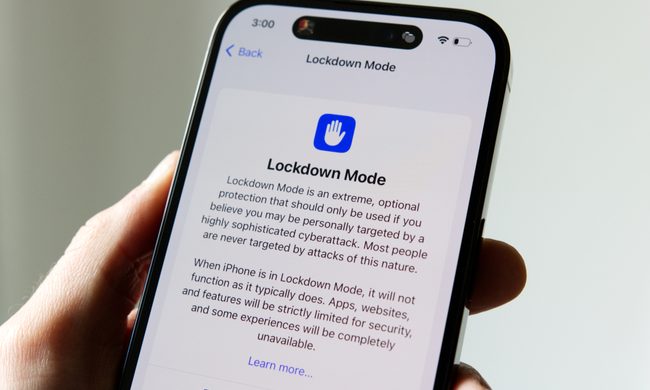
Lockdown Mode information page on an iPhone 14 Pro.

Apple says it has not seen a successful spyware attack on any iPhone with Lockdown Mode enabled, a claim it shared with TechCrunch.

Lockdown Mode arrived in 2022 as an opt-in feature for iPhone, iPad, and Mac. It was introduced as a stricter security mode for people at high risk of targeted attacks, such as journalists, activists, and government officials.

Read more
The Dynamic Island could shrink on the iPhone 18 series, and not just on the Pro models
One leaker, one claim, and a big question: is Apple genuinely ready to give every iPhone buyer the same design treatment as Pro owners this cycle?
Apple iPhone 17 Pro in Cosmic Orange leaning on a gray wall.

Apple’s Dynamic Island has been around long enough that most people have made their peace with it or forgotten it’s there. In fact, I’ve seen people associating the pill-shaped notch with newer iPhone models (released in the last 3 years). Now, a fresh leak suggests that the notch replacement is about to shrink, not just on the expensive models. 

What did the leaker actually say?

Read more
Apple Podcasts finally gets serious about video, adds multiple YouTube-inspired features
With offline downloads, Picture-in-Picture, and a dedicated video hub, iOS 26.4 turns Apple Podcasts into a platform creators can no longer afford to ignore.
Electronics, Phone, Mobile Phone

For years, the Apple Podcasts app supported video, at least it did technically, but nobody used it. Creators ignored it, while listeners forgot it. Meanwhile, other platforms like YouTube and Spotify quietly built empires on video podcasting. However, that changes with the iOS 26.4 update, or at least that is what Apple hopes for. 

Video podcasting exploded in popularity in recent years, with audiences gravitating toward platforms that treated the format well (as already mentioned above). Despite being an iPhone user, I personally consume podcasts on YouTube (I briefly paid for the Premium membership as well). 

Read more