
Snapchat messages aren’t as fleeting as we thought. While we all know photos can be saved via screen shots, videos hadn’t yet aroused much concern. But Buzzfeed discovered a loophole that will allow you to retrieve, save, and rewatch both Snapchat and Poke videos.
Just when you thought there was the perfect app for self-destructing messages, it’s too good to be true. When the recipient of the message takes a screen shot to save an image sent through Poke and Snapchat, the sender is alerted. This isn’t the case if the recipient decides to access the temporary file. So how does it work?
Even on your computer, files are stored locally as a temporary file and the same goes for files sent to and from your smartphone. These files though aren’t visible unless you download an iPhone, iPad, iPod file browser to your desktop, like iFunBox — which for the record doesn’t require you to jailbreak your phone either.
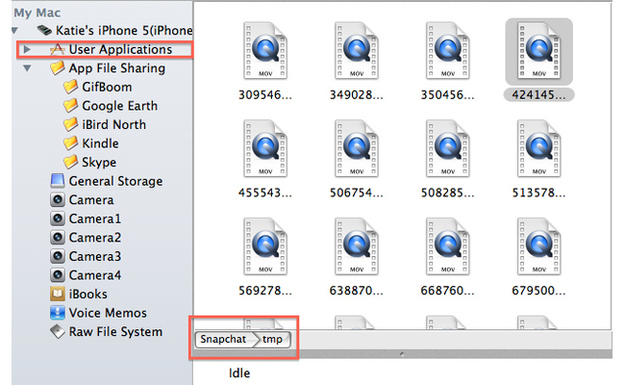
When you’ve received a video through Poke or Snapchat, don’t open the file. If the video is opened when using Poke and played, the temporary file disappears and there’s no way of retrieving it. Instead connect your iOS device to your computer and open up the iPhone file browser where you can view all of the files inside of your phone.
To access Snapchat videos, access the Snapchat folder. Within this is a folder is a subfolder labeled “tmp,” which stands for “temporary.” You’ll find the temporary files of the videos here.
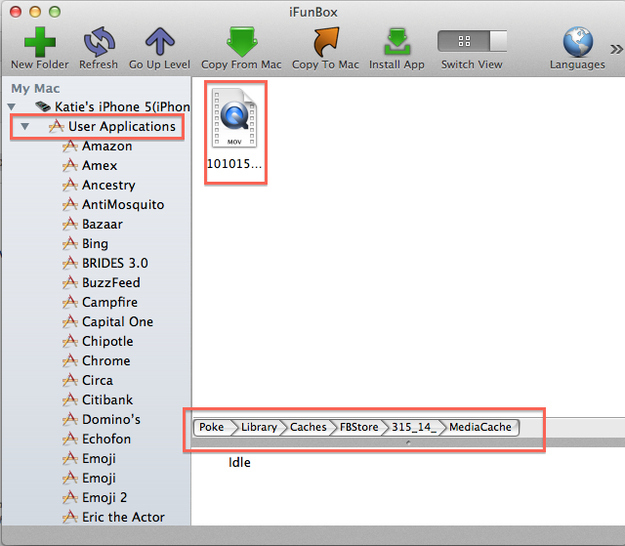
To view and save the temporary files from Poke, you’ll have to navigate to Poke/library/caches/fbstore/mediacard.
Buzzfeed notes that while Poke videos disappear after viewing it, Snapchat’s videos instead linger around. And the loophole doesn’t work for photos since they’re not cached.
Snapchat founder Evan Spiegel doesn’t appear to be fazed enough by this loophole to patch it and chalks it up to the nature of the app. He tells Buzzfeed, “The people who most enjoy using Snapchat are those who embrace the spirit and intent of the service. There will always be ways to reverse engineer technology products — but that spoils the fun!”
Facebook, on the other hand, is working on a fix.
Loophole or no loophole, there really is no panacea for protecting users from duplicating content sent to and from any of these “self-destructing” apps. If someone really wanted to record a video or photo without alerting the sender, most would opt to use another device and record the clips or take a photo of the image. If you’re under the impression that these apps have your privacy in mind, consider this a wake up call.


