1. Home
  2. Phones
  3. Mobile
  4. Deal Evergreens

Amazon Kindle Unlimited Free Trial: How to sign up without paying a dime

Add as a preferred source on Google

Searching for an Amazon Kindle Unlimited free trial? Stick with us and in no time you’ll be enjoying a two-month subscription without handing over a dime. You’ll even receive a notification when it’s about to come to an end so you can nip it in the bud before it switches over to a paid membership.

Think of Amazon Kindle Unlimited as the Amazon Prime Video (or Netflix) of the book world. The service offers unrestricted access to more than a million must-read titles, as well as a selection of popular magazines and audiobooks that come bundled with the subscription for free — no hidden charges.

Signing up for the Kindle Unlimited free trial couldn’t be easier. Just head over the website — or click the button above — and follow the on-screen instructions to create an Amazon account. Already have one? Simply click ‘”Join Kindle Unlimited”. You’re now enrolled for two months — for free.


Of course, there are some caveats. First, the two-month trial offer is only valid for customers who subscribe before midnight on June 30. Second, former Kindle Unlimited subscribers are not eligible for the taster: They’ll need to hand over the usual $10 per month if they want to use it again.

How To Sign Up For The Amazon Kindle Unlimited Trial

Confused? We’ll walk you through how to sign up for the Kindle Unlimited free trial.

Existing Amazon Customer

Step 1: Head over to the Amazon Kindle Unlimited website.
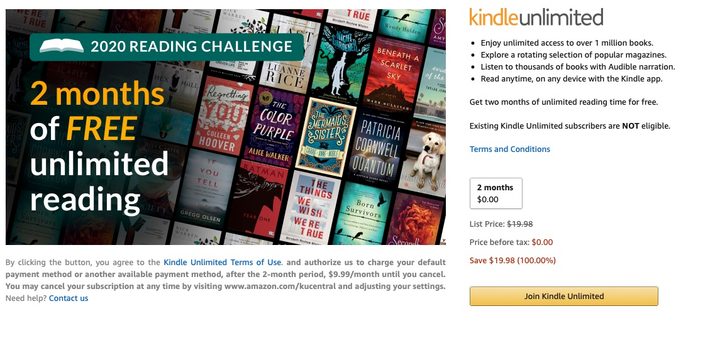
Head over to the Kindle Unlimited website and select ‘Join Kindle Unlimited’. Image used with permission by copyright holder

Step 2: Click the button labeled “Join Kindle Unlimited” — or hit the one below.

Step 3: Enter payment information for when the trial comes to an end.
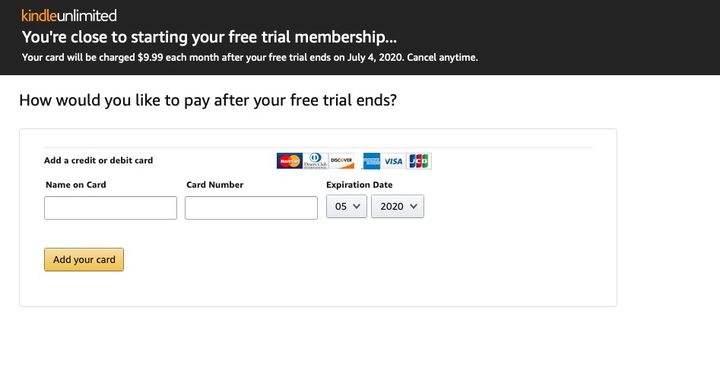
Enter some payment information for after the trial ends. Image used with permission by copyright holder

Step 4: Time to start reading!

New Amazon Customer

Step 1: Head over to the Amazon Kindle Unlimited website.
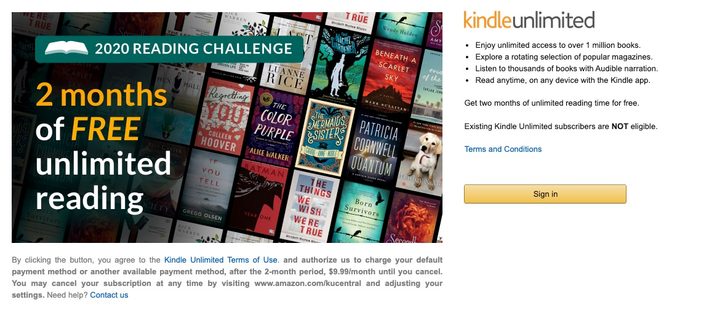
Head over to the Kindle Unlimited website and select “Sign In.” Image used with permission by copyright holder

Step 2: Click the button entitled ‘Sign In’ — or click the button below.

Step 3: Press “Create Your Amazon Account.”
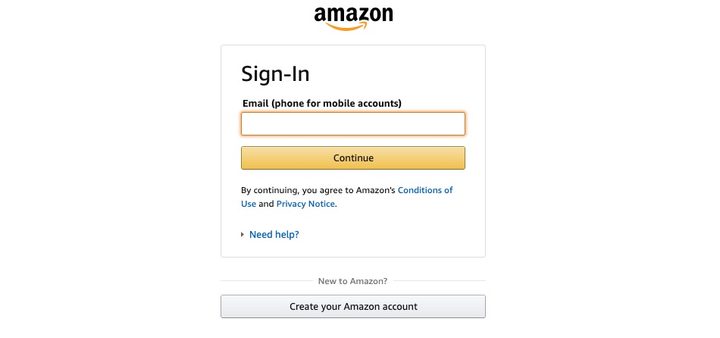
Select “Create Your Amazon Account” and follow the instructions. Image used with permission by copyright holder

Step 4: Follow the on-screen instructions to create an account.

Step 5: Add a credit card to be used once the taster is over.

Enter some payment information for after the trial ends. Image used with permission by copyright holder

Step 6: Choose a book and start reading!

Not sure where to start? Your best bet is to head over to the Amazon Kindle Unlimited Store, which isn’t a store at all because everything is free. What it is, however, is a catalog of everything that can be accessed through the subscription at no charge, organized by genre and what’s trending.

Here’s a look at what’s hot at the moment:

  1. When We Believed In Mermaids by Barbara O’Neal
  2. If You Tell by Gregg Olsen
  3. In An Instant by Suzanne Redfearn
  4. Last Day by Luanne Rice
  5. The Last Sister by Kendra Elliot
  6. The Dressmaker’s Gift by Fiona Valpy
  7. The Missing Sister by Elle Marr
  8. A Killer’s Wife by Victor Methos
  9. The Dare by Lauren Landish
  10. Wall of Silence by Tracy Buchanan
Commerce Contributor
Former Digital Trends Contributor
Digital Trends' Commerce team has a simple mission: to help our readers make the purchasing decision that is right for them…
Apple Podcasts finally gets serious about video, adds multiple YouTube-inspired features
With offline downloads, Picture-in-Picture, and a dedicated video hub, iOS 26.4 turns Apple Podcasts into a platform creators can no longer afford to ignore.
Electronics, Phone, Mobile Phone

For years, the Apple Podcasts app supported video, at least it did technically, but nobody used it. Creators ignored it, while listeners forgot it. Meanwhile, other platforms like YouTube and Spotify quietly built empires on video podcasting. However, that changes with the iOS 26.4 update, or at least that is what Apple hopes for. 

Video podcasting exploded in popularity in recent years, with audiences gravitating toward platforms that treated the format well (as already mentioned above). Despite being an iPhone user, I personally consume podcasts on YouTube (I briefly paid for the Premium membership as well). 

Read more
Instagram could soon let you watch Reels while offline with automatic downloads
A new leak suggests Instagram is working on automatic downloads for Reels, which could let you continue your binge even without an internet connection.
Instagram and YouTube

Instagram could soon let users continue their Reels binge even when they're offline. A new leak suggests the app is working on automatic downloads for short-form videos, a move that would bring it closer to YouTube, which already allows offline viewing of Shorts.

What is Instagram working on?

Read more
Android 17 will let apps get the best out of your phone’s camera chops
A new vendor-defined extension system could bring advanced camera features like Super Resolution to your favorite third-party apps.
Android 17 logo.

Android 17 is shaping up to be quite an important update, especially if you care about camera quality across apps. Google is introducing a new way for phone makers to extend their custom camera features system-wide, which could finally close the gap between stock camera apps and third-party ones.

How is Android changing camera access for apps?

Read more