

Without fail, one thing always happens during the iOS segment at Apple’s Worldwide Developer Conference (WWDC): I have a moment where I want more people I know to own an iPhone and use iMessage because it always looks a whole lot more fun than my usual message apps.
It’s not evidence of iMessage being generally superior, though; it’s about something else. And this was especially true at WWDC 2024.
There’s something about iMessage

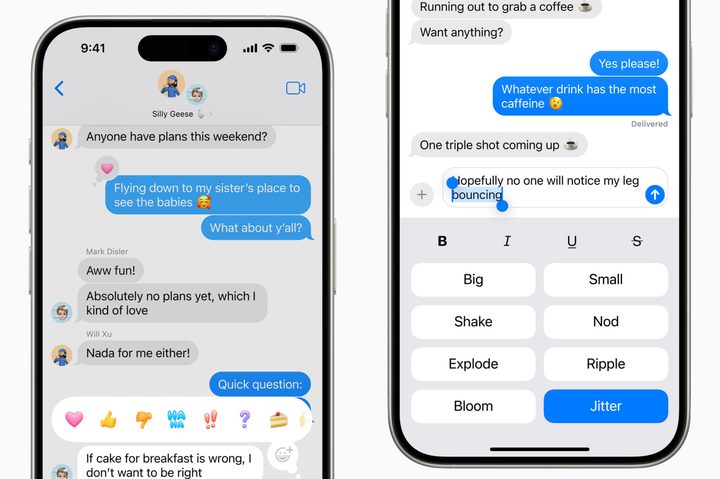
Apple always does a great job of showing how its products and features could enhance your life, and iMessage is always portrayed as a wonderful way to connect, chat, and have fun with friends. iOS 18 will introduce several new features to iMessage, including ways to highlight specific words, add any emoji or sticker to messages through the Tapback menu, and also schedule messages to be sent at a specific time.
It’s not the most exciting list of new features, but that’s not the point. It’s the way iMessage was (and has always been) portrayed during WWDC’s keynote presentation. Although only a few minutes were spent on iMessage, it just looked fun and engaging to use. I want to try out the different effects for words, and I don’t care if it’s annoying to the recipient. In fact, I want them to send back a similarly annoying animated word — the less appropriate, the better.
I want a long list of blue-and-gray message boxes, all with bouncy words, emoji reactions, and little videos that would be fun to create and send and then heartwarming to look back on. That’s what iMessage appears to offer. But it will only do so when you and the people in your life also use iMessage, and for me, that’s just not the case.
But is Apple’s portrayal of iMessage even accurate?
Other messaging apps dominate

If I don’t really use iMessage, what do I use? WhatsApp is the messaging app of choice for almost everyone I know, and it’s almost standard practice to ask if someone has WhatsApp when exchanging contact information. There’s absolutely nothing wrong with WhatsApp at all, and it has some of the features I like from iMessage — such as emoji reactions, GIFs, and stickers.
I find calls and video to be reliable, and the quality is usually excellent, so my complaint is not so much about the app itself but more about how a lot of people use it. Outside of a few thumbs-up or heart emoji reactions, my WhatsApp message feeds are relatively ordinary. I also use Line, the original sticker-heavy messaging app, but I also find stickers are used judiciously there. I don’t want to be the one to charge in and jazz all these chats up with unwanted images and stickers, much as I may like the idea.
Finally, there are RCS messages. Yes, iOS is getting support for the flashier, interactive features offered by the messaging system, but any excitement around it is entirely lost on me. The only SMS/RCS messages I receive come from automated services like delivery reminders, informational no-reply messages, or from people I barely know. If I knew them, chances are we’d have connected on WhatsApp anyway.
Would iMessage be any different?

I’m sure there are a lot of people who fully embrace all the features iMessage, WhatsApp, PCs, Line, and every other messaging app offer. It’s certainly the way Apple makes it seem with its fun-packed iMessage demonstrations. But rather than it being reality, at least for me, it’s more evidence of Apple’s incredible sales ability.
We’re talking about a messaging app here. It’s not going to change my world, as most of the time, the messages I send and receive are fairly mundane, with long, in-depth conversations happening over the phone or in person. There’s often no place for more than a thumbs-up reaction, and even if I forced everyone I know to buy an iPhone and use iMessage, I have a feeling nothing much would change.
But it doesn’t matter. Apple does such a good job of making the app look attractive that I’m easily convinced messaging nirvana exists in those blue bubbles. Apple’s advertising prowess is evident in everything from the Apple Vision Pro to the iOS 18 custom home screen design and tools like the Apple Pencil. I am not an artistic person, but when I see the Pencil demonstrated during an Apple event, I quickly imagine the $100 stylus would be capable of changing the situation.
I know all this, but I’m still looking forward to iOS 18 and the new iMessage features so I can try them out on my small selection of iPhone-owning friends. That’s the true power of Apple’s incredible presentations and advertising at WWDC 2024.



