  1. Home
  2. Phones
  3. Mobile
  4. News

Digital Trends may earn a commission when you buy through links on our site. Why trust us?

Bing’s AI chatbot is now on your Android phone’s keyboard — here’s how to get it

Add as a preferred source on Google

Chatbots have become extraordinarily popular for those looking for help with their writing — or simply mess around with them and have fun. Now, Android users have access to one such chatbot straight from their keyboard. Bing Chat is Microsoft’s chatbot that rivals the likes of ChatGPT and Google Bard, and it has been added as a feature to the SwiftKey keyboard, a predictive keyboard that helps with texting.

While Bing Chat can help users compose the body of a message, it can also analyze prewritten text for your tone to suggest changes if the user wants to avoid coming across a certain way. Bing Chat has already been providing those services via the Bing app and through web browsers; however, the new integration with the SwiftKey keyboard allows users to easily access the chatbot for help whenever their keyboard is enabled.

Recommended Videos

How to use Bing Chat with the SwiftKey keyboard
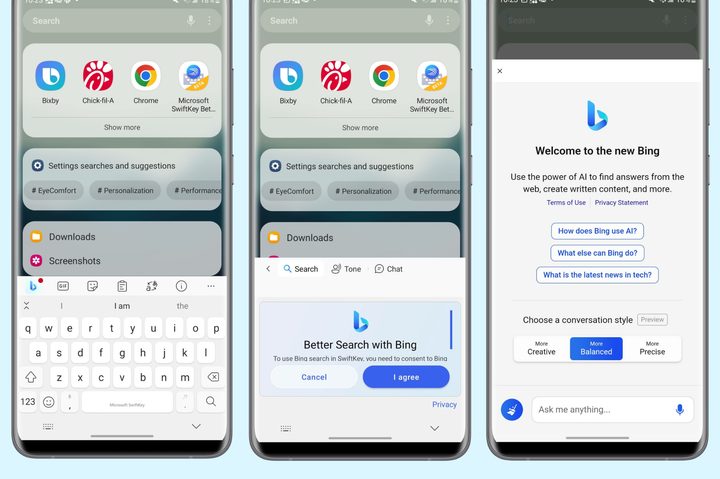
Screenshots of Bing Chat running through the SwiftKey keyboard on Android.
Digital Trends

If you’re looking to give Bing Chat a try, luckily, getting it set up is pretty simple. That said, there are two things to know right off the bat that may change your experience with getting it on your device.

The first is that it currently is not available for iOS, so iPhone users won’t be able to integrate it into their keyboards. That said, iOS users can still access it through the Bing app as well as their browsers while they wait for official integration with SwiftKey.

The second thing to know is that Bing Chat integration is “slowly rolling out,” according to Microsoft CTO Pedram Rezaei, so it may not be available for you when you try to download it. If that’s the case, check back later, as it should be pushed everywhere soon.

To download it on Android devices and start using the chatbot yourself, follow these simple steps:

  • Download the Microsoft SwiftKey Beta app from the Google Play store (make sure that you’re downloading the beta version and not the regular one.)
  • Once downloaded, open the app and follow the on-screen prompts to enable the SwiftKey keyboard and log into your account.
  • Pull up your keyboard and select the Bing Chat icon on the left side and then choose the function you want from the three options: Search, Tone, or Chat.

As mentioned above, you may not have access to Bing Chat quite yet as it’s still rolling out. However, once it becomes available, it’s easy to start using it directly from your keyboard.

Peter Hunt Szpytek
A podcast host and journalist, Peter covers mobile news with Digital Trends and gaming news, reviews, and guides for sites…
Apple says Lockdown Mode thwarted spyware attacks with a clean slate
Apple’s strongest defense is actually holding up
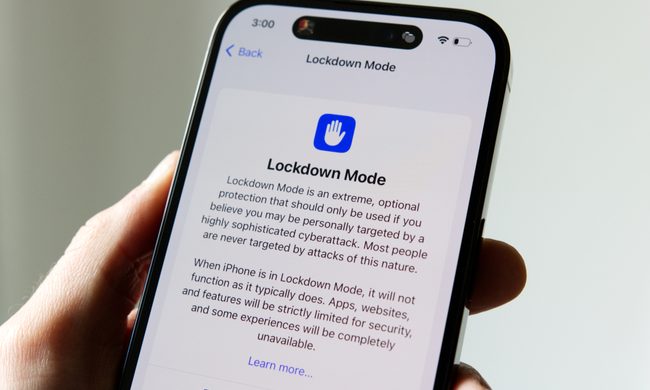
Lockdown Mode information page on an iPhone 14 Pro.

Apple says it has not seen a successful spyware attack on any iPhone with Lockdown Mode enabled, a claim it shared with TechCrunch.

Lockdown Mode arrived in 2022 as an opt-in feature for iPhone, iPad, and Mac. It was introduced as a stricter security mode for people at high risk of targeted attacks, such as journalists, activists, and government officials.

Read more
The Dynamic Island could shrink on the iPhone 18 series, and not just on the Pro models
One leaker, one claim, and a big question: is Apple genuinely ready to give every iPhone buyer the same design treatment as Pro owners this cycle?
Apple iPhone 17 Pro in Cosmic Orange leaning on a gray wall.

Apple’s Dynamic Island has been around long enough that most people have made their peace with it or forgotten it’s there. In fact, I’ve seen people associating the pill-shaped notch with newer iPhone models (released in the last 3 years). Now, a fresh leak suggests that the notch replacement is about to shrink, not just on the expensive models. 

What did the leaker actually say?

Read more
Apple Podcasts finally gets serious about video, adds multiple YouTube-inspired features
With offline downloads, Picture-in-Picture, and a dedicated video hub, iOS 26.4 turns Apple Podcasts into a platform creators can no longer afford to ignore.
Electronics, Phone, Mobile Phone

For years, the Apple Podcasts app supported video, at least it did technically, but nobody used it. Creators ignored it, while listeners forgot it. Meanwhile, other platforms like YouTube and Spotify quietly built empires on video podcasting. However, that changes with the iOS 26.4 update, or at least that is what Apple hopes for. 

Video podcasting exploded in popularity in recent years, with audiences gravitating toward platforms that treated the format well (as already mentioned above). Despite being an iPhone user, I personally consume podcasts on YouTube (I briefly paid for the Premium membership as well). 

Read more