


“We highly recommend the Galaxy S II. More powerful phones will come out, but this will remain a great option for some time. At $200 with a two-year contract, we can't complain.”
- Super AMOLED Plus screen is colorful and bright
- Great battery life
- Powerful dual-core processor
- Super thin and super light
- 16GB of internal storage
- TouchWiz UI is much improved
- Plastic construction
- AT&T's “4G” data speeds are unimpressive
“Why you can trust Digital Trends – We have a 20-year history of testing, reviewing, and rating products, services and apps to help you make a sound buying decision. Find out more about how we test and score products.“
The Samsung Galaxy S II was announced way back in January at CES, and has been out around the world since April, but we’re only just now getting a taste of the Korean manufacturer’s flagship phone here in the States. Fortunately, the wait was worth it. The Galaxy S II delivers in every way.
Design and feel
If the Galaxy S II looks familiar to you, it’s not because you’re crazy. The Galaxy S II is actually almost identical to the Infuse 4G. It has almost the same exact design, with one small difference: The Galaxy S II has a 4.3-inch screen, while the Infuse 4G had a 4.5-inch. And the S II has roughly double the processing power, but we’ll get into that later.
 Left: Samsung Galaxy S II, Right: Samsung Infuse 4G
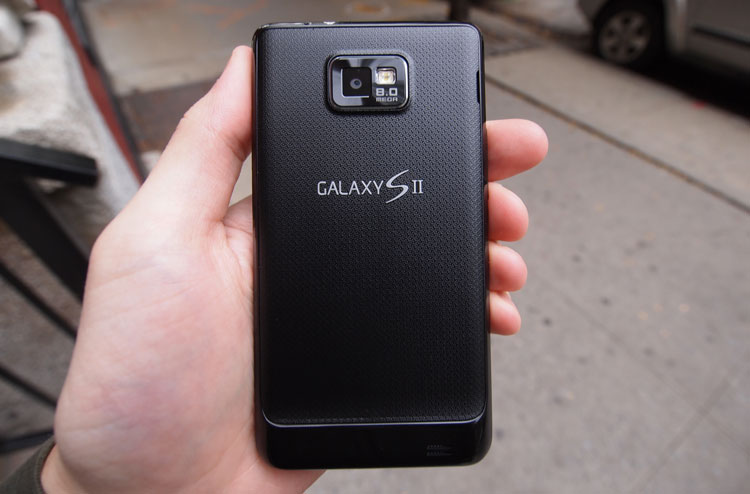
Like the Infuse, the Galaxy S II is a good-looking phone. We wish Samsung didn’t use so much plastic in its phones, but we’ve begun to warm to the tradeoff, considering how incredibly thin and light the S II is. The Galaxy S II weighs about a third of a pound (4.3 ounces) and measures about a third of an inch (0.35) thick. Other than a slight protrusion at the bottom for the speaker and antenna, the back of the unit is pretty flat. The camera protrudes a couple millimeters, but it’s almost flush with the back of the unit as well. The shell is a glossy slate-grey plastic, with a textured back panel that snaps off to reveal the battery, SIM, and microSD card.
The power button is on the right side of the phone, but it’s a bit smaller and placed lower than on most phones. We’re not quite sure why, but it might be for the benefit of those with smaller hands. For those of us with normal-sized hands, the new location of the power button takes some getting used to, though we wouldn’t consider it a terrible design choice. Power aside, there is a stereo audio jack up top, a volume rocker on the left side, and a micro USB charging port on the bottom center. The front and rear cameras are nicely placed.

Our only complaint is that, like the Infuse, the Galaxy S II only has one anemic little speaker on the back, bottom left of the unit. While we don’t expect much out of smartphone speakers, this one is in a place easily blocked by hands or anything the phone happens to be lying on. The speaker tends to go completely quiet if you block it with a finger, as well.
Power and specs
The Galaxy S II has great specs, but they’re similar to every other dual-core phone that’s been hitting the market in the last couple of months. It runs a 1.2GHz dual-core Samsung Exnyos processor, has 1GB of RAM, and 16GB of internal storage. The 4.3-inch screen uses Samsung’s Super AMOLED Plus technology and has a resolution of 480 x 800. The phone is as powerful as anything on the market, and more powerful than almost all competitors. This phone also has NFC abilities. Assuming Google Wallet actually takes off, you should be able to run it on this phone.
Operating system: Android 2.3 with TouchWiz 4.0
We might lose it if we see another Android 2.2 (Froyo) phone hit the market. Luckily, it looks like the torture is over. The Galaxy S II runs on the speedy Android 2.3 (Gingerbread), topped off with Samsung’s newest custom interface: TouchWiz 4.0.
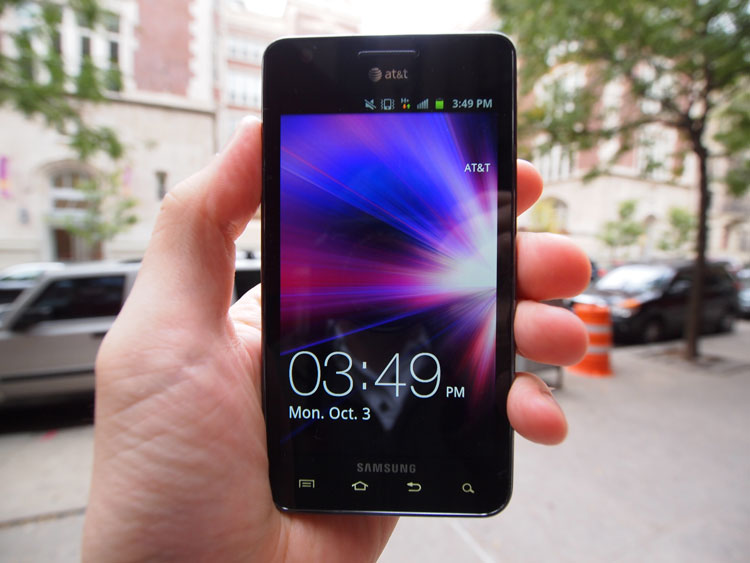
We haven’t loved previous versions of TouchWiz as much as the default Android interface, or HTC’s Sense UI, but TouchWiz 4.0 is a big improvement. The silly iPhone-like icon boxes and other iOS copycat features are gone, replaced by a more colorful, and feature-rich interface. Samsung has finally added a good-looking set of widgets for the clock, calendar, and social items. In addition, the notifications bar looks a lot nicer now that the company has done away with the ugly brown interface. Now, the notification bar is gray with bright green toggles so you can easily turn on and off the GPS, Bluetooth, Wi-Fi, Flight Mode, or Screen Rotation. We hope that Samsung adds a really fast way to get to the Settings menu in a future iteration, but it’s good to see the company on the right track.
Samsung’s TouchWiz is now comparable to HTC Sense. It doesn’t have as many customization options, but it’s roughly just as helpful and useful.
Features and apps
TouchWiz 4.0 is nice, but we really like the improved Samsung apps that come with it. The task manager app is the best of these additions, allowing you to easily exit any app that’s giving you trouble. Better yet, you can hold the Home button to bring it up. The task manager has tabs to show you how much RAM and storage you’re using as well — pretty handy.
We also like the improved text-messaging app, calculator, mini diary, My Files (file manager), and Task list app. The included Photo Editor and Video Maker are fairly robust for being phone apps as well. They should be useful for you at some point.

Less useful are the bloatware apps like myAT&T, AT&T Navigator, Qik Light, Words for Friends, AP Mobile, and Accuweather. Luckily, for the first time, some of these apps are removable. You can uninstall a lot of the AT&T apps. If only we could get rid of everything we didn’t want or need. But hey, progress is progress. We’ll take it.
Google Music beta listeners, you’ll have to download the Google Music app from the Android Market. Samsung has included its own music player here, but it doesn’t access Google’s cloud.
Camera
The Galaxy S II has an 8-megapixel rear camera and a 2-megapixel front camera. The camera app interface has been improved significantly from the Infuse 4G, with simpler menus that take better advantage of the phone’s large 4.3-inch screen. The scene selecting found in the Infuse is there as well. Overall, we’re always fairly impressed with Samsung cameras. They seem to capture more light and color than some competitors. The addition of 1080p video recording on the S II should please some as well. We didn’t encounter any significant jittering or other issues while recording video.
Phone calls and data speed
Call clarity on the Galaxy S II is as good as it gets on a phone network. We have no complaints here in Manhattan, New York. Yes, call clarity is dependent on how well AT&T’s network runs in your area, but for its part, Samsung’s Galaxy S II is doing its job.
Data speeds on AT&T’s HSPA+ network are not impressive. We’ve only been able to get 0.8 to 1.2 Mbps download and upload speeds in Manhattan, which isn’t as fast as T-Mobile or Sprint. Verizon’s LTE network, of course, is about 20 times faster than AT&T’s. But the Galaxy S II isn’t to blame for AT&T’s slow network. We wish Verizon would launch an LTE version of the phone, but regardless, this is as fast as you’re going to get on AT&T until the carrier finally launches its LTE network.
Battery life
One of the biggest problems with the current crop of dual-core phones is battery life. Perhaps it’s due to AT&T’s weak “4G” network, but the Galaxy S II is getting stellar battery life for a smartphone. The battery has lasted for more than a day with moderate use, and is rated to last even longer if you don’t use your phone much. The 1,650 mAh battery is rated to last 8 hours during talk and 16 days on standby. We haven’t performed a full battery drain test, but if battery life is a big deal, this phone doesn’t sacrifice it for style.

Conclusion
It’s been a long wait for the Samsung Galaxy S II, but it’s been worth it. For those on AT&T, this phone is better than the Infuse 4G, HTC Inspire, LG Thrill 4G, and Motorola Atrix. The battery life is solid, Samsung has spruced up its TouchWiz interface, the specs are best in class, and the camera is as good as ever. We highly recommend the Galaxy S II. More powerful phones will come out, but this will remain a great option for some time. At $200 with a two-year contract, we can’t complain.
Highs:
- Super AMOLED Plus screen is colorful and brigh
- Great battery life
- Powerful dual-core processor
- Super thin and super light
- 16GB of internal storage
- TouchWiz UI is much improved
Lows:
- Plastic construction
- AT&T’s “4G” data speeds are unimpressive


