
Emoji provide us with a whole new world of expressiveness when we’re online, but they aren’t exactly personal. Fortunately, Bitmoji allows us to customize our characters to create incredibly realistic depictions of ourselves to share with our friends and family — without losing any of the appeal of using emoji.
So, what exactly is a Bitmoji, and how can you use them? Here is everything you’ll need to know about Bitmoji.
What is Bitmoji?

Bitmoji is an accessory app for social media platforms that people use to create little cartoon versions of themselves, which they then use on their various social media accounts. It’s a very simple service: You create an avatar of yourself and create various comics, GIFs, expressions, and reactions that use this avatar. Then, when you are communicating with someone in a chat or via email, you can use your Bitmoji to express yourself. That’s it!
Over time, Bitmoji has become popular with people who started feeling tired of the generalized emoji available on their apps and wanted something more interesting and personal. The company provides various updates and themes, like special options for sports events and holidays, that you can occasionally switch between as you desire. Additionally, part of the app’s charm is the simple focus — this is Bitmoji’s only service, and there are very few add-ons, which is ideal for beginners and users who want some personalization with little hassle.
How did Bitmoji begin?

While it is currently owned by Snap Inc., the company behind Snapchat, Bitmoji was originally developed by the company Bitstrips from Toronto, Canada. Founded in 2007, Bitstrips was focused on creating digital comic strips that featured personalized avatars, a concept very similar to Bitmoji.
Once emoji became more popular and found their place online in various chat apps, Bitstrips realized the potential. The company created a separate app called Bitmoji in 2014, designed to specialize in these emoji. The big apps were quick to notice the potential in Bitmoji. In 2016, Snapchat’s parent company, Snap Inc., bought Bitstrips, shut it down, and began running Bitmoji as a sole division.
Where are Bitmoji used?
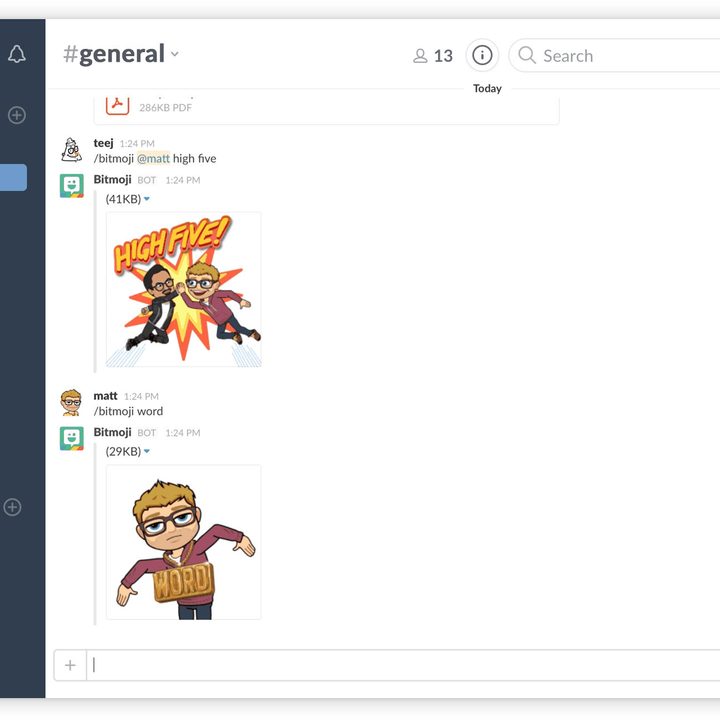
While Snapchat may own the company, you can still use Bitmoji on a variety of platforms. They are available on Facebook, Gboard, iMessage, and even work-oriented apps like Slack. Bitmoji are also Chrome-friendly and work with Gmail as well. There are also a few unique uses for Bitmoji such as Bitmoji for games.
Note that you do not need Snapchat to use Bitmoji. It’s a separate app that you can download for iOS or Android. However, if you do use Bitmoji with Snapchat, you gain access to Friendmoji, which are personalized little Bitmoji between you and a close friend, which is something no other service currently offers.
How do I create my own Bitmoji?

If you are a new user, just download the app, and get started making an avatar. If you’ve created a personalized digital avatar for other platforms, this process will be familiar for you. You pick out a skin shade, hair color, hairstyle, jawline, chin, nose, eyes, eyebrows, and so on. One reason that Bitmoji are so popular is that the app provides a lot of options for personalization in this area, so it’s worth some time to get right. A common refrain about successful customization is, “How does your Bitmoji look so much like you?”
From there, you have a whole lot of options to customize your Bitmoji stickers and comics. You can dress them in various outfits, put them in a variety of scenes, create innumerable stickers with different postures and expressions, and so on (you can also switch the overall style). Then, when you’re ready, pick one and paste it all over your social media app of choice to add flavor to a conversation.
The ultimate goal is to create a Bitmoji “keyboard” with all your favorite Bitmoji stickers on it, so you can quickly bring it up and use them in the middle of a conversation. Bitmoji offers an option to enable this keyboard in its settings. Remember, you can always go back and change your Bitmoji if you are unhappy with the results.
Sharing Bitmoji


To share Bitmoji, you can either enable the Bitmoji keyboard within your messaging application of choice or share stickers directly from the app itself. To send emoji in-app, just open the Bitmoji app, tap on the sticker you’d like to send, and select your messaging app of choice from the pop-up list. You’ll enter the recipient on the next screen, and that’s it. Sharing within your favorite chat or text app requires you to enable the keyboard in your settings. The one-time activation means you can then send Bitmoji from all your communication apps.
Are there any costs or risks associated with Bitmoji?


Bitmoji charges a small amount (usually around $1) for individual clothing packs, especially ones that celebrate specific people, teams, holidays, or special events. But other than that, Bitmoji is free to use at this time.
After installing the Bitmoji keyboard, an app alerts you immediately about the potential risks involved. The warnings will pop up on your screen — you’ll have to acknowledge them before you continue the process, so you can’t plead ignorance. The warning messages include one ensuring that you’re well aware that Bitmoji needs a live server connection to upload your personalized stickers. It also has to monitor, from a broad perspective, what you’re doing in your social media apps. The app also requests full access to your device, which may be a cause for concern for some users.
That said, Bitmoji won’t be able to read anything you type physically. The keyboard simply needs to be connected to your app in order to work properly. Having that live connection to your data could potentially leave your personal information exposed, which may allow hackers to steal your information. Currently, there haven’t been any Bitmoji-related mass hacks. So, these warnings shouldn’t keep you up at night.
According to its privacy policy, Bitmoji may collect additional information from Snap-related apps. If you’re using Snapchat or its sister apps, Bitmoji may monitor your behavior data and save it. Apps like Snapchat could then later choose to sell that information to third parties. Of course, there are many apps that have been doing that for years, so it’s definitely up to you whether you’re comfortable swapping some of your privacy for Bitmoji.



