
Apple’s Deep Fusion camera feature has made a lot of buzz before its official release in iOS 13.2. Now that it’s live, we’re taking a deeper look at what’s being fused, and how.
It’s not that con-Fusing
Much like Apple’s Smart HDR, Deep Fusion relies on object and scene recognition, as well as a series of eight images captured before you click the shutter button.
Of the eight images, four are taken with standard exposure, and four with short exposure. A ninth picture is then taken with a long exposure when the shutter button is triggered. The short exposure shots are meant to freeze time and bolster high-frequency details like grass blades or stubble on a person’s face. Therefore, the sharpest image of this series is chosen to move on to the next step.
Three of the standard-exposure shots which display the best color, tones, and other low-frequency data are then fused with the long-exposure frame to compose a single image. This image and the sharpest short-exposure frame are then sent through neural networks, which choose between these two images for the best pixel to ultimately represent this photo. This pixel-by-pixel analysis enhances your images by ultimately minimizing noise, sharpening details, and accurately coloring your photos, doing so on a very granular and intelligent level.
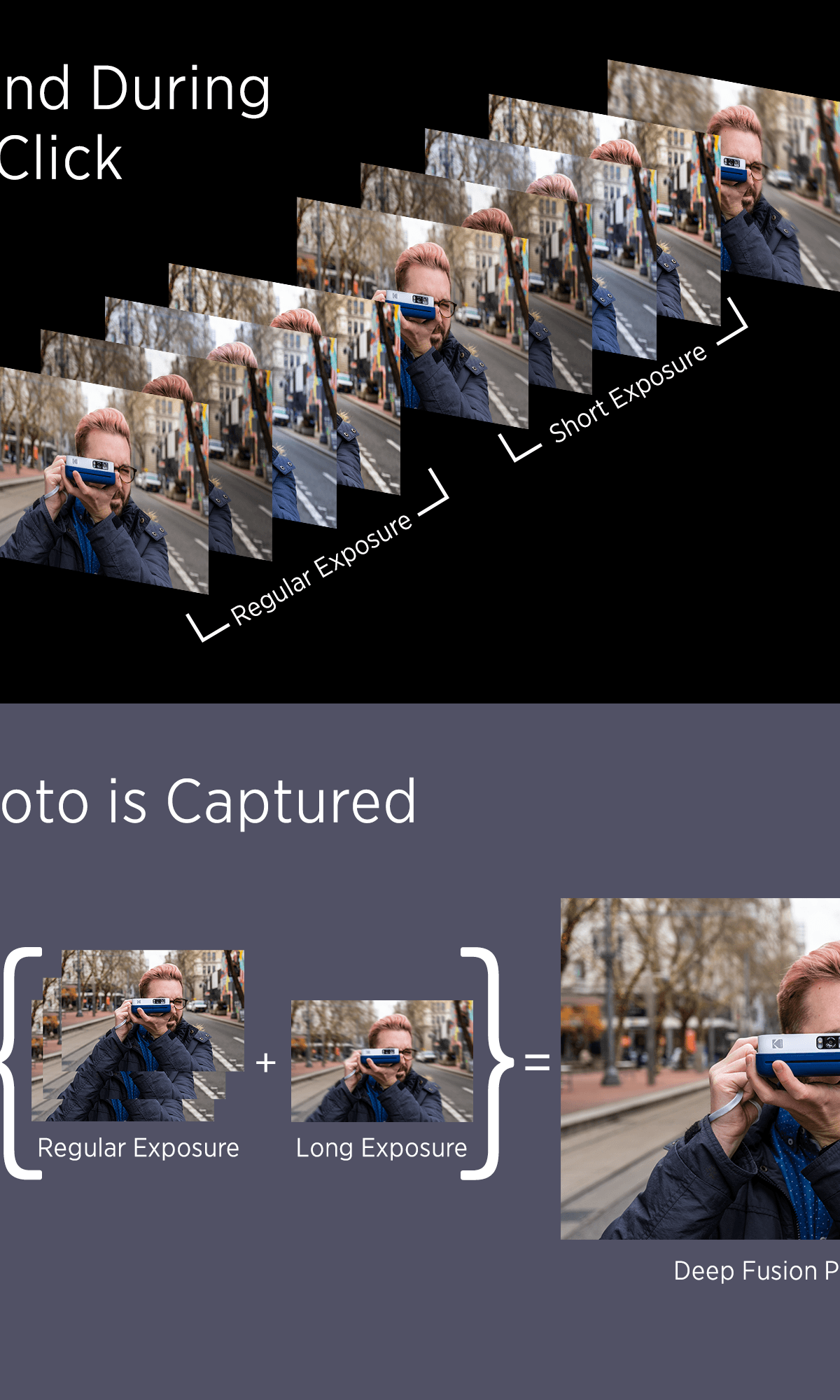
All of the post-shutter processing is done behind the scenes, so it won’t impact your photo capture time. In other words, you can still snap back-to-back photos just as quickly as you ever could on the iPhone, and if they’re all using Deep Fusion, they’ll simply be queued up in the camera roll to be processed in order. Apple says you could go into your camera roll and potentially see an image still processing for a half-second, but I’ve yet to encounter this. Deep Fusion won’t work on burst mode, however, and it will only be available on the iPhone 11 and iPhone 11 Pro models.
It just works
Apple’s iconic mantra is the guiding principle for Deep Fusion’s nonintrusiveness. There’s no toggle to flip this on; it will enable itself when possible in during various lighting situations that vary by the lens you’re shooting with.
The ultrawide-angle lens, for instance, cannot take advantage of Deep Fusion at all. On the main lens, Deep Fusion kicks in for what Apple describes as “indoor lighting” or anything below twilight in outdoor settings — that is, if the iPhone doesn’t explicitly offer night mode. The telephoto lens uses Deep Fusion for anything that isn’t very dark or exceedingly bright, but keep in mind that darker situations usually disable the telephoto camera and kick over the responsibilities to the main sensor, which will then determine what to do — be it Deep Fusion, night mode, or Smart HDR.
The results
So far, Deep Fusion’s impacts have been mostly subtle in our testing. We tested it on our iPhone 11 Pro Max running iOS 13.2 against the iPhone 11 Pro running iOS 13.1 which is not equipped with Deep Fusion, and at first, it’s hard to see Deep Fusion’s influence. But zooming in on a picture did reveal areas where finer details were more defined and less smoothed-over. This isn’t something that’s going to jump out at you, especially looking at it on a phone, though. Of course, Deep Fusion being a part of the equation never produced a worse image than without it.


We did have a couple of instances where, if you zoomed in a little, you could appreciate the difference Deep Fusion makes, particularly in the finer details of an image. So, while it may not be as magical as night mode, it’s still better to have than to not.


