


When Nikon and Canon launched their first full-frame mirrorless cameras, the Nikon Z 6 and Canon EOS R looked to be rivals every bit as competitive as neighboring sports teams. But then Canon pulled up its sleeves to reveal another surprise: A lower priced entry into full-frame mirrorless, the Canon EOS RP.
While the Z 6 and EOS R are arguably closer competitors with less of a price gap and more in common across the spec list, Nikon doesn’t have a full-frame mirrorless model closer to the EOS RP’s attractive $1,299 price point. If you want the cheapest full-frame mirrorless from Nikon or Canon, the options are the Nikon Z 6 or the Canon EOS RP.
With a $700 price difference in favor of the RP, finding better specifications in almost every category on the Z 6 comes as no surprise. But the RP also has a bit more going for it than a cheap price tag. Here’s what photographers eyeing Nikon and Canon’s entry-level mirrorless systems need to know about the Canon EOS RP vs. Nikon Z 6.
Nikon Z 6
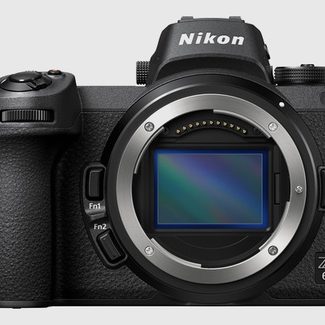 |
Canon EOS RP
 |
|
| Sensor | 24.5 megapixel full-frame CMOS with optical low pass filter | 26.2 megapixel full-frame CMOS sensor with optical low pass filter |
| Burst Speed | 12 fps in extended mode or 5.5 fps with live view | 5 fps, or 4 fps with continous autofocus |
| Shutter Speed | 30 sec. to 1/8000, bulb. 1/200 flash sync | 30 sec. to 1/4000, bulb. 1/180 flash sync |
| ISO | 100 – 51,2000 (50 – 204,800 extended) | 100 – 40,000 |
| Autofocus | 273-point hybrid phase-detection contrast AF down to -3.5 (-6 in low light AF mode) | 4,779-point Dual Pixel autofocus down to -5 EV |
| Image Stabilization | 5-axis sensor shift | None (available in some lenses) |
| Video | 4K at 30 fps, 1080p at 120 fps | 4K at 24 fps with a 1.7x crop, 1080p at 60 fps |
| EVF | 0.5 inch 3.69 million dot EVF with 21mm eye point | 0.39 inch 2.36 million dot EVF with 22mm eyepoint |
| LCD | 3.2 inch, 2.10 million dot tilting touchscreen | 3.0-inch, 1.04 million dot tilting touchscreen |
| Media Slots | Single XQD card slot | Single SD card slot |
| Battery | 310 shots | 250 shots |
| Dimensions (WxHxD) | 5.3 x 4 x 2.7 inches | 5.22 x 3.35 x 2.76 inches |
| Weight | 1.29 lbs. (body only) | 1.07 lbs. |
| Price | $2,000 | $1,299 |
| Read more | Nikon Z 6 Review | Canon EOS RP Review |
| Buy Now |
Sensor


- 1. Shot on Nikon Z 6
- 2. Shot with Canon EOS RP
Specification-wise, the sensors on the RP and the Z 6 are rather similar. Both are full-frame with the optical low pass filter intact, with the RP eking out 2 more megapixels at 26MP compared to the Z 6’s 24. But that’s hardly the full story.
While both cameras produced excellent JPEGs, the RAW images from the RP felt a bit lackluster. Base ISO fell behind competitors like the Z 6 and flexibility in post is much more limited than some of Canon’s other cameras. That’s not exactly surprising, however, considering even the more expensive EOS R didn’t perform as well as the Z 6 in lab testing by DxO Mark. Both full-frame cameras will do a good job in low light, but the Z 6 edges out the EOS R here again.
If you only want to shoot in JPEG, you won’t notice a huge difference between the two cameras. But if you want to get the most you possibly can out of your photos, the Z 6 is the way to go.
Winner: Nikon Z 6
Speed

A quick look at the specs shows the Nikon Z 6 easily winning this category — but make sure to look closely. The Z 6 has the fastest burst speed of the two at 12 frames per second with continuous autofocus. Live view is limited at this speed, however, and the camera drops to just 5.5 fps with live view. This isn’t that far ahead of the EOS RP’s 4 fps burst rate with continuous autofocus, but that camera tops out at 5 fps with focus locked. Nikon clearly comes out ahead, but isn’t doing laps around the RP if you need full access to that viewfinder during burst shooting.
Winner: Nikon Z 6
Autofocus

Autofocus is one area where the pricier camera actually falls a little behind. Canon’s Dual Pixel autofocus technology has long impressed, and it doesn’t disappoint moving over to the mirrorless system either. The Dual Pixel system means plenty of autofocus points yes, but the RF does well in low light, performing down to -5 EV where the Z 6 needs a (slower) special mode to reach that far.
That’s not to say the Z 6’s autofocus system is horrible — it’s solid in most scenarios, but doesn’t quite match-up to the performance of Nikon’s DSLRs, particularly in limited lighting. A recent update did bring eye-detection to the Z 6, a feature the EOS RP also has. We did notice the RP’s eye-detection didn’t work at distances beyond a few feet, however, so the Z 6 is likely a little stronger here. Dual Pixel Autofocus also isn’t available while shooting 4K video on the EOS RP, and the contrast-detection AF it uses instead is frustratingly slow.
So the EOS RP wins for low light sensitivity, the Nikon wins for video. Both are capable systems with different, specific limitations that make choosing a winner difficult.
Winner: Tie
Stabilization

You don’t have to look beyond the specs to figure this one out — the Canon EOS RP lacks in-body stabilization. The Nikon Z 6 has image stabilization built in to the body, offering 5 stops of shake reduction. The only stabilization Canon offers is either inside the lens or, in video mode, with digital stabilization that reduces quality. This is another clear win for the Nikon.
Winner: Nikon Z 6
Video

Nikon went all out for video with the new mirrorless system — and it shows in more ways than one when comparing the Canon EOS RP vs. Nikon Z 6. The Z 6 captures 4K at 30 fps using that entire full-frame sensor. For more flexibility in post, users can record 10-bit N-Log using external recording equipment — a high-end feature that’s nice to see on an entry-level model. Without external recording equipment, the Z 6 captures in 8-bit using the usual color profiles. In 1080p, video can be recorded at up to 120 fps for slow-motion playback.
The EOS RP, on the other hand, uses a 1.7x crop of the sensor to capture 4K at 24 fps — essentially, you could get similar results from a 4K APS-C camera. 4K is limited to a single frame rate: 24p. Remember, it also doesn’t use Dual Pixel AF in 4K mode. Stepping down to 1080p, the EOS RP records from the full sensor and uses DPAF, but it is missing options like slow motion and even a 24p mode.
Winner: Nikon Z 6
Design

Which camera of the pair has the better design? The answer is going to come down to what matters most to you — size, or features. The Canon EOS RP lays claim to the title for the lightest full-frame mirrorless on the market. The body size is also smaller than the Z 6. The tilt screen also flips to the side, so you can use it for selfies, if that matters.
Feature-wise, however, the Z 6 packs in more inside a body that’s not terribly large either. It’s professionally weather-sealed and the resolution of both the EVF and LCD screen is higher than on the RP. The Z 6 also keeps more of the features in common with full-frame DSLRs, with a secondary screen at the top, a focus point selector joystick, and more physical controls overall. We’ll give the title to the Z 6 here because of those more advanced features and better build, but if size matters, the EOS RP comes in with a slight edge.
Winner: Nikon Z 6
Is there a clear winner?
Well, yes — the Nikon Z 6 pretty easily bests the Canon EOS RP. But if it didn’t, we’d be a bit worried — it’s quite a bit more expensive, after all. Canon purposely ignored features on the EOS RP in order to get its price down — and that approach shows when comparing the camera to the competition. The Z 6 outperforms and outshoots the RP in nearly every category, with better RAW files, more speed, in-body stabilization, high-end video options, and a more advanced design.
But if size and cost are the most important factors for you, the EOS RP is a good buy. It’s not a bad choice for users that already have a collection of Canon lenses, but it doesn’t give Nikon or Sony owners any reason to switch. We should also mention the older Sony A7 II is still available, and for even less money than the EOS RP. It may be a generation old, but it still outperforms the EOS R in some areas, including RAW image quality.


