  1. Home
  2. Photography
  3. Android
  4. News

Google’s bag of tricks includes a surprise — the lifelogging Google Clips camera

Add as a preferred source on Google

Lifelogging cameras have gone by the wayside, but apparently Google never received the memo. Alongside the launch of the Pixel 2 and Pixel 2 XL, Google announced the release of a new device called Google Clips.

As the name suggests, Google Clips is a small lifelogging camera designed to clip onto objects and record life as it happens, keeping only the best moments for you to save and cherish.

Recommended Videos

The square device weighs just 60.5 grams and measures 49mm, making it roughly the size of similar lifelogging cameras. On the front of the camera is a large, protruding camera lens that captures 130-degree field of view through an f/2.4 aperture.
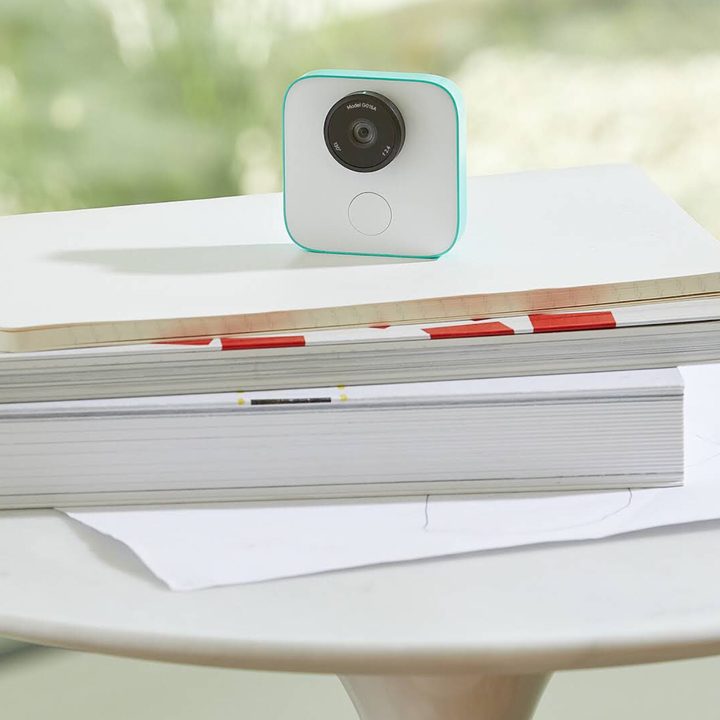
Image used with permission by copyright holder

At the heart of the camera is an A.I. engine designed specifically to capture the details of life in the best quality possible. Using machine learning, the camera captures 15 frames per second and pulls out the sharpest, most important details. You can manually sort through the photos it chooses and save the ones you want.

It can even learn the faces of people you capture the most and learn to prioritize those particular images. If that thought is a little scary, don’t fret — all of this processing is done in-camera.

The sole button on the device is a large shutter button on the front of the camera. Although Google Clips can stand on its own, there’s a clip case included for mounting the camera on just about anything you can imagine, from the pocket of your shirt to your dog’s collar.

Google Clips has 16GB of onboard storage and files stored on the device can be transferred to Android devices running Android 7.0 Nougat or later using Wi-Fi and Bluetooth.

You can currently sign up through Google’s online store to be on a waiting list to order Google Clips, which will retail for $250.

Google Clips - Full Announcement
Gannon Burgett
Former Editor
Google releases big v4.0 update for its popular Snapseed editing app on Android
Electronics, Phone, Mobile Phone

After years of sitting on its hands, Google appears to have remembered it owns one of the best photo editing apps on mobile. Snapseed 4.0 is now rolling out to Android, bringing the platform up to speed after a stretch of iOS exclusivity that left Android users watching from the sidelines.

The story starts last June, when Google quietly broke Snapseed out of its long dormancy with a significant 3.0 update for iPhone. It was a surprise move that suggested the company was serious about the app again. Google then confirmed at the start of this year that Android wouldn't be left behind for long, and true to that word, the Play Store listing has now been updated to reflect version 4.0 — skipping straight past 3.0 for Android users and landing both platforms on the same version simultaneously.

Read more
Google Photos gets new editing tools that are all about subtle touch-ups
Google Photos just made your camera roll feel like it came with a makeup artist included, and the results are refreshingly understated.
Google Photos Touch Up feature in action.

Whether it is dark circles from a late night of work, a blemish that showed up uninvited, or something similar that could use additional brightness, Google Photos now has you covered.

Google has officially rolled out a new Touch Up suite inside its Photos app editor, integrating face retouching tools directly into the app for the first time. Previously, such adjustments were only available inside Google’s Camera app at the time of capture. 

Read more
Adobe Firefly AI will let you edit in creative software by just talking your way through it
Adobe's new AI Assistant can now run your entire creative workflow. Yes, all of it.
Adobe Firefly logo on dark background

Adobe has quietly been building something big inside Firefly, its all-in-one creative AI studio. And today, the company is ready to show it off.

Meet Firefly AI Assistant, a conversational tool that lets you describe what you want to create and then handles the execution across Adobe's entire app ecosystem, including Photoshop, Premiere, Lightroom, Express, and Illustrator. 

Read more