
Facebook is not the only social network aware of the power of mobile technology. In an event this week, LinkedIn announced a slew of brand-new initiatives that will push the job hunting site’s mobile efforts forward. This includes something the company calls LinkedIn Intro, which is exactly what it sounds like, but for iPhones.
In a nutshell, LinkedIn Intro gives you a fancy-schmancy new way to view LinkedIn profiles on your phone, through your iPhone’s built-in Mail app. If you don’t use Mail, the new feature also works with AOL mail, Yahoo! mail, iCloud, Gmail, and Google Apps as well. Reportedly built on a social email service called Rapportive – a LinkedIn acquisition from early last year that allows you to see more information about an email sender – LinkedIn Intro adds a button in the email messages you receive that makes senders’ LinkedIn profiles visible and easily accessible, provided that they have one. Clicking on the button will reveal a more comprehensive look into the person’s online résumé: the company they work for, their official job title, their previous work experience, their education, the works.
To get LinkedIn Intro to work, visit the website and follow the initial setup steps. Then you will be able to see a more enriched sender profile on the emails that you receive.
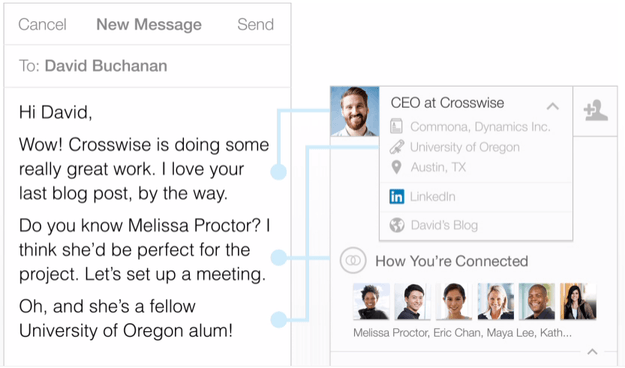
Users who already had the Rapportive browser plug-in previously installed into their computers already know how useful the enriched profiles are, which appear as a sidebar within Gmail – its transformation as a mobile function is a welcome surprise, considering that it’s designed for a product made by Apple, a company notorious for keeping close reigns on their own designs.
LinkedIn’s language about the release makes it clear it will not be sharing information with outside social networks – and there are quite a lot of situations in which Intro won’t tack on the extra LinkedIn content:
If the sender’s email address does not exist on the sender’s LinkedIn profile, then we will not include Intro. In this case, you can still tap on Intro, and we’ll automatically search for the sender’s name on LinkedIn. This very often finds the right profile. If the sender’s email address looks like it belongs to an organization (e.g. newsletter@company.org), then we will not include Intro. If the contents of the email are very long, then we will not include Intro. (Currently, the limit is 128KB.)
LinkedIn Intro’s integration isn’t for everyone, but as far as layout goes, it doesn’t take away from Mail’s user experience – if a contact doesn’t have an account on LinkedIn, nothing changes on the surface. While this update may sound unnecessary for plenty of people (if I want LinkedIn info … can’t I just hop on over to LinkedIn?), this move certainly gives email a more professional feel, and if you need immediate career info on the person you’re exchanging emails with, then this is a nice one-stop-shop setup. For everyone else, it might just sort of feel like a worthless tack-on, shoving data in your face you don’t really care about; i.e., those three emails you get from your mom every day definitely don’t need her career history attached.


