

Facebook Graph Search has a nasty surprise waiting for you. Did you know that you can revisit all of your Facebook searches (and other activities)? These activities are saved in the history of everything you’re doing on Facebook, down to the minute details. In some cases, this data only goes back a couple years or even just a few months – but that’s still terrifying, right? So with Facebook Graph Search rolling out to more users and encouraging searches for just about anything, we’ve got the low down on how to delete this log from ever seeing the light of day.
Click on “Activity Log”

If you click on the “Activity Log” button at the top right corner of your Facebook profile, next to the gear icon, that will take you straight to your Facebook activity page.
Side note: How to surface “Include Only Me” activities

This is important, so excuse the brief tangent. If you click on the “Include Only Me activity” check box, which can also be found in the top right corner of the Activity Log page, you’ll notice that all of your searches and other activities that are tagged with the lock icon will surface amid your other activities. By default “Include Only Me” activities are by default hidden from your log, including your searches.
Click “More” to open more filters options
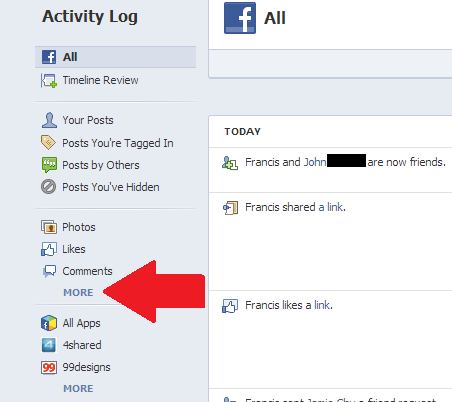
Now to delete the history of your activities, you can go down through the list and unfriend people, unlike content, and delete posts. Or if you’re just really concerned about getting rid of any traces of the search terms you’ve plugged into Facebook, there’s a one-stop solution for deleting all of your searches in one fell swoop (we’ll get to that momentarily).
In the left hand column under Activity Log, click on “More” under where it says “Photos,” “Likes,” and “Comments” to expand and open up additional filter options.
Click on “Search”

At the very bottom of this section above the option titled “Less,” you’ll find an icon labeled “Search.” Click on this.
Clear Searches

Now we’re almost done. At the top right corner of the page where all of your search terms are listed, you’ll find an option labeled “Clear Searches.” Again click on this option.
In case you haven’t found it already, the option can be found just above the month and year.
Confirm Clear Search

When you click on “Clear Searches,” Facebook will pop up a confirmation box asking you if you really want to delete a history of your searches. Confirm by clicking on the “Clear Searches” button. But before you click and erase your search history, you might want to hear Facebook out – although the decision is ultimately up to you.
The social network does have a good reason though to ask twice, and it has to do with Graph Search. Facebook’s Graph Search results are closely tied to your history of previous searches, and this is because for every search you make Facebook is getting a better idea about your search habits, which means that over time the social network is able to better tailor search results for you. If you end up deleting a record of your searches, Facebook has to start from scratch and probably wont be able to serve better results. But that’s just a minor inconvenience for a peace of mind.
An empty search history

If you’ve decided to clear your searches, voila, you’re now done and you should be greeted with an empty search history page that’s waiting to be filled up again. Now you’ll know how to purge your history for next time.
Now if you’re really concerned about your privacy, well you can always outright delete your Facebook account for good.


