Over the years, many have tried to turn Facebook into a dating app by sending unsolicited nude photos through Messenger, hitting on folks in photo comments and generally stalking people’s pages. Maybe that gave the social media mega-site a hint because now they’ve introduced Facebook Dating. Want to know how to score a date using this new service? Here’s what you need to know.
Getting started with Facebook Dating
Facebook Dating isn’t a separate app, it’s built right into the site. If you have a Facebook account, you’re already ahead of the game because you’ll need one to access Dating. Though your Dating profile is separate, the Dating section grabs some of your information from your other profile.
First, go to the Facebook app, tap on the menu icon in the upper right side of the screen and tap on Dating. (If you don’t see the Dating option, you’ll probably need to tap the See More option.) Then, you’ll be taken to the dating section of Facebook. Click on Get Started and follow the on-screen directions for setting up a profile. You’ll need to specify the gender you’re looking for, location and choose a nice photo of yourself.
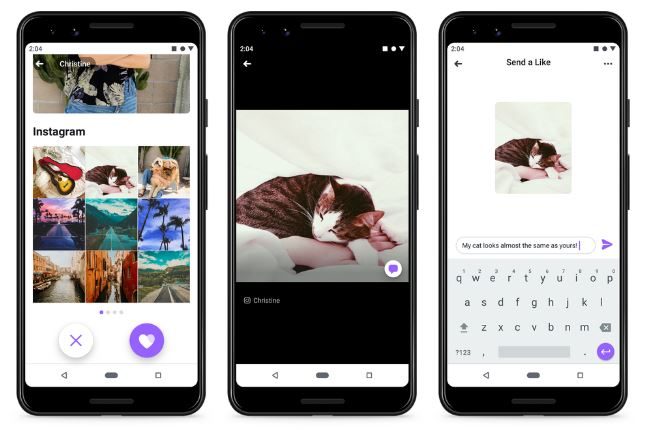
From there, Facebook will automatically generate a dating profile for you by skimming your non-dating profile. You can then adjust the profile to exactly how you want it by removing things, adding photos and adding posts from your Instagram by tapping on Preview Profile option. When you’re satisfied, click Done.
What happens next
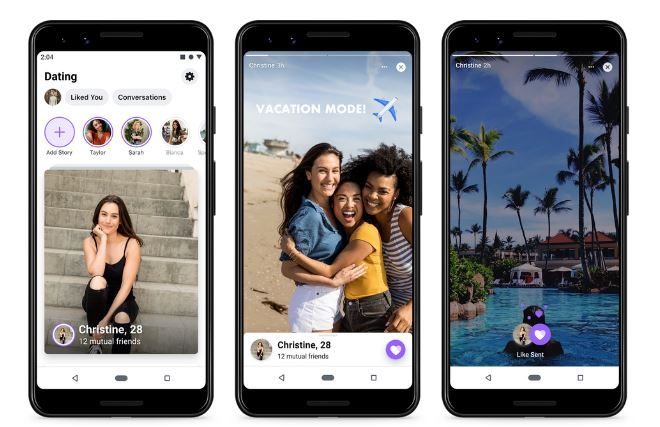
Now, Facebook will start sending you matches. This process can take several days. Don’t worry, Facebook won’t suggest your current Facebook friends and no one will see your dating stuff outside of the Dating section of Facebook. When you get a match, you’ll get a notification. If you like the person you’re matched with, tap the heart icon on their Dating feed.
To start up a conversation with one of your matches, tap their profile photo and the option to type a message will appear. When you’re done typing a witty introduction, tap the arrow icon to send the message. Messages can be accessed by tapping the Conversations button at the top of the feed screen.
Want to match up with people that have the same interests as you? Go to the menu and tap Suggestions From Your Events or Suggestions From Your Groups, then tap on a event or group, slide the button next to it and tap See Suggested Matches.
How to create Secret Crushes

Got a crush on someone and want to use Facebook to help you meet up? The Secret Crush feature lets you add up to nine of your Facebook friends or Instagram followers and will notify them that someone has a crush on them through Facebook Dating, if they have a dating profile, that is. If you both add each other as secret crushes Dating will notify both of you that you have a crush on each other. If there’s no match, no one will ever know about your crush.
To add a Secret Crush:
- Go to the menu
- Tap Go to Secret Crush
- Tap Got It
- Tap the + icon
- Search for your crush’s name and add them by tapping the + icon next to their name
How to delete your Facebook Dating profile
If you’ve found the love of your life, or are just having second thoughts about using Facebook as your Cupid, deleting your dating profile is easy and won’t affect your other profile. Go to Dating in the Facebook menu options. Tap on the icon on the top right side of the screen, tap Delete Profile under the General section and then tap Delete.
Availability
Can’t find Facebook Dating? You may not have it yet. It is currently available in the U.S., Argentina, Bolivia, Brazil, Canada, Chile, Colombia, Ecuador, Guyana, Laos, Malaysia, Mexico, Paraguay, Peru, the Philippines, Singapore, Suriname, Thailand, Uruguay, and Vietnam. Facebook says Dating will be available in Europe by early 2020. If Facebook Dating is not the one for you, you can turn your attention to other dating apps as well.