Cybersecurity is always a top priority for Apple. When it released iOS 16 in September 2022 and iPadOS 16 the following month, it was no surprise that it included one of its latest innovations in cybersecurity technology: Passkeys.
Apple already implemented the Passkey system into the Safari app to make it easier for people to surf the web and prevent hackers from stealing passwords. Other companies have also been jumping on the bandwagon to update their apps and make them compatible with Passkey — including Kayak and, more recently, PayPal — to ensure that users’ personal and financial information doesn’t get compromised.
What are Passkeys?
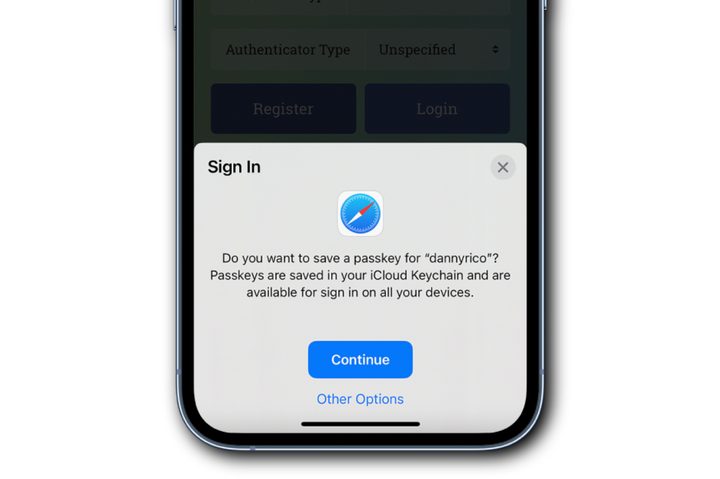
Passkeys are a new authentication system that replaces traditional passwords with cryptographic keys. Created by Apple, Google, and Microsoft in partnership with the FIDO Alliance and the World Wide Web Consortium, it’s a unique credential that’s not visible to you, is stored natively on your iPhone and iPad, and requires biometric authentication (like Face ID and Touch ID) to log you into the websites and apps you need to get into.
This feature is useful for people who fall into the bad habit of using the same password for all of their online accounts. It might be more convenient to reuse passwords, but it’s also incredibly dangerous and puts your information at risk. Passkeys aim to give you that convenience without compromising your online security.
A Passkey consists of a key pair: a public one, which is registered to the website or app you’re using, and a private one, which is held only by your devices. Passkeys are end-to-end encrypted, won’t be leaked from websites or apps, and are so strong that even the most skilled hackers almost certainly won’t be able to crack them. They also require you to use iCloud Keychain to save them. If you don’t have iCloud Keychain turned on already, you might want to enable it if you want to save any of your passkeys.
Apps and websites that support Passkeys
Passkeys have become an industrywide security standard, and many websites and apps are adding Passkey support. Here are some of the websites and apps that support the use of Passkeys:
- PayPal
- Kayak
- Best Buy
- eBay
- GoDaddy
- Dashlane
- Safari
- CardPointers
While the list may be small right now, we expect more websites and apps to add Passkey support in the near future. And the more apps/sites that eventually adopt Passkeys, the better and more convenient the security method will become.