

There are some things you can set your watch by. The sun will always rise in the east, Uncle Sam will always want your taxes, and people will always ask when Apple is going to release a touchscreen Mac. If you have been wondering about the latter, I’ve got some news for you: Apple just made it happen at its Worldwide Developers Conference (WWDC). But hear me out — it’s not what you expect.
When most people envision a touchscreen Mac, they think of the standard MacBook Pro or iMac, but with touch controls built in. Lots of companies already do that, and they make some pretty great devices. But Apple has always said it thinks this sort of device is bad for your posture and makes your arms ache with prolonged use. It is likely that that kind of touchscreen Mac is never going to happen.
At the same time, Apple has been moving its operating systems closer and closer together. You can use a keyboard and a mouse with an iPad, which now has a Dock just like the Mac. And speaking of Apple’s computers, the MacOS operating system has been able to run iPad apps for a couple of years now. The new MacOS Monterey even looks a bit like iPadOS.
But here’s the thing: By making these devices and their accompanying operating systems more like each other, Apple is not focusing on the hardware. It is not building touchscreen panels into its Macs. Instead, it is channeling its energies into the software. And that is what is giving us a sort of halfway-house touchscreen Mac.
Universal Control freak
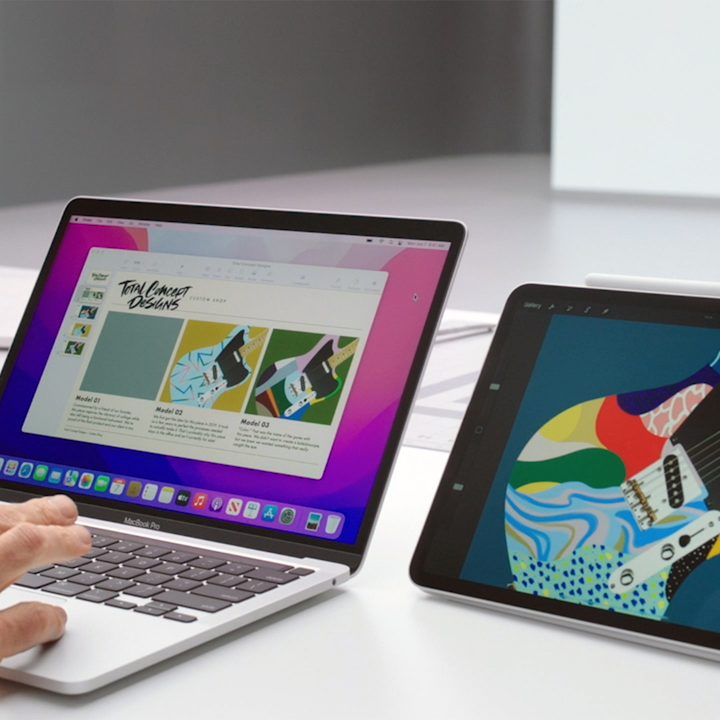
WWDC 2021 was a mixed bag, with plenty of great software ideas but with hardware conspicuous by its absence. It was a “point five” version compared to last year’s major release. Yet there was one MacOS feature that was beyond exciting: Universal Control.
With this feature, you can simply plonk an iPad down next to a Mac and then move your pointer from one device to the other. No fiddly set-up process or wires to connect, it just happens automatically (thankfully, Apple’s Craig Federighi resisted the urge to call it “automagic”).
But Universal Control means you can do more than just control multiple screens. You can drag and drop files from your iPad onto your Mac in one smooth motion. You can swipe between iPad apps using your Mac’s trackpad gestures. It even works on three or more devices at the same time, letting you move a file from an iPad, across a MacBook, and onto an iMac, all without taking a break.
In other words, the differences between the Mac and the iPad have never been smaller. Whereas before Apple’s Sidecar system allowed you to draw on an iPad and see it reflected on your Mac, Universal Control is a two-way system. The iPad has been elevated from a junior understudy to a full partner in the company.
And what does the iPad bring that the Mac still lacks? Why yes, a touchscreen. With Universal Control, you can work on your Mac, then move that work to the iPad and continue with your Mac’s keyboard and mouse without skipping a beat. The only difference is you now have a touchscreen at your disposal.
Sure, it is not running MacOS and it doesn’t have full window control yet, but one of the major barriers to standing it on an equal footing with the Mac has just been eliminated. And one of the major barriers to using your Mac with a touchscreen panel has also been swept asunder. If you were holding out for a touchscreen Mac, this is pretty damn close.
The real touchscreen Mac

Apple did not just reveal this in isolation. It also introduced some new multitasking features on iPadOS that it claims will make the operating system much more powerful for serious users.
For instance, you can now minimize apps to a shelf, much like how on MacOS your app windows are minimized to the Dock. Split View is now more useful, letting you view an email in a pop-up window without breaking the Split View arrangement, for example. And then there’s QuickNote, which is yet another way of having a second overlaid “window” open for multitasking.
Let’s not get carried away here, it is still not a full desktop experience. There are no menu bars, no full Mac apps, and more limited window management tools than you would find on your desktop or laptop. It is a hobbled touchscreen Mac experience thanks to Apple’s reluctance to go full steam ahead. But combined with the much more exciting goings-on in Universal Control, it makes the iPad a far better tool for more involved work.
Apple says it does not want to merge iPadOS and MacOS because it would dilute the best features of each system. And let’s be honest, it also does not want to cannibalize the sales of each device by the other because they are so similar. But in spite of its repeated denials, today’s WWDC announcement is the closest we have ever been to getting a touchscreen Mac. Who knew it would actually be an iPad?


