


When it comes to offering one of the best smart notebook experiences, the ReMarkable is a leading choice. However, it isn't the only smart notebook available. There are plenty of alternatives worth considering, and if you're interested in exploring new options, we’re here to provide guidance on what to buy if you want a smart notebook that isn't a ReMarkable, such as the ReMarkable 2 and the ReMarkable Paper Pro.
With many options on the market, we've narrowed it down to the top alternatives, including some excellent budget choices for those looking to save money or who are just starting to explore the world of smart notebooks. You will notice some of these are also the best tablets on the market, such as the Amazon Fire Max 11 and iPad Pro (2024).
Check out the list below to find the right fit for your needs, whether it's from a major brand or a popular smart notebooks.


Best overall ReMarkable alternative
Kindle Scribe (2024)
- Large, high-resolution display
- Long battery life
- Modern design
- High price
- No color display
- Could be bulky for some
| Specification: | |
| Dimensions | 228.6 x 195.58 x 5.08 mm (9 x 7.7 x 0.2 inches) |
| Weight | 433.748 grams (15.3 ounces) |
| Display | 10.2-inch E Ink display with 300 pixels per inch (ppi) |
| Storage | 16GB, 32GB, 64GB |
| Stylus included | Yes, Premium Pen with eraser |
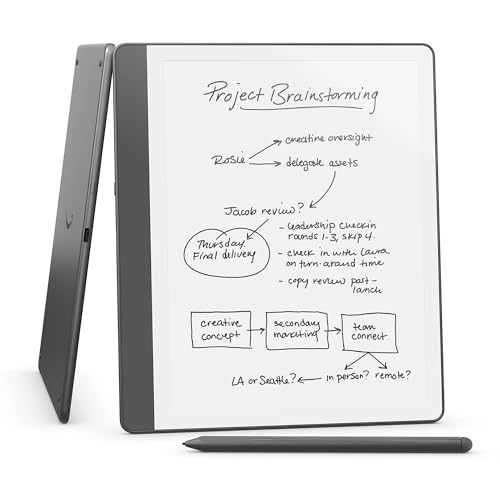
The Kindle Scribe (2024) is the second generation of Amazon's innovative e-reader for reading and writing. One of its standout features is the impressive 10.2-inch, 300 ppi glare-free display, which replicates the feeling of reading on paper and makes it comfortable for extended reading and writing sessions. The device now features a redesigned flush-front display alongside uniform white bezels, enhancing its modern aesthetics.
The upgraded "Premium Pen" stylus significantly improves the writing experience, providing a more natural and responsive one. It offers pressure sensitivity, allowing users to vary line thickness based on how hard they press, similar to a pen. The Kindle Scribe (2024) is ideal for various activities, from taking notes and annotating eBooks to converting handwritten notes into typed text, making it versatile for students and professionals.
Additional features include a notebook application that seamlessly lets you organize your thoughts and ideas. Users can create to-do lists and even import documents to mark up directly on the screen, particularly useful for reviewing work or collaborating on projects.
The Kindle Scribe comes in three storage options: 16GB, 32GB, and 64GB, catering to different user needs. It balances performance and functionality, making it a valuable tool for anyone looking to enhance their reading and writing experience in a sleek, portable format. Other features may include wireless connectivity for easy syncing and backup, adjustable warm light for eye comfort, and long battery life so you can write and read for hours without worrying about recharging.

Best budget ReMarkable alternative
Amazon Fire Max 11
- Great screen for video
- Keyboard feels good to type on
- 10-hour-plus battery life
- Useful kickstand case
- Sparse app store
- Slow charging
| Specification: | |
| Dimensions | 259.08 x 162.56 x 7.37 mm (10.2 x 6.4 x 0.29 inches) |
| Weight | 490.3 grams (17.28 ounces) |
| Display | 11-inch 2K (2000 x 1200 pixels) IPS LCD |
| Storage | 64GB, 128GB |
| Stylus included | No, available separately |
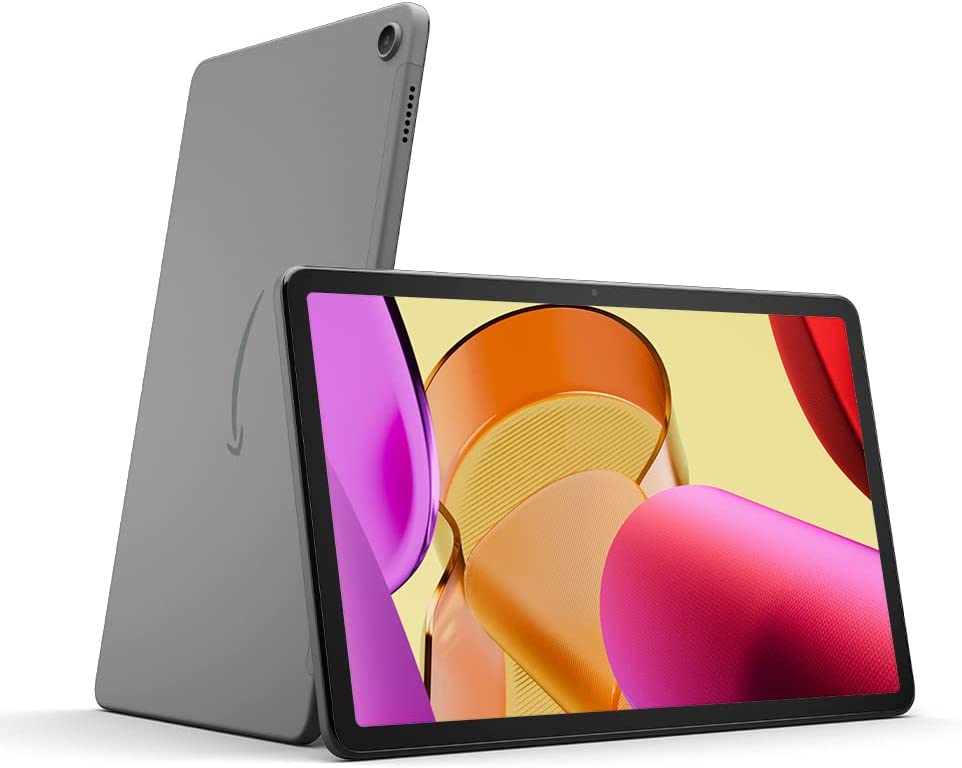
The Amazon Fire Max 11 is a full-featured Android tablet equipped with an 11-inch LCD screen, while the ReMarkable tablet focuses on providing a paper-like writing experience through its e-ink display.
The Fire Max 11 operates on Amazon's Fire OS, a customized version of Android that offers access to a wide range of apps, including streaming services, games, and productivity tools. In contrast, the ReMarkable runs on a custom Linux-based operating system specifically designed for reading, writing, and sketching. The Fire Max 11 features a bright and vibrant 11-inch LCD display with a resolution of 2000 x 1200, making it well-suited for watching videos and browsing the web. On the other hand, the ReMarkable is primarily intended for a distraction-free environment, ideal for note-taking and reading.
Additionally, the Fire Max 11 is a versatile device capable of handling various tasks, from entertainment to professional work. Users can browse the internet, watch movies, play games, and utilize productivity apps. The ReMarkable, however, excels in note-taking and document annotation with its realistic writing experience and impressive battery life. You'll have to decide for yourself which is the most important for you.
Ultimately, the best choice between these two tablets depends on your specific needs and priorities. If you are looking for a versatile tablet for both entertainment and productivity, the Fire Max 11 is an excellent option. However, if your main focus is on achieving a distraction-free writing and reading experience, the ReMarkable may be worth considering, despite its higher price tag.

Best versatile ReMarkable alternative
Kobo Elipsa 2E
- Bright and clear display
- In-book annotations
- Big list of supported files
- Google Drive and Dropbox integration
- Weeks of battery life
- Stylus needs separate charging
- Sluggish performance in areas
- Dodgy exporting
| Specification: | |
| Dimensions | 193 x 227 x 7.5 mm (7.60 x 8.94 x 0.30 inches) |
| Weight | 390 grams (13.76 ounces) |
| Display | 10.3-inch E Ink Carta 1200 touchscreen with 1404 x 1872 (227 ppi) |
| Storage | 32GB |
| Stylus included | Yes, Kobo Stylus 2 with eraser |
The Kobo Elipsa 2E is an advanced 10.3-inch e-reader that seamlessly blends reading and note-taking functionalities, making it an excellent choice for students, professionals, and avid readers. Its design emphasizes sustainability, incorporating recycled and ocean-bound plastics, reflecting a commitment to environmentally friendly practices.
The device showcases a glare-free E-Ink Carta 1200 touchscreen, which ensures a paper-like reading experience, even in bright sunlight. Additionally, the ComfortLight PRO feature allows users to adjust brightness and color temperature, which not only enhances reading comfort but also helps reduce blue light exposure during nighttime reading sessions. This thoughtful design element helps alleviate eye strain and promotes better sleep quality.
The Elipsa 2E includes the Kobo Stylus 2, renowned for its smooth and responsive writing capabilities directly on eBooks and PDFs. This stylus allows for precise annotation, making it easier for users to highlight important passages, jot down notes, and create to-do lists. The device’s 32GB of storage capacity is impressive, enabling it to hold a vast library of thousands of eBooks and notebooks, thus ensuring that materials are always at your fingertips.
Regarding multimedia capabilities, the Elipsa 2E supports Kobo Audiobooks through Bluetooth, allowing users to enjoy various audiobooks. This feature complements its reading functionality, providing an all-in-one visual and auditory storytelling solution.
Battery life is another strong aspect of the Elipsa 2E. It can last weeks on a single charge, which is advantageous for users who read frequently or use it for extended note-taking sessions.
In the competitive landscape of e-readers, the Kobo Elipsa 2E stands out as a formidable rival to the Kindle Scribe. It offers a comparable note-taking experience while emphasizing eco-consciousness, making it a compelling choice for environmentally aware consumers seeking a versatile reading device that combines functionality with sustainability.
Best small ReMarkable alternative
Apple iPad mini (2024)
- Pocketable size and gleefully light
- Better aspect ratio than other iPads
- Sharp and colorful display
- A17 Pro silicon is plenty powerful
- Battery life doesn't disappoint
- Screen should be brighter
- Apple Intelligence is still half-baked
| Specification: | |
| Dimensions | 195.33 x 134.62 x 6.35 mm (7.69 x 5.30 x 0.25 inches) |
| Weight | Starting at 293 grams (10.4 ounces) |
| Display | Display: 8.3-inch Liquid Retina display (2266 x 1488 resolution) |
| Storage | 128GB, 256GB, or 512GB |
| Stylus included | No, Apple Pencil available separately |
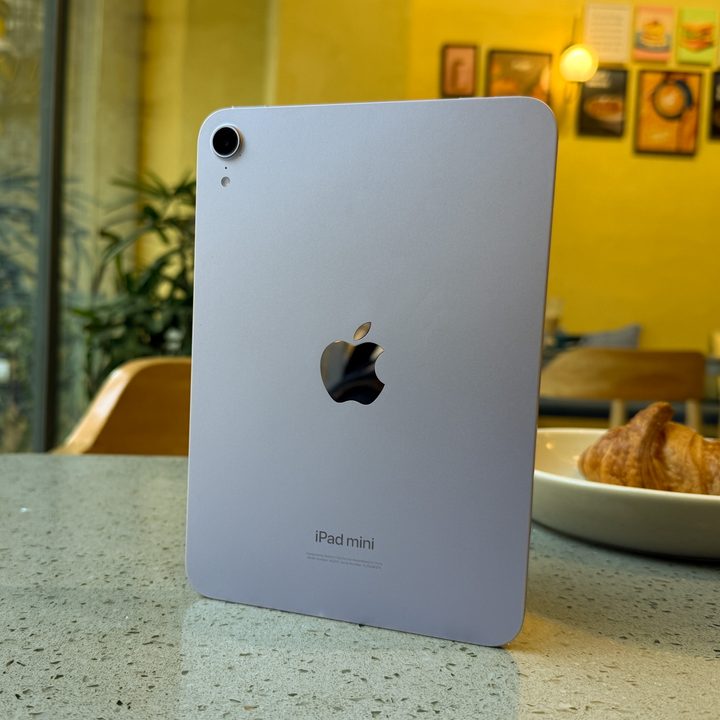
The Apple iPad mini (2024) and ReMarkable brand tablets present distinct digital note-taking and reading approaches, catering to different user needs and preferences.
The iPad mini stands out as a versatile, full-fledged tablet. It features a vibrant Liquid Retina display that supports True Tone, providing crisp visuals and an immersive viewing experience. Users can access the App Store, which hosts a vast library of applications tailored for various tasks—from productivity tools like Microsoft Office and Notability to entertainment options like Netflix and social media. This flexibility makes the iPad mini an excellent choice for those who need a multipurpose device. Its powerful A17 Pro chip ensures smooth multitasking, allowing users to juggle between apps seamlessly. However, the glossy screen, while attractive, can lead to reflections and may be distracting for those aiming to focus solely on writing or reading.
On the other hand, ReMarkable tablets prioritize a distraction-free environment, utilizing an innovative e-ink display that closely resembles the tactile quality of writing on paper. This design significantly reduces eye strain and is easier to read in bright sunlight. The tablet is built explicitly for note-taking and document markup, boasting features like handwriting recognition and converting handwritten notes into text. The reMarkable’s higher battery life means it can last for days on a single charge, addressing a common concern for digital note-takers. However, it's important to note that its functionality is somewhat constrained; it lacks the app diversity and advanced capabilities of complete tablet operating systems. Features like web browsing and gaming are unavailable, which may deter users from seeking a more multifaceted device.
Ultimately, choosing between the iPad mini and the ReMarkable tablet hinges on personal priorities. If you value a versatile device that can handle a wide range of tasks beyond note-taking—such as media consumption, gaming, and productivity—then the iPad mini is the clear winner. Conversely, if you prioritize a focused, authentic writing experience that mimics paper and enables seamless annotation, the reMarkable tablet stands out as the superior option. Each device offers unique strengths, ensuring users can find a tablet that aligns with their needs.
Best high-end ReMarkable alternative
Apple iPad Pro (2024)
- Sublime OLED screen
- Lovely design and build
- Top-notch speakers
- Surprisingly good battery life
- Blistering performance
- Excellent keyboard and stylus
- iPadOS is achingly lacking
- It's extremely expensive
- Pricey accessories
| Specification: | |
| Dimensions | 11-inch: 249.7 x 177.5 x 5.3 mm (9.83 x 6.99 x 0.21 inches) 13-inch: 281.6 x 215.5 x 5.1 mm (11.09 x 8.48 x 0.20 inches) |
| Weight | 11-inch: from 444 grams (15.66 ounces) 13-inch: from 579 grams (20.43 ounces) |
| Display | 11-inch Liquid Retina XDR Display with 1668 x 2388 pixels (~264 ppi) 13-inch Liquid Retina XDR Display with 2064 x 2752 pixels (~264 ppi) |
| Storage | 128GB, 256GB, 512GB, 1TB, 2TB |
| Stylus included | No, Apple Pencil available separately |
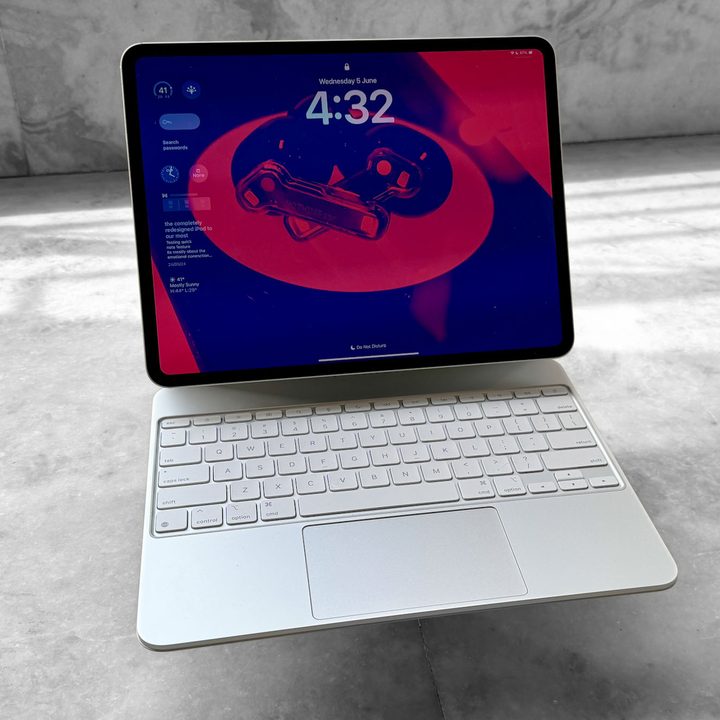
The iPad Pro is a versatile, multi-purpose device ideal for creative professionals, students, and anyone needing a powerful tablet for work, entertainment, and more. In contrast, ReMarkable tablets are designed specifically for reading, writing, and sketching.
The iPad Pro seamlessly integrates with the Apple ecosystem, allowing for easy synchronization of notes, files, and apps with your iPhone, Mac, and other Apple products. While ReMarkable provides a cloud service and some limited integration, it doesn't match the extent of Apple's ecosystem.
The iPad Pro’s Liquid Retina XDR display is brighter, sharper, and more vibrant than the e-ink display found in ReMarkable tablets. This makes the iPad Pro ideal for watching videos, editing photos, and enjoying other visual content. The iPad Pro’s powerful M3 chip can handle demanding tasks such as video editing, 3D modeling, and gaming. On the other hand, ReMarkable devices are equipped with less powerful processors that are optimized for their specific functions. Finally, the iPad Pro has access to a vast library of apps through the App Store, including productivity tools, creative applications, and games. ReMarkable offers a limited selection of apps primarily focused on productivity and creativity.
Ultimately, the iPad Pro and ReMarkable tablets serve different needs. If you require a powerful and versatile tablet for various tasks, the iPad Pro is the superior choice. However, if your main priority is a focused, distraction-free writing and reading experience, a ReMarkable device may be the better option.
How we selected the best ReMarkable alternatives
Choosing the right smart notebook that isn't a ReMarkable can be overwhelming. With numerous options available, the quality can vary significantly based on brand and price. Below, we explain how we identified the best ReMarkable alternatives and provide insights into what to consider before purchasing a new smart notebook.
The writing experience
Since you'll be doing a lot of writing with your smart notebook, the experience must be enjoyable. The pen should feel comfortable on the "paper," and latency should be minimal to avoid stuttering that could disrupt your experience. While all the smart notebooks listed include a pen or stylus, not all do, so be sure to check whether you need to pay extra for this essential accessory.
Visual comfort
In addition to writing, you'll spend time reading and studying on your smart notebook screen. This experience must be easy on your eyes. A larger display can enhance your experience, but also consider resolution levels and pixel density. Opting for lower quality in these areas may result in a less than satisfactory display.
Check how well it plays with others
You want a smart notebook that supports many different file types, makes it simple to import new content from other devices and export documents. Cloud syncing can also be a major bonus, although it isn’t always essential. Make sure that whichever smart notebook you buy plays nicely with your other devices so you won’t be stuck with your notes trapped on one device.
How we test
When looking for an alternative to the ReMarkable tablet, hands-on testing is essential. Start by holding the device to evaluate its ergonomics and comfort. Carefully examine the e-ink display, checking for sharpness, responsiveness, and its ability to handle glare in various lighting conditions. The writing experience is also important, so use the stylus to write and sketch, paying close attention to latency, pressure sensitivity, and palm rejection.
Next, explore the software interface to ensure it is intuitive and offers the needed features, such as handwriting-to-text conversion or cloud syncing. If possible, import some documents to see how they render, and test any essential apps you rely on. Finally, read in-depth reviews and watch comparison videos to gain further insights from other users and experts.
Why trust us
Digital Trends is a highly regarded and widely recognized technology news and media website that provides in-depth coverage of the latest developments in the tech industry. We have built a reputation for comprehensive product reviews that analyze everything from smartphones and laptops to smart home devices and gaming gear.
In addition to our product reviews, we offer timely news articles that inform our readers about significant technological advancements and industry trends. Our how-to guides provide practical tips and tutorials that help users navigate various tech challenges and make the most of their devices.
We also produce engaging videos and podcasts exploring various tech topics, offering insights and discussions for enthusiasts and casual users alike. Our reviews and recommendations are grounded in extensive research, ensuring our audience can trust our insights when making a purchase. Digital Trends caters to the interests of tech lovers, professionals, and everyday consumers by covering a diverse range of technology subjects.


