
The market for Android tablets appears to be sinking, but the likes of the Pixel Tablet may have some role in salvaging it. The Pixel Tablet, launched last week — exactly a year after it was first unveiled — marks Google’s reentry into the tablet segment after almost a decade.
While this development may help bring more manufacturers onto the scene, Google itself feels shy about making big claims about performance and productivity. Instead, the Pixel Tablet is projected as a mere hybrid upgrade to the Nest Hub and Nest Hub Max.

Meanwhile, brands like OnePlus seem to take a more vigorous approach with tablets, starting with the OnePlus Pad, a $479 tablet that is claimed to empower you in both work and play. More importantly, the OnePlus Pad borrows key features from the Apple ecosystem, making it a more attractive option than the $499 Pixel Tablet.
Here are the top reasons I think the OnePlus Pad is a better purchase than the Pixel Tablet.
OnePlus Pad: refreshing display

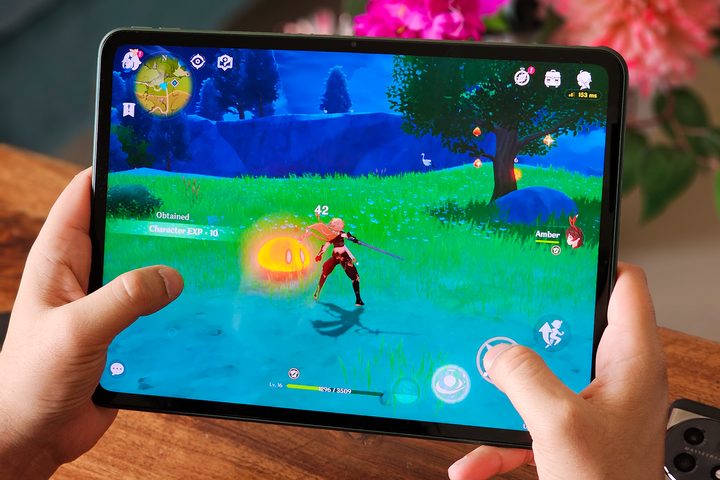
The OnePlus Pad rocks an 11.6-inch display with a 2800 x 2000 resolution. The display has a 144Hz refresh rate display, which means the contents on the display update 144 times every second, allowing the OnePlus Pad to render smooth animations for launching or transitioning between apps, scrolling webpages, and playing games.
Meanwhile, the Pixel Tablet is still stuck with a 60Hz display. In the past, Google has displayed exceptional lethargy in upgrading displays to support a higher refresh rate. While even budget Android smartphones now come equipped with 120Hz or higher refresh rates, Google has been very picky in terms of which devices will support a display that refreshes faster. In its current flagship lineup, the Pixel 7 is still limited to a 90Hz refresh rate, and the same goes for the Pixel 8.
From Google’s vantage, that is justified for a device expected to be used as a display hooked to a speaker for most of its lifetime — but that is where the problem lies. Countless Android apps, especially games, now support higher refresh rates for a better visual experience. And while the Pixel Tablet has powerful internal hardware to run those apps or games, the display limits the output to a maximum of 60 frames per second (fps) owing to the 60Hz refresh rate.
This leads us to my next point about how Google restricts the Pixel Tablet’s utility to just one aspect: entertainment.
Pixel Tablet: all about entertainment
At last week’s Google I/O 2023 conference, Google talked about several updates coming to its services, mainly AI-backed improvements. The tech giant briefly touched upon upcoming devices, including the Pixel Tablet, and spoke about specific capabilities — such as entertainment, video calling, and editing images in Google Photos.
While doing so, Google completely overlooked the Tensor G2’s capabilities as the powerful chipset driving the Pixel Tablet. It also missed the opportunity to endorse the Pixel Tablet as a device for productivity tasks, work, or demanding usage beyond watching movies and TV shows.
This is one area where Android tablets, except a handful of expensive tablets from Samsung, have traditionally lagged. While Apple projects the iPad as a computer’s replacement — and the recently added support for demanding software such as Final Cut Pro and Logic Pro X affirms that notion — Google appears to steer clear.
OnePlus, on the other hand, hails the OnePlus Pad as a multipurpose device that’s not limited to entertainment. The Dimensity 9000 chip is claimed to offer a powerful, yet efficient performance. In real-life usage, the OnePlus Pad barely stutters or lags, irrespective of the task you throw at it.
Outside the U.S., OnePlus also sells a variant of the OnePlus Pad with 12GB of RAM. While that may sound preposterous for an Android tablet, it gives the OnePlus Pad immense power for extensive tasks such as gaming.
Where are all the official Pixel accessories?

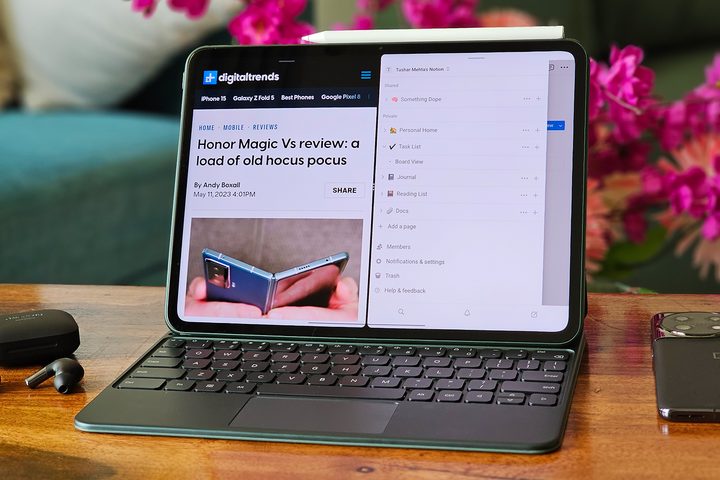
Official accessories further enhance the OnePlus Pad’s utility. The official OnePlus keyboard folio, priced at $149, is designed to supercharge your multitasking on the fly. Although the folio and One Plus Pad may not be as effective in replacing your laptop as the combination of an iPad Pro and an Apple Magic Keyboard, it is better than having to deal with third-party accessories.
The keyboard folio brings direct function buttons to increase or decrease the brightness or volume, or to take screenshots. At the same time, the trackpad adds two- and three-finger navigation gestures to breeze through the interface when the folio is connected.
The OnePlus Pad also seeks to target digital illustrators with its Stylo pencil. Although the OnePlus Stylo looks like an Apple Pencil duplicate, it offers an almost lag-free response for sketching and note-taking. Like the Apple Pencil, you can also double-tap near the tip to change tools while drawing in the native OnePlus Notes app, making this $99 accessory a productivity enhancer.
In contrast, the Pixel Tablet supports the Universal Stylus Initiative (or USI 2.0) standard for generic active styluses. While the move favors interoperability, it also leaves the task of researching and finding the most appropriate stylus for the tablet up to you, should you wish to illustrate on the Pixel Tablet.
OnePlus: robust productivity features

When it comes to productivity tasks, the void left by the lack of an official keyboard and stylus is widened further with the Pixel Tablet’s lackluster productivity features. Both the OnePlus Pad and the Pixel Tablet offer multi-window support for apps, allowing two apps (or two instances of the same app) to run side by side. OnePlus adds to this with the ability to show floating windows, allowing you to interact with up to three apps simultaneously without switching away from the screen.
The OnePlus Pad adopts an iPadOS-like dock, allowing you to place icons of up to six apps (or folders), along with three recent apps. Compared to the OnePlus Pad’s dock, the Pixel Tablet comes with a “transient” taskbar built upon the static taskbar from Android 12L. The updated taskbar, which is available for all devices with larger screens running stock Android 13, can show four persistent apps, along with two suggested apps that dynamically change based on your usage.

The Pixel Tablet’s taskbar notably wins in its ability to appear over any app (or multi-window setup). The OnePlus Pad’s dock is not visible over apps and only on the home screen. But the OnePlus Pad has a sidebar that can be accessed over any screen to launch any installed app or open the app drawer. While the dock and sidebar may feel wimpy compared to the Pixel Tablet’s taskbar individually, they easily overpower it when combined.
OnePlus also chooses an unconventional 7:5 aspect ratio for the display, compared to the Pixel Tablet’s 16:10 display. The OnePlus Pad’s display allows for more vertical space when used in landscape mode, making it more appropriate for reading in a tabletop- or laptop-like orientation.
Tending to the ecosystem

Besides productivity features, OnePlus also borrows another page from Apple’s book to help enhance user experience. While the Pixel Tablet relies on open standards and third-party accessories, OnePlus aims to strengthen an Apple-like ecosystem by allowing a smooth interaction between the Pad and other OnePlus devices.
These features include seamless and automatic data sharing between the OnePlus Pad and any OnePlus phone running OxygenOS 13.1 or above (like the OnePlus 11). When in range, the OnePlus Pad automatically connects to a Wi-Fi hotspot on the OnePlus phone without requiring you to turn it on actively. Clipboard is instantly synchronized across devices, so you can copy a piece of text or media on one and instantly paste it on the other.
Similarly, you can also view your notifications and other call- or message-related alerts from your OnePlus phone directly on the OnePlus Pad. And lastly, any photos or videos shot on the phone can be automatically synced to the Pad if you use OnePlus’s cloud storage.
Battery and charging

Owing to their respective flagship chipsets, the Pixel Tablet and the OnePlus Pad can be expected to offer similar (mostly lag-free) performance. But the OnePlus Pad comes with a slight advantage in the form of a bigger 9,510mAh battery. Meanwhile, Google uses different units and claims a 27 watt-hour battery for the Pixel Tablet. Watt-hour and mAh (milliampere-hour) are not directly convertible power units, but Android Authority confirms the Pixel Tablet’s battery to be rated at 7,020mAh.
Another advantage of the OnePlus Pad is its support for 67-watt fast charging, which tops up the large battery in less than two hours. Meanwhile, the Pixel Tablet still uses the archaic 18W charging speed through USB-C.
Pixel Tablet: docked design may be problematic

Google’s supposed solution to power problems is to keep the Pixel Tablet attached to its charging speaker dock when not in use. But continuous charging comes with its own set of issues. When a lithium-ion battery, as is used on the Pixel Tablet, is charged continuously such that the battery is almost 100% for long durations, it leads to a phenomenon called trickle charge.
During trickle charge, the battery is continuously topped up by the charger to compensate for any current supplied from the battery to the device. This leads to frequent charging-discharging cycles that cause physical deformations inside the battery.
Google offers a solution to Pixel devices, including the Pixel Tablet, in the form of “Adaptive Charging,” which delivers current at a slower-than-usual rate to prevent the battery from heating, but that does not prevent the battery from being charged to 100%.
Pixel devices also have the ability to stop charging when they reach 80% capacity. But this requires certain conditions: when there is continuous charging under a high drain (for instance, while watching movies or gaming) or when the device is plugged in for four days continuously. Thus, to enjoy these battery improvements, you may have to keep the Pixel Tablet plugged in for four days straight, effectively limiting it to a smart display rather than as a tablet.
Strange decisions that don’t add up
OnePlus has gone all-in to promote its tablet, ensuring it attracts consumers with varied expectations. Meanwhile, Google sets lower expectations, reserving the Pixel Tablet for tasks like entertainment. This lack of enthusiasm from Google toward tablets can be unsettling for fans who waited a whole year for Google to launch its first Android tablet in almost a decade.
Google presumably wants to prevent Android tablets from overstepping into the category of Chromebooks, which is why it has skipped on key use cases such as productivity. But with Apple finally realizing that it can’t delay merging tablets and laptops much longer, Google’s approach feels old-fashioned and regressive. This may end up backfiring and lowering the sales of the Pixel Tablet.
On top of a launch that took a year since the first unveiling, Google is still asking potential buyers to wait until June 20 to buy the Pixel Tablet. Meanwhile, the OnePlus Pad is already available for purchase.
If you are in need of a multipurpose tablet that helps you with both work and entertainment, the OnePlus Pad may be the wiser choice. And at $20 cheaper than the Pixel Tablet, it’s a pretty good deal, too.


