

Saving fuel is something we can all appreciate, but who among us wants to endure the hassle of jotting down exactly how much you paid at the pump or how many miles you’ve driven every time you jump in the car? Not I, said the laziest guy in the room.
Thankfully, through the magic of the iPhone, we don’t have to.
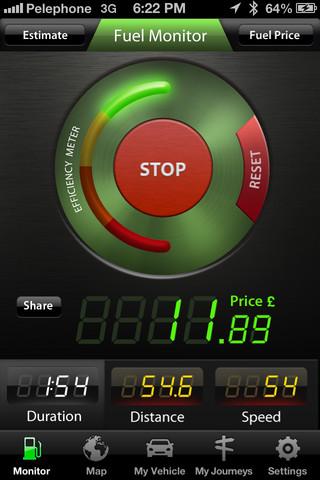 A group of developers have brought yet another fuel monitoring app to iOS and it’s … well it’s actually called Fuel Monitor. Fancy stuff, right?
As its creative name suggests, Fuel Monitor tracks different driving metrics like your fuel consumption, drive duration, distance, and speed, which it does through a combination of your iPhone or iPad’s accelerometer, built-in GPS, and auto manufacturer information.
Drivers pick from a virtual car lot of over 60,000 makes, models, and years – some of which I haven’t even heard of before.
The app isn’t restricted to users in the U.S. either, with over 25 different currencies and different units of measure, meaning Fuel Monitor should work no matter what country you live in.
Once all the data is collected, and the price paid for gas calculated, Fuel Monitor spits out the total cost of the trip, letting drivers know exactly what their total mileage travelled cost was all in real-time. It’s also a great way for people to share the financial burden of carpooling and road trips in a more fair and accurate way.
GPS is really the key here, as it lets the app track the actual distance you’re traveling rather than relying on some rough estimate entered by the user.
Users can even keep the app running in the background but be warned: the GPS function can be a battery hog.

The app also claims to help drivers save money and reduce their carbon footprint, by way of greener, more efficient driving. Who doesn’t want to save money and the earth?
As mentioned, a simple efficiency meter on the display moves from red to green the more efficiently you drive. Does your lead foot get the better of your driving habits? The app can detect when you’re accelerating wildly. Stuck in slow moving traffic? Prepare to see red while you lose your green.
Sure there are number of efficient driving techniques drivers can utilized without buying an app, but Fuel Monitors efficiency gauge gives a nice color-coded readout so you can give it a quick glance to ensure you’re squeezing the most out of your mileage.
It’s also one of the better looking fuel apps on the market. Digital read outs, icons that make sense, and slick efficiency gauge all help add up to make one intuitive and eye-catching interface.
And for just $1.99, you really can’t go wrong.


