
With cable growing increasingly more expensive people are turning to watching their favorite shows other ways. A phone screen can be too small and a laptop too bulky, which leaves a tablet – or in this case an iPad – as an ideal solution when traveling or as a simple alternative to a TV. Here you’ll find the best ways to watch TV on an iPad.
Netflix

The first and most obvious choice for quick shows and movies on any device is Netflix. As you probably already know, Netflix offers a growing selection of movies and TV shows but it doesn’t offer current episodes. It also charges $8 a month for instant streaming.
Hulu

The next go to for shows is Hulu, but the only way to use the app is with a Hulu Plus account, which will run you $8 a month as well. The app runs smoothly and has TV episodes for many major network and cable TV shows the day after they air, but it does have lengthy commercial breaks. It really isn’t much different than watching live TV.
HBOGo

Like Netflix or Hulu, these shows are free, but you must have an HBO subscription (through a cable company) to log on. It carries entire series of HBO originals, such as Game of Thrones and The Sopranos. The movie library is smaller than Netflix, but has more new high-profile movies. There’s a faster turnover rate for movies than other services, too. The app freezes and quits from time to time, but for the most part it’s consistent. The great thing about this app is it doesn’t recognize how many people are signed into it at once, so if you have a Sopranos obsessed friend, you can let him or her use the same account at the same time (but we didn’t tell you that). While other premium channels also have their own apps, HBOGo is the easiest to use and comes with a wider variety of content.
Elgato EyeTV

Elgato EyeTV Mobile boasts the ability to watch live TV with a decent DVR. It is a free app, but to use it you have to pay $100 for EyeTV’s antenna. It can’t be accessed everywhere in the country and often only has a few channels that work. For instance, Portland, Oregon only has access to ABC, Fox, and NBC. The DVR would be nice but getting the individual channel apps would be easier and cheaper.
YouTube

If all else fails, YouTube is a good fallback option. This isn’t a terrible place to find some older shows and movies – check out our regularly updated guide to the best movies on YouTube. Most users are able to upload entire movies to one video, but others break films into six or seven parts. YouTube is free, but the quality is fair at best and not all videos are enabled for mobile devices – so don’t get too excited to Hocus Pocus on your iPad.
Crackle

Crackle offers movies, shows, and originals completely free. The app is geared at men and specializes in action, horror and comedy, so not the place to find “When Harry Met Sally.” Unlike Netflix, You don’t have to register to use Crackle, but it offers perks to those who do. You can create multiple queues and share those with friends or sign up for updates when new content is added in a certain genre or series. There aren’t a whole lot of choices for content, but the company is growing so that should change soon.
Amazon Instant Video
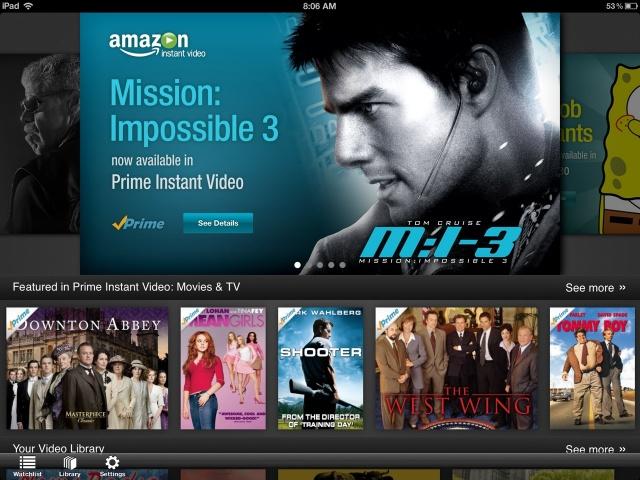
The variety and availability of content in this app is comparable to Netflix. For $80 a year, an Amazon Prime account gives you access to instantly streaming movies and shows. A Prime subscription also allows for free two-day shipping on many things from Amazon.com.
Can I Stream It?

Though this app doesn’t play videos, it will tell you exactly which one will stream the movie you are looking for. Can I Stream It? shows where any movie or show can be instantly streamed, rented, or purchased. It will also send you alerts when your favorite movie comes to Netflix or Hulu. This is a much more efficient way of finding things than looking through each app individually.
SnagFilms

This app started out solely to view documentary films and that still is what primarily makes up it’s selection but fictional independent movies have also been added. The movies and app are free, but there are commercials. Some of them are even from Hulu so there are commercials. It is hard to search on the app and customers have complained about suddenly losing sound. This doesn’t require any kind of subscription or registration but registering allows the user to create personal lists, pick up from where they left off in a movie and see what friends are watching. SnagFilms can feel a bit snobby but it will introduce you to films you probably wouldn’t have seen.
Flixster

Like Can I Stream It? this app will show you options for viewing any movie you search for. Some you can watch directly from Flixster using UltraViolet, but most of the options are to purchase movies. The app is free, but most of the movies cost money.
Vidora

Vidora is the TV watching apps to end all apps. It compiles all of the shows and movies that are streaming on other sites such as Hulu and Netflix and becomes your one stop shop for anything streaming. The only hitch is that the show actually plays in the Netflix or Hulu app so it can be a bit jarring constantly switching between things. Check out our complete review of Vidora.
What do you think of our guide to watching TV on your iPad? Did we miss something? Let us know in the comments below.


