Blood pressure monitors can help you establish a history of health information, and at-home monitors have come a long way in recent years. Each of our picks for at-home monitors is medically accurate and offers plenty of memory to store readings, so you don’t have to resort to pen and paper. Let’s take a look at our top picks for the best blood pressure monitor, including a few with apps and Wi-Fi connectivity, and find the right one for you.
Beurer BM55 Upper Arm Blood Pressure Monitor
Best blood pressure monitor overall
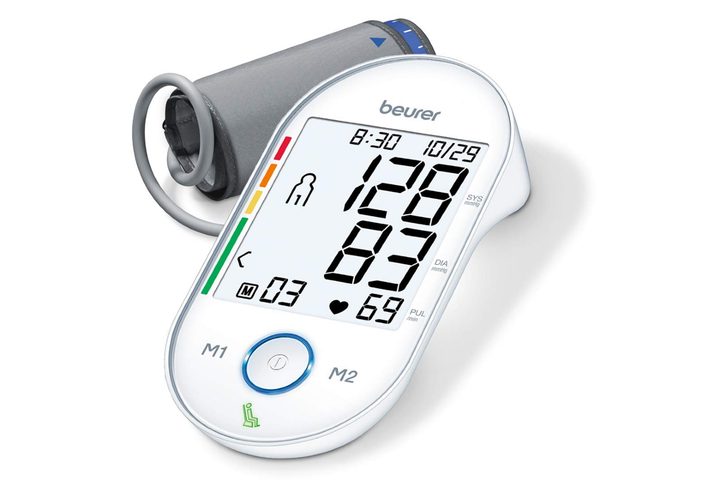
Beurer offers an ultra-large screen with easy to read display and room for two users to store up to 60 readings. It’s a medical-grade device and uses a simple start button for easy measurements. It comes with a patented rest monitor. It tells you if you’re not calm enough to take an accurate blood pressure reading, alleviating guesswork and providing a better picture of your blood pressure patterns.
The extra-large cuff fits arms between 8.7 and 16.5 inches in circumferences, and the band is flexible with a gentle inflation style. With the handy color scale displayed on the side, you know in an instant if your blood pressure is too high. It comes with a storage case and required batteries so that you can get started right away. There’s no plug-in option and no smart device connection. However, for a straightforward, automatic option, this one provides reliable results with an incorrect usage indicator to ensure accuracy.
Why we love it:
- Large screen and easy-read display
- Can store up to 60 readings for two users
A&D Medical Premium Upper Arm BP Monitor
Best value blood pressure monitor
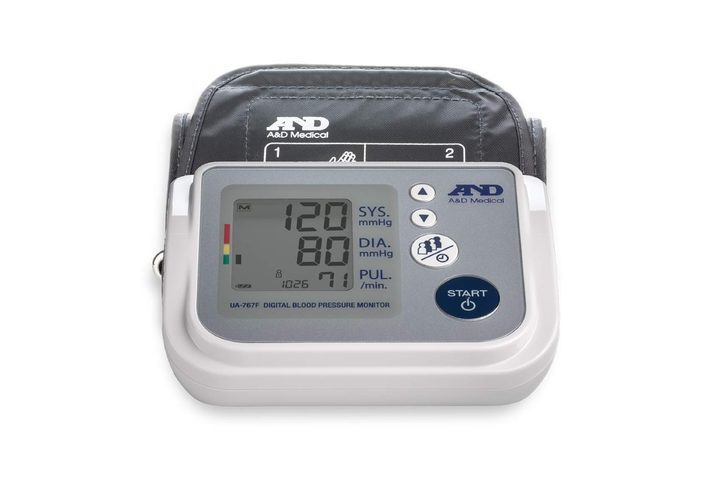
If your loved ones aren’t that tech-savvy, this option from A&D could provide the answer. It features a recognizable, one-button start with a comfortable armband. It has a large digital display for multiple readings, and it automatically averages a series of measurements.
You have the option of storing up to 30 readings, allowing you to track your patterns for better monitoring. If you need more than that, you can download the app for electronic logs. It uses gentle inflation for comfort, providing fast, accurate, and stress-free readings.
Why we love it:
- Clinically validated for accuracy
- Affordable price point
Omron 10 Series Wireless Blood Pressure Monitor
Easiest blood pressure monitor display to read
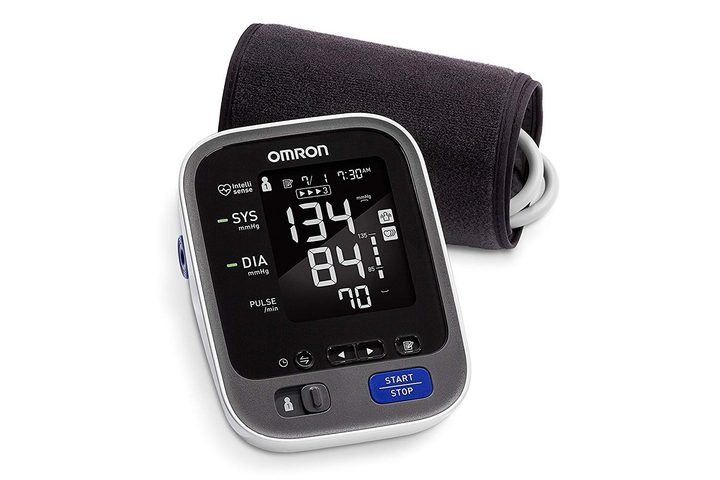
The 10 Series offers convenient monitoring with a wireless connection. It accommodates two users with up to 100 measurements each for tracking patterns and connects to select Android and iOS devices through Bluetooth. You also have the option of emailing results directly. It features an easy-to-read, well-lit monitor for no mistakes, and it automatically averages three readings for a better picture of your blood pressure at any given moment. Multicolored LED indicator lights display results using internationally recognized guidelines.
It’s designed to wrap around itself safely for travel and storage and has a simple, push-button start. Connect it to the free app, and you can store unlimited readings for a full picture of your blood pressure patterns. It requires four AA batteries or the included AC adaptor. Measure your arm using cloth tape before you invest because it fits standard arms from 9 to 17 inches in circumference.
Why we love it:
- Connects to Android and iOS for smart operation
- Easy-read LED display
iProven Wrist Blood Pressure Monitor
Best blood pressure monitor for travel
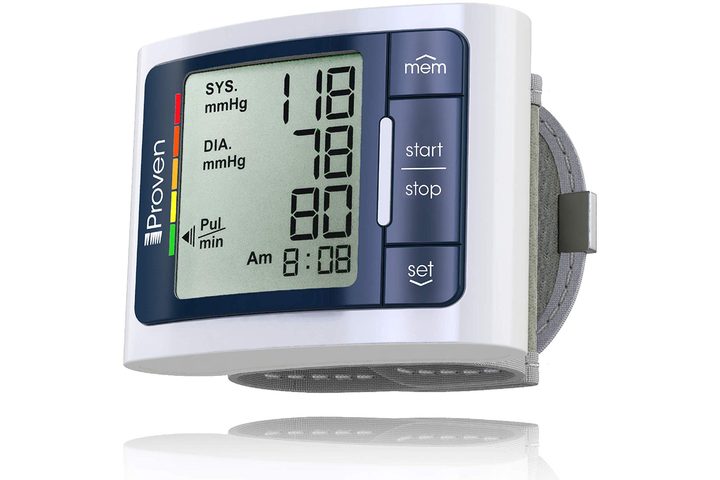
For those of you needing a wrist option, this option from iProven has an excellent display and simple operation. It’s manual, so it may take some getting used to if you’ve got an automatic cuff, but the display makes things easy. It has a handy color chart on the side to let you know if you’re reaching dangerous territory, and it follows the standard American Heart Association chart. It gives you storage for up to 60 readings, plenty to establish a pattern or trend, and it’s easy to adjust the cuff for the right fit. It detects irregular heartbeats for you and is one of the smallest options on the market. It comes with four AA batteries to operate, but can be adapted to a 6v adapter(not included).
Why we love it:
- Monitors via a wristband
- Easy-read display
How long do at-home blood pressure monitors last?
At-home blood pressure monitors come pre-calibrated and tested, but they don’t keep their accuracy forever. You’ve got two or three good years of quality. After that, you’ll need to bring your cuff to your doctor to check the calibration.
Are at-home monitors accurate?
They can be very accurate, but there are a few things you need to look for. First, don’t bother with those smart apps that claim to scan your blood pressure and heart rate. They don’t work.
Second, you should use an arm cuff over a wrist cuff for the most accurate measurements. Brachial blood pressure monitors are typically the most reliable and are the recommended type if you’re over the age of 50.
Under the age of 50, certain wrist monitors can still be accurate, but you’ll need to ensure the right fit, just like the upper arm. If it’s too tight, your pressure can read too high. Too loose and your cuff won’t be able to measure.
If you want to double-check your monitor’s accuracy, most doctors are happy to check your machine against their medical-grade machines. If you do this once a year, you’re pretty well assured of an accurate monitor.
Are manual or automatic monitors better?
In a study of office readings, automated monitors were shown to be more accurate overall than traditional recordings. This could remove human error and subtle differences in technique. For at-home use, you shouldn’t have to worry about having a stethoscope, which can be challenging to manage alone.
Automatic cuffs provide a simple, push-button start with simple readings. As long as you’re calm, you’ll get the best results from this option than manual monitors.
Do I need extra features?
If you don’t have a history of heart issues, you probably don’t need to shell out the extra cash for things like indicators for tachycardia or unlimited storage for apps. Most people just need a basic monitor to store around a month or two of the readings to establish a pattern.
Apps can be helpful if you want a holistic picture of your health or need to share quick results with your healthcare professional. They can provide you an easier way to keep an eye on things, and some even help streamline the footprint of your monitor to travel better.
When and where do I take my blood pressure for the best results?
To get the most accurate reading, you must be in a calm, resting state of mind. You must be in a calm frame of mind to ensure that your blood pressure isn’t temporarily raised from stress or other outside factors.
It’s best to use your left arm for readings and make sure your arm is resting comfortably at heart level for 5 to 10 minutes before attempting a reading. You may want to consider taking the other arm periodically because significant differences in readings between each arm could mean trouble with your peripheral arteries.
How do I choose a monitor?
It’s essential that you get the right fit. Measure your upper arms with a cloth tape and double-check that your arm falls comfortably within the range offered by your desired monitor. You need an easy start button to ensure straightforward operation.
The display should be large enough that you can read it with no mistakes, but batteries versus plugin options are a matter of preference. Batteries are more convenient for travel, but they require changing. Cords never run out of juice, but you may have to finagle the cable around as you measure.
Why do I need an at-home monitor?
You should invest in an at-home monitor for a variety of reasons.
- Whitecoat syndrome — Many patients are nervous at the doctor’s office, and that anxiety can translate into regular high blood pressure readings. Sometimes, it’s hard to tell if it’s the office or a real issue. An at-home machine may be a way to help understand your BP issues better.
- Regular readings — If you know you have high blood pressure, you may not go to your doctor often enough to keep an eye on it. Your doctor may even want you to take readings and send them over regularly to help establish patterns and determine if your medication or lifestyle changes are working.
- Finding patterns — Speaking of patterns, a blood pressure monitor could alert you to changes in your blood pressure long before your healthcare professional sees it. Many monitors provide you with long-term patterns and trends in your blood pressure that help with diagnosis.
How does Digital Trends choose the best blood pressure monitors?
Subjectively, we look at the design of the blood pressure monitor. They all provide straightforward operation without a lot of wires or issues with fit and placement. Most have simple, push-button starts and easy-to-read numbers.
Your experience with each monitor should be easy and convenient, providing ways for you to track and store a history of readings and potentially share that information directly. They’re all small enough to travel well and serve a variety of types of people.