Compared to some of our top-rated consumer desktops, business owners will want to focus on systems tailored to the enterprise given that many come with enhanced security features for data protection, extended warranty options to help minimize potential downtime should something go wrong, and some are even built with components designed for harsher operating environments for better durability. Whatever your business computing needs, we’ve got you covered, and here are some excellent desktop PCs that you can buy as an small business owner.
Lenovo ThinkCentre M720 Tower
The best overall desktop for SMB
Why you should buy this: You need an affordable tower with business-class support that provides strong performance and room for future upgrades.
Who it’s for: SMBs that need solid PC performance without any frills.
Why we picked the Lenovo ThinkCentre M720 Tower:
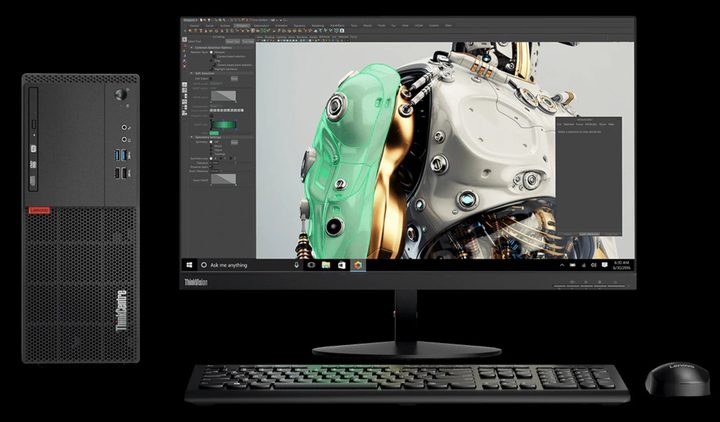
Lenovo’s “Think” brand is often regarded as the gold standard for business thanks to its simple designs, durability, and configuration options. You’d think that all of those features, along with enterprise-class warranty, would cost a premium, but the M Series towers start at a very budget-friendly price point. At this level, you’re getting the bare minimum on the ThinkCentre M720 Tower, including an Intel Pentium Gold G5400 processor, 4GB of DDR4 memory, and a 500GB hard drive. Unless you’re using this system for the most basic front-office tasks, most small businesses will want to upgrade to an 8th-generation Intel Core i3 or i5 processor, 16GB of RAM to smoothly juggle between tasks, discrete Nvidia GeForce GT730, and a solid-state drive. Though this almost doubles the cost of the system, these upgrades will ensure that your desktop will have plenty of power to last for at least a few years.
As a business PC, the ThinkCentre’s tower design not only accommodates plenty of internal space to handle additional storage drives and upgrades as your computing needs change, but this PC also comes with ample ports. There are four USB-A ports and a USB-C connector on the front for easy access to thumb drives along with plenty of ports on the rear to handle displays, Ethernet, and other USB accessories on the rear. Security is handled by way of a Trusted Platform Module for data encryption.
Lenovo also offers its ThinkCentre M Series in a variety of form factors, including mini PCs, small form factor formats, thin clients, and all-in-one designs, assuring that you’ll find the right size PC to fit your work space, Though it may not be as stylish as a consumer desktop, going with an enterprise offering, like the ThinkCentre M from Lenovo, assures that you’ll have plenty of options for extended warranties. Lenovo offers up to five years of on-site support, so should something go wrong, a technician will visit your location to help minimize any down time.
Dell XPS 8930
The best desktop for SMB with discrete graphics

Why you should buy this: You need a stylish desktop that gets the job done at an affordable price.
Who it’s for: Users who need an affordable solution today that they can upgrade in the future.
Why we picked the Dell XPS 8930:
Most people are familiar with Dell’s XPS branding through its eye-catching designs and chart-topping performance from its XPS 13 and XPS 15 line of notebooks. Thankfully, Dell’s understated design also applies to the XPS 8930, a desktop tower that manages to stay business-friendly without being just another black box on your desk. The glossy front plate adds a bit of flare, making this PC look attractive both in a cubicle and for use in the reception area of a customer-facing front office.
The base model comes with an Intel Core i3-8100 processor and 8GB of memory. Optional upgrades like an SSD for speedy storage, more RAM, and better Intel Core i7-8700 CPU will give you a boost in performance for more multitasking, ensuring that this system will be usable for many years to come. Business users will be pleased that an Nvidia GTX 1060 graphics card is also available on some configurations, allowing the XPS 8930 to be used for content creation, like photo and video editing. Just as many small business employees have to juggle multiple hats and roles through the course of the day, the XPS 8930 can similarly handle not only your Microsoft Office tasks, but it’s versatile enough to be used to create content for social media platforms.
You’ll even find a USB-C port here, helping to keep this desktop future-proof. Given its tower form factor, there’s also plenty of room inside for upgrades provided you’re willing to roll up your sleeves and make the DIY effort. With the right upgrades, the XPS 8930 promises to stay as fast years into the future as it does out of the box today. Owners will get the standard one-year warranty, though you can opt for Dell’s premium protection plan if you intend on keeping this affordable workhorse around for a while.
Lenovo ThinkCentre M715 Tiny
The best budget desktop for SMB

Why you should buy this: You have limited desktop real-estate and need a versatile, powerful workhorse.
Who it’s for: Budget and space-restricted offices.
Why we picked the Lenovo ThinkCentre M715 Tiny:
Like the ThinkCentre M720 tower that made it onto our list, the ThinkCentre M715 Tiny is a compact desktop that will give the Mac Mini a run for its money. This 1-liter volume desktop can be placed on or beside a desk, mounted below a desk in a cubicle, or for the space constrained office, attached behind a Tiny-in-One Monitor allowing the setup to function like a modular all-in-one PC for an even more elegant setup. The M715 delivers plenty of performance for everyday computing tasks, and optional upgrades, like a dust shield, helps it survive harsher conditions for harsher businesses environments, like warehouse spaces, manufacturing centers, or automotive garages.
Upgrading to AMD’s quad-core Ryzen 5 Pro 2400 GE takes the cost up, and more advanced users will want to to splurge by increasing the memory from a meager 4GB of RAM to 8GB or 12GB. This small PC ships with a 500GB hard disk drive, but you can squeeze in extra performance by adding a secondary M.2 format NVMe solid-state drive, which will help apps and larger files to open quicker. Given its small size, you’re limited to AMD’s integrated graphics, so don’t expect to use this desktop for heavy graphics or video editing, but it should easily handle all your web browsing, Microsoft Office apps, and custom business software with ease.
This desktop competes well against Intel’s compact NUC desktops, and users with more demand GPU needs will want to take a look at Intel’s Hades Canyon NUC, a system that comes with discrete graphics support. However, if you go with Intel’s solutions, you’ll miss out on Lenovo’s clever Tiny-in-One design. Like other Think products, the ThinkCentre M715 Tiny’s warranty can be upgraded to provide longer coverage.
HP Z8 G4
The best powerful workstation for SMBs

Why you should buy this: You need unthrottled silicon performance for creative workflows.
Who it’s for: SMBs working in industries requiring raw CPU and GPU power.
Why we picked the HP Z8 G4:
With an understated black silhouette, it’d be easy to mistake HP’s Z8 G4 for any other run of the mill PC. However, equipped with Intel’s powerful Xeon processor and Nvidia’s professional Quadro graphics, the Z8 offers plenty of processing and GPU performance for businesses that handle data analysis, large creative projects, or require a capable system for 3D rendering and CAD design. Most small businesses likely won’t have a need for something this big or powerful, but if you work in an industry that requires the best silicon available, this system tops out with dual-CPU and triple-GPU support, making it an insanely powerful computer.
For the most demanding creative artist, GP offers extensive levels of customizability that tops out with dual Intel Xeon Platinum 8280 processors, 768GB of memory, 480GB Intel Optane solid-state drive, eight additional PCIe and M.2 slots with up to 2TB of storage per drive, six hard drive bays, three Nvidia Quadro graphics cards, and dual-port NIC networking.
Even if you don’t have the budget to get all the components you want today, an easy-to-remove side door makes servicing and upgrades easy. The PC’s angular design also accommodates two built-in carry handles — one on the front and one on the rear — making it easy to transport this desktop between job sites or between office suites. Surprisingly, even though the top configuration is expensive, HP’s extended support options are relatively affordable. A five-year next business day on-site extended warranty is a must have to ensure that your investment runs smoothly down the road.
Research and buying tips
What factors to consider when buying a desktop for SMBs?
After choosing a desktop PC with the components to meet your power needs today and into the foreseeable future — processors, graphics card, memory, and storage — small business owners will want to also consider the design and warranty options available. For instance, a more compact design may be more unobtrusive and can stay out of the way to foster better customer interactions when used in front office reception area, but these miniature PCs may not be as upgradable as larger tower form factors. And although a tower can occupy, the roomy enclosure makes upgrading a cinch and can help protect your investment.
When it comes to extending the life of your investment, a solid warranty policy can ensure your business is operational with minimal downtime. Consumer desktops often come with a standard one-year policy, but workstations and desktops for enterprise often ship with three-year warranties that buyers can sometime upgrade to up to five years. If you don’t have a dedicated IT infrastructure to service your equipment, an extended warranty policy can help to minimize disruption to your workflow. If your PC manufacturer doesn’t offer an extended warranty policy, consider buying from a retailers that offer their own extended protection plans that cover the standard manufacturing defects along with accidental damage.
Should my desktop computer have an SSD or GPU?
Solid-state drives and graphics cards are optional upgrades that can deliver more performance to your desktop, especially if you intend to keep your investment for a number of years. Fortunately, the price of SSDs have dropped significantly in recent years, making them a sound investment to get more performance out of your desktop. If you’re on a budget, consider a workstation with multiple drive bays. You can load the operating system and frequently used apps on a primary SSD to get the speed benefits and offload larger files and documents to a secondary hard drive to save money.
And even though graphics cards aren’t a requirement — unless you work in a creative field — they can be worthwhile investments for most small businesses. Given that most SMB owners take on multiple roles at the office — from bookkeeping to managing social media accounts — a dedicated graphics card can help ease the process of creating short videos or simple graphics to help promote your business. Thankfully, you don’t need the most expensive graphics card to do this, and an entry-level GPU can help extend the utility and lifespan of your desktop, especially since Office apps and even the Chrome web browser are offloading some of the heavy lifting from the CPU to the GPU. If your business doesn’t have the budget for a GPU today but you think you may need one in the future, a tower design with enough internal space will allow you to add a graphics card later.
How much processing power will my SMB desktop require?
While it’s nice to be able to buy a PC with the latest desktop with an Intel 9th-generation or soon to be launched 10th-generation silicon, not every SMB has the budget to get a fully loaded system. If your workflow involves juggling large files or heavy multitasking, you’ll want to step up to a more powerful Intel Core i7 or Core i9 processor, but you can save some money by going with an older 8th-Gen CPU to help keep costs at bay. If you work in a field where you need more CPU power, stepping into a dedicated workstation allows you to top out with multi-Intel Xeon processors, but that level of performance comes with hefty prices. Many workstations also come with support for multiple graphics cards, which will be important for creative workflows, like 3D rendering, CAD design, photo editing, and video processing work.
Alternatively, going with a system with an AMD configuration can also deliver some cots savings benefits. AMD’s Ryzen processors have generated a lot of buzz over the last few years, and the chip-maker’s third-generation Ryzen 3000 series promises to stay competitive with Intel’s best silicon with less power consumption. The new Ryzen 3000 processors also the utilize faster PCI Express 4 standard, which can help your PC stay fast today and be future-proof for tomorrow.