Before buying anything, it’s essential to know that WiFi extenders will not solve any network speed issues you’re experiencing. These devices merely expand a network’s range by rebroadcasting its signal. Therefore, an extender that’s easy to set up and performs efficiently should be your top priority. Check out or top picks below.
TP-Link RE650
Best Overall
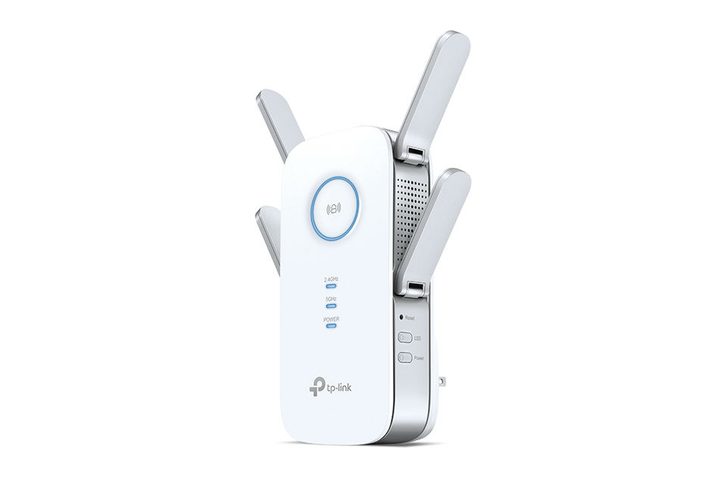
If you’re looking for an elite extender that doesn’t sacrifice WiFi quality (possibly for gaming, or for a larger office, etc.), then this AC2600 TP-Link model is an excellent choice. It comes with a high-speed mode that prioritizes a stable connection and an intelligent signal indicator that will help you locate the right area for maximizing your WiFi signal as much as possible–up to 14,000 square feet! It also supports the latest router technologies like MU-MIMO, so you don’t lose those advantages when extending your network. Like modern routers, this extender also uses beamforming to help maintain connections with wireless devices even if they aren’t MU-MIMO compatible.
It’s the best extender we’ve found, but the price point may be a little high for some buyers, especially those who don’t need to cover such a large area or don’t need such a powerful signal.
Why we love it:
- Powerful, stable connection across a large area
- Supports the latest router technologies
- Quad-antenna design boosts range
Something to consider: The quad-antenna design makes this WiFi extender extra-bulky. It might block other outlets, which can be inconvenient if you don’t have many outlets available.
Xiaomi WiFi Extender
Best Value
If ultra-fast network speed is the least of your concerns, you will find the Xiaomi WiFi Extender most suitable for your needs. This extender can cover dead spots effectively as it sports two high-gain external antennae that give it ample range and signal strength. It has excellent compatibility as it can link with other routers and connect with up to 64 devices simultaneously (though the recommended number of connected devices is 24).
This WiFI extender has a light indicator that shall help you set it up easier. The indicator can light up blue, red, yellow, or orange, which all corresponds to a different state.
Why we love it:
- Cost-effective
- Updates automatically
- Compatible with most routers
Something to consider: While it has a respectable range and performance, this WiFi extender isn’t built for maintaining optimal network speeds. It only supports 2.4GHz, which bottlenecks its speed.
Netgear EX2800
Best with Compact Design
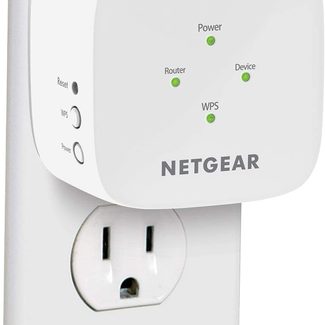
Netgear’s simple, effective dual-band extender is an excellent middle-of-the-road extender. It doesn’t have many bells and whistles. Still, it is a superb 750Mbps extender with outstanding reliability and a super-simple setup process for connecting and ensuring the extender is working. Don’t let the Netgear brand fool you, either: This extender will work with any router that you’ve got. It also includes an Ethernet port for one wired connection if necessary. It’s nothing fancy, but it gets the job done and is fits most homes.
With a low-profile design, finding a good spot to place this extender is quick and easy. Its compact form allows it to blend with the rest of the devices plugged into the wall easily.
Why we love it:
- Simple to set up and install
- Works with any router
- Wired or wireless functionality
Something to consider: This WiFi extender can’t be used as a wired access point. It sacrifices the inclusion of an ethernet port for a compact build.
Linksys Max-Stream Tri-Band WiFi Extender
Best Tri-Band Extender
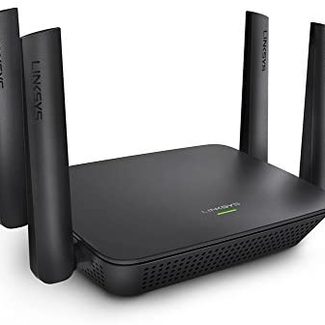
The Linksys Max-Stream Tri-Band WiFi Extender is ideal for areas that suffer from slower network speeds due to WiFi congestion. As a tri-band router, this extender broadcasts a 2.4GHz network and two separate 5GHz networks. Meaning, users who want to connect to a 5GHz network will have more speed to share since they’re grouped into two networks.
At ideal conditions, this WiFi extender has a range of 10,000 square feet. It’s compatible with all WiFi routers and multi-user MIMO routers. It features a Spot Finder that makes setting it up quicker and easier.
Why we love it:
- Offers seamless roaming when paired with another extender
- Sleek, black design
- Spot Finder is handy for finding the perfect area for setup
Something to consider: While tri-band extenders give way to optimal speeds, it’s not worth the higher price tag if your network doesn’t experience any congestion.
These WiFi extenders give you everything you need to boost your signal and get a reliable, effective internet signal for your home or office. For various systems and setups, these WiFi extenders will ensure you don’t lose connectivity. They will also prevent any network slowdown as you move from one room to another.
Where is the best place to put a WiFi extender?
To get the most out of a WiFi extender, you must place it mid-way between the router and the area where you start experiencing a decrease in signal strength. Doing so will let you maximize the range of the extender and get the strongest possible signal.
What’s the difference between a mesh router and a WiFi extender?
Although they can solve the same problems, don’t confuse a mesh router and a WiFi extender. “Mesh” means that the router can link up to other routers of a similar kind to propagate a signal more effectively. Today’s mesh routers are often sold in packs of three, so you can spread them out around a building and solve coverage woes. Extenders may have mesh features, but most cannot act as a router by themselves (and are more affordable as a result).
Do WiFi extenders slow down network speed?
Yes, but it’s negligible in most cases. WiFi extenders excel in expanding the range of a network to cover dead spots, but data slows down every time it passes through a device. To ensure this reduction in speed remains minimal, you should invest in a dual-band or tri-band extender, whichever is adequate.
About the Author
Rusty Davis has been a tech lover for as long as he can remember. From the early days of gaming consoles to the introduction of the smartphone, portable computers, and more, he’s always wanted to get his hands on the latest and greatest. He has years upon years of experience reviewing and testing everything from phone cases to smartwatches, the latest phones and tablets to gaming computers, and even desks. If it’s a piece of tech or tech-adjacent, he’s interested in how it works and who it works best for. He’s now here sharing all of his knowledge with you to help you make the best decision for yourself.