1. Home
  2. Web
  3. Legacy Archives

Customizable Gmail inbox organization coming soon

Add as a preferred source on Google
gmail-logo-by-google
Image used with permission by copyright holder

Google announced Thursday new ways for Gmail users to customize how their inbox displays and organizes emails. The additional features, intended to improve the way emails are organized for each user, are being rolled out “over the coming weeks,” says Google software engineer Andrew Moedinger in a post on the official Gmail blog. Some Gmail users already have access to the new options.
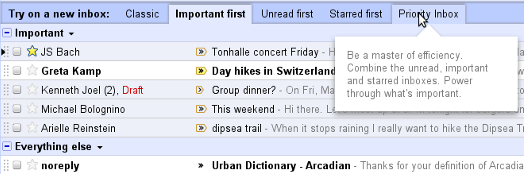
Gmail inbox organization

According to Google, the various inbox sorting options are as follows:

Recommended Videos

•    Classic – This is the default inbox style most people are used to. In the Classic inbox, messages are ordered chronologically, with your most recent email at the top.
•    Priority Inbox – Important and unread messages appear at the top of your inbox, then starred messages, then everything else. Each section can be customized further, so you can create your own inbox style.
•    Important first – This style puts important mail at the top of the page (both read and unread messages). Everything else is in its own section at the bottom of your inbox. You may have noticed that we turned on importance arrows for everyone a few weeks ago; this inbox style separates messages with these arrows from those without.
•    Unread first – Simple: unread mail at the top; everything else at the bottom.
•    Starred first – Starred messages at the top; everything else at the bottom.

Users can test out which inbox option they like better using tabs that will appear at the top of the inbox screen. After a certain style has been used “for about a week,” says Moedinger, the tabs will disappear, but all the options will remain available in a drop-down menu next to the Inbox label.

These changes come as Google prepares a full redesign of Gmail, which will match that of the new Google search design and its newly launched (but still in its testing phase) social network, Google+. Users can try out the new Gmail layout by selecting the “Preview (Dense)” option under the “Themes” tab in Settings. Google says that these changes will be gradually rolled out over the next few months.

Andrew Couts
Features Editor for Digital Trends, Andrew Couts covers a wide swath of consumer technology topics, with particular focus on…
Topics
How to find archived emails in Gmail and return them to your inbox
Archived emails in Gmail are easier to find than you think—once you know where Google hides them
Gmail icon on a screen.

If you’re looking to clean up your Gmail inbox, but you don’t want to delete anything permanently, then choosing the archive option is your best bet. Whenever you archive an email, it is removed from your inbox folder while still remaining accessible. Here’s how to access any emails you have archived previously, as well as how to move such messages back to your regular inbox for fast access.

Read more
Is there a Walmart Plus free trial? Get a month of free delivery
A Walmart sign on the outside of a store.

For regular Walmart shoppers, signing up for Walmart Plus is a no-brainer. It's basically Walmart's version of Amazon Prime, with subscribers unlocking free shipping on most orders, early access to discounts and new product drops (like Nintendo Switch 2 restocks), the best grocery delivery, and more. If you're always taking advantage of Walmart's bargains for the best smart home devices or the best tech products in general, but you're still not sure if you'll be able to maximize the benefits of Walmart Plus, we highly recommend claiming the free trial to the service, and we've got everything you need to know about it right here.

START YOUR FREE TRIAL

Read more
Best Buy’s Cyber Monday has insane discounts of up to 72% off
Digital Trends Best Black Friday Best Buy Deals

With Black Friday officially over and Cyber Monday starting, there are a lot of great Best Buy deals going on that you can take advantage of. That means getting Cyber Monday smartwatch deals, Cyber Monday gaming laptop deals, Cyber Monday TV deals, and more. You might also want to check out our general roundup of all the greatest Cyber Monday deals going on right now, along with all the great deals from Best Buy below.
Our Top Pick: Arlo Pro 5S 2K 3 Camera Indoor/Outdoor Wireless Bundle — $200 $500 60% off

Arlo is considered one of the best home security camera makers, so this deal on three of their indoor/outdoor cams is a fantastic way to get started on your home security journey. In our mashup of the Arlo Pro 5S vs Ring Stick Up Cam — two of the most premium security cams available — the Arlo Pro 5S was considered best for those wanting the "most vivid images possible."

Read more