
We reviewed Apple’s iOS 10 last year, and it came with a host of improvements. Most importantly, the iMessage App Store lets you download stickers and install games or apps for you to play and use directly within a conversation. The whole iMessage platform, announced at Apple’s Worldwide Developer Conference earlier this year, is quite similar to the Facebook chat bots craze. You can install apps like The Weather Channel if you want to pull up the day’s highs and lows directly within a chat, or OpenTable, which lets you vote and book your favorite restaurants.
There are three types of iMessage Apps you can install — games, apps, and stickers. You can access the iMessage App Store from the Messages app by tapping the App Store icon near the keyboard in a conversation. The list of stickers, games, and apps for iMessage are continuing to grow, and plenty more will come. For now, we’ve picked five in each section that we think you should download. Check them out.
If you want a complete gaming experience, don’t forget to check out our picks for the best iPhone games and the best iPhone apps.
Best iMessage Stickers
Super Mario Run Stickers

Nintendo’s second major app to come to a mobile operating system after Miitomo features the company’s most iconic character, Mario. But game aside, who doesn’t want to spam Mario stickers in every conversation? These stickers allow you to embed the popular plumber within your messages, and you can even send a selfie with Mario’s hat and mustache layered over your face.
Grammar Snob ($1)

If you’re the type to constantly correct your friends on their grammar and spelling, you should download Grammar Snob now. The app lets you playfully place misused or misspelled words over errors in a red, handwritten-like font.
Aardman Face Bomb
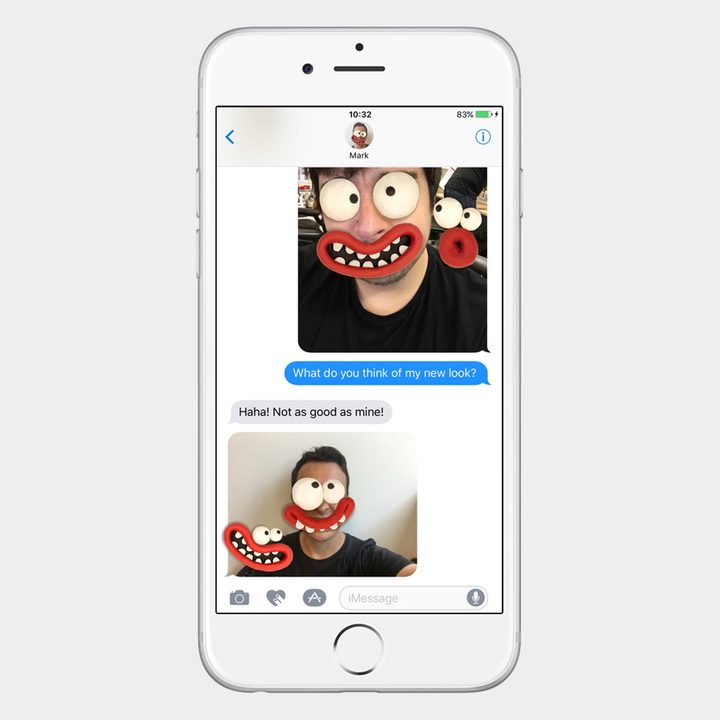
These face bomb stickers are extremely fun because they’re interactive. To use the face bomb stickers, simply drag them on top of any picture in your conversation. You can use two fingers while you’re dragging the sticker to resize or rotate it. You can also drag the sticker on top of a message, if desired.
Cookie Monster Stickers

Cookies aren’t the only time you need to bring up Cookie Monster. OK, they kind of are, but Cookie Monster is cute and goofy so he deserves a place in your Messages. Like the Disney stickers, you can drag the blue fur ball to your chat bubbles, over images, and on top of other stickers as well.
George R. R. Martin Stickers

Winter is coming. No really, it is. But instead of typing those words out, why not use the sticker from George R. R. Martin‘s A Song of Fire and Ice collection? You can send stickers of iconic phrases, house sigils, and artifacts such as swords and crowns, and you can also place them on top of other images.
Best iMessage apps and games
Best iMessage apps
GIF Keyboard

If you’re heavy into GIFs, then GIF Keyboard should be your No. 1 priority. Once you tap on the iMessage app, you’ll be able to search through GIF Keyboard’s robust database of GIFs and stickers. You can double tap a GIF to save it to your favorites for quick access, and better yet, you can make your own GIF without leaving the Messages app.
Circle Pay

With Circle Pay, you can send money to anyone through Messages. There are no fees, and you can send dollars, euros, pound sterling, and bitcoins to anyone directly inside of iMessage. The app also lets you cash out with almost every bank in the United States and the United Kingdom, and support for Europe is on the way. All you need to do is set up a debit card.
OpenTable

There are almost endless ways to use OpenTable to reserve a table at a restaurant, whether it’s through Siri or via Google Maps. What better way than mid-conversation? OpenTable’s iMessage app allows you to send a list of several restaurants to a friend or a group. People in the message thread can then vote on which restaurant they want to eat at, and you’ll be able to reserve a table right within the Messages app.
Genius: Song Lyrics & Music Knowledge

Genius, the service that offers a better understanding of songs, now lets you quickly share lyrics directly within iMessage. If you search for lyrics or a song, the service will pull up the full lyric sheet. You’ll then be able to select from one of the several options for the background of the text, and you can highlight the specific word(s) you want to post. They’ll be placed over the backdrop, and will be ready to send.
Airbnb

When you’re booking a hotel room or an Airbnb with someone, chances are you’re sending listings back and forth. Airbnb has simplified the whole process, however, by integrating with iMessage. Now, you can browse through your recent and saved listings in the Messages app, and share them with your contacts. Recipients can vote on locations, which is great if you’re in a group conversation.
Best iMessage games
Words with Friends

The Scrabble-like mobile game Words with Friends is now available on iMessage. No Facebook log-in is required, and every time you play a word, it’s sent over to the friend you’re competing with so they can start their turn. The goal is to score higher points with a set of letters you receive.
GamePigeon

GamePigeon should be like the pre-installed versions of Solitaire and Minesweeper that used to come with older iterations of Windows. It comes with an assortment of two-player games for you to choose from, including billiards, poker, sea battle, anagrams, and Gomoku. These games will surely keep you occupied whenever you’re feeling a little bored.
Wordie: Guess the Word

Wordie is more of a solo game than a collaboration. There are a handful of images that offer a common word or theme, and you have to guess the word out of a clutter of letters. You can challenge your friends to see who guesses first, or you can ask them for help to solve a difficult puzzle.
Memorado
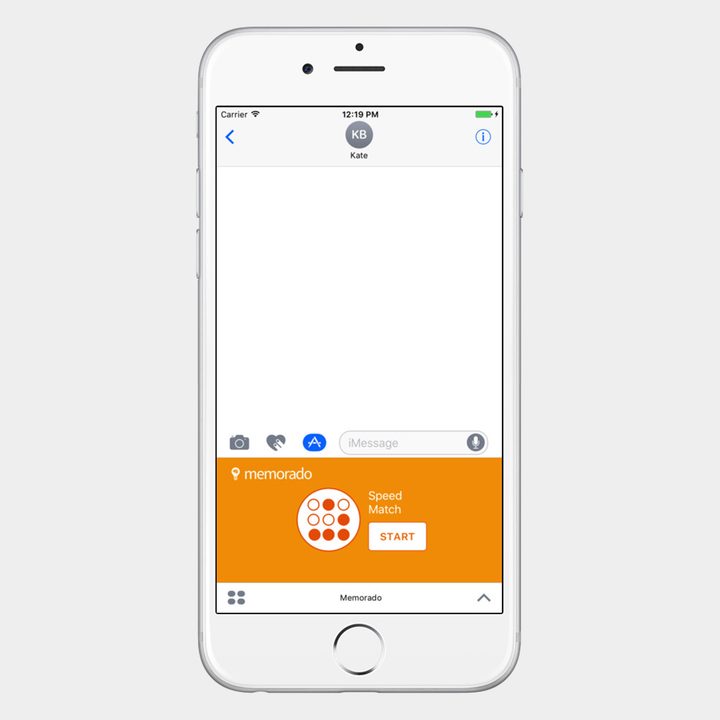
Memorado is the perfect game to have at your fingertips when you need to stimulate your brain. This title features more than 720 levels and 24 different game types, thus ensuring that you don’t run out of options. Created by neuroscientists, this game is not only fun but also designed to improve your memory and concentration.
MsgMe WordGuess

MsgMe WordGuess is similar to Wordie, but it’s more in line with the traditional game of hangman. Both players pick a word, and the other has to guess it. The first to guess the word wins. You have to send the message to start the game — as is the case with many of these iMessage games — and, thankfully, no one hangs regardless of who wins.
Update: Added Memorado and the Aardman Face Bomb stickers.


